An office chair should be replaced when its structure is damaged, its essential functions cannot be restored with supported repairs, or its dimensions cannot fit the person and task. Age alone is a poor replacement rule. A clean ten-year-old chair with supported parts may be a better repair candidate than a much newer chair with a cracked base and no identifiable manufacturer.
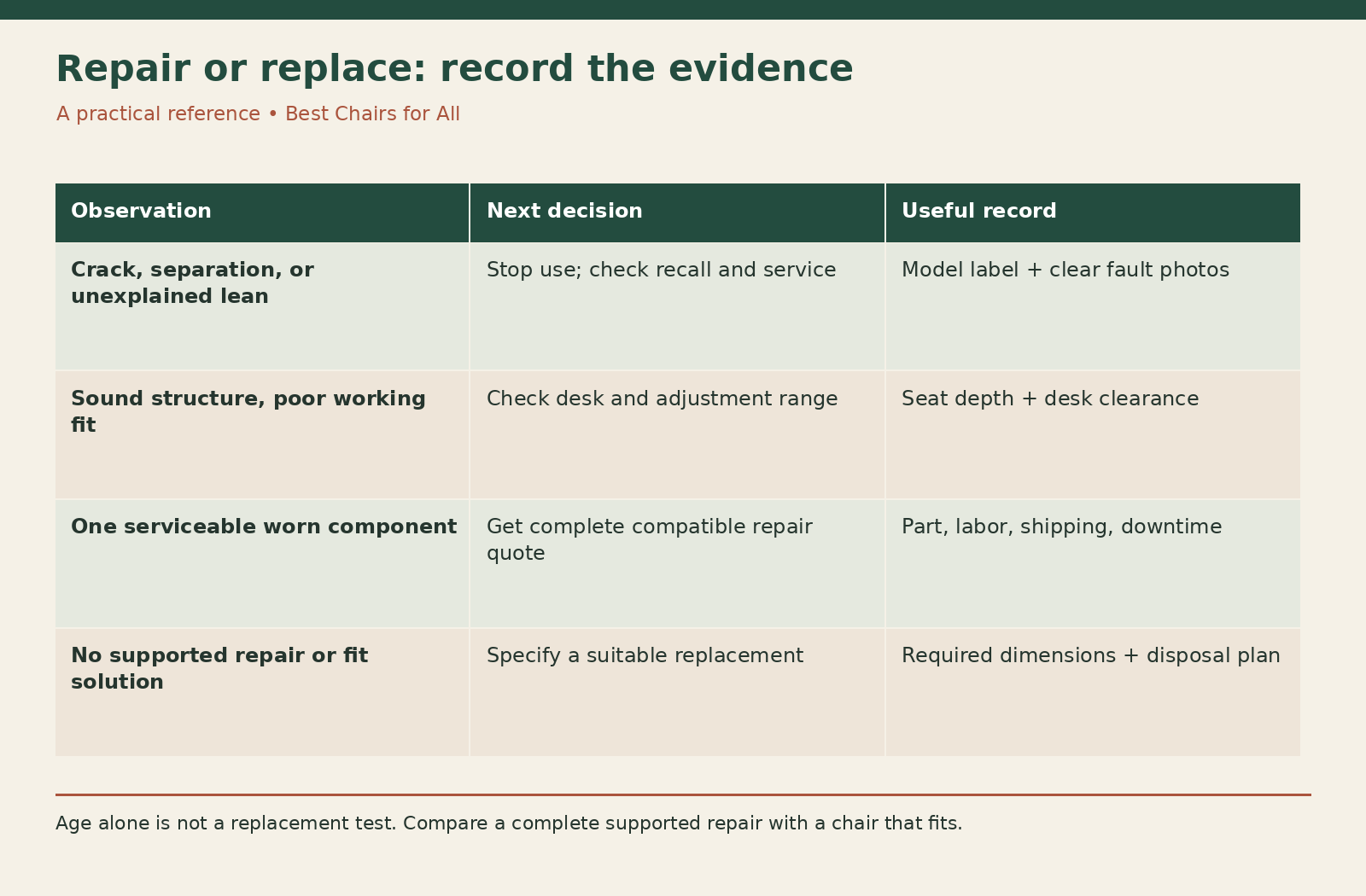
The useful question is whether you have a setup problem, a serviceable component problem, or a chair that should leave use. Work through those possibilities in that order only after checking for obvious damage. This guide provides a decision worksheet; it does not assume that an uncomfortable chair is worn out or that a worn chair can be made suitable by adding cushions.
Start with reasons to stop using it
Take the chair out of use if a base spoke is cracked or bent, a caster socket is breaking, the seat or back attachment is separating, or the chair has developed an unexplained pronounced lean. Do not sit in it to demonstrate how far it will move. Photograph the fault without loading it and contact the manufacturer or a qualified repair provider.
Check the model against the CPSC recall database and the manufacturer’s notices. A recall can require a remedy even when a chair looks normal. Match the model and identifying label, rather than deciding from a similar photograph. Follow the actual notice: a home repair, donation, or continued use may conflict with the specified remedy.
Keep a suspect chair away from shared desks until the decision is resolved. A note saying that it is broken does not prevent somebody from using it. If you cannot safely move it, isolate the area and ask for assistance. A towel over a cracked seat frame disguises the defect without addressing it.
Separate fit from deterioration
A chair can be mechanically sound and still be the wrong size. Ask whether you can sit against the backrest, support your feet, work close enough to the keyboard, and keep the seat edge from crowding the backs of your knees. Check these points in your actual workstation, with normal footwear and the usual keyboard position.
The OSHA computer-workstation checklists provide a useful external reference for examining the whole arrangement. They help reveal when desk height or leg clearance is driving the problem. Replacing a chair with another of the same dimensions will not fix a keyboard that is too high or a cabinet that blocks your legs.
For example, a seat may reach the right working height but leave your feet unsupported. Depending on the desk and available clearance, an appropriate foot support or keyboard-height change may solve that mismatch. Conversely, if the seat remains too deep at its shortest setting, buying extra lumbar pillows may simply consume space while leaving the basic geometry unsuitable.
Check whether adjustments actually hold
Record the starting positions before making changes. Lower armrests that block your approach to the desk, choose a usable seat depth, and follow the model’s instructions for recline tension and stops. Make one change at a time so you know which adjustment affected the result. Our office-chair adjustment guide covers the setup sequence.
An adjustment that does not hold is a different problem from one that has not been set correctly. Height that slips, an arm that drops out of its indexed position, or a backrest that will not stay attached needs service assessment. Do not use stacked objects or clamps to defeat a failed adjustment while treating the chair as repaired.
If you have persistent discomfort after a reasonable setup change, avoid concluding that a particular foam or mesh has caused a medical condition. Consider the task, work duration, and the rest of the workstation. Seek appropriate professional advice for ongoing symptoms. A chair purchase is not a diagnosis or a guaranteed treatment.
Inspect the support surfaces separately
Look at the seat, back, arm pads, frame, and rolling base as separate assemblies. Surface abrasion on one arm pad is not equivalent to a torn suspension seat. Cosmetic marks can be tolerable; a sharp exposed edge or loss of the surface that supports your weight needs a different response.
On a foam seat, note whether you increasingly feel the hard support below it in the same working position. On a suspended seat, look for damage at the attachment and changes that make the frame interfere with sitting. These observations justify asking about a replacement seat assembly. They do not establish a universal foam-life deadline or a method for retensioning mesh.
Odor, staining, and dirt also deserve separate records. Identify the upholstery and consult its care instructions before declaring a chair uncleanable. Some surfaces can be cleaned; peeling coatings and damaged foam cannot be restored by stronger detergent. If contamination requires treatment outside the approved care method, ask a professional whether cleaning or replacement is appropriate.
Find out what repair would actually involve
Photograph the product label and gather the purchase record before shopping for parts. Ask for the exact compatible assembly, the labor needed, and whether the work is covered. A generic part advertised as universal may change seat height, caster fit, control operation, or the load path through the chair.
As one manufacturer example, Herman Miller’s warranty and service page directs owners to their dealer or retailer to establish repair eligibility. It asks for identifying information rather than treating all chairs carrying the same family name as identical. Follow your own brand’s process; coverage depends on the applicable terms, purchase channel, and product.
Gas lifts and stored-energy mechanisms require special care. Do not cut, drill, heat, open, or improvise repairs to a pressure cylinder. Get a supported service quotation for the complete compatible component and installation. A cheap part price is not the total repair cost when specialized removal or adjustment is needed.
Use this repair-or-replace worksheet
Write one line for each fault with five fields: observed symptom, affected assembly, proposed remedy, complete cost, and confidence that the chair will fit afterward. Add a sixth field for downtime. That last field matters if this is your only usable work chair and the repair requires shipping it away.
Consider this hypothetical example, with invented planning figures rather than market quotations. An otherwise suitable chair needs a compatible arm-pad pair quoted at $70 and $20 delivery. A replacement chair you have already tried costs $450 delivered. If the structure and remaining adjustments pass inspection, spending $90 to restore the contact surfaces can be reasonable. There is no need to assign a fictional number of extra years to justify the comparison.
Now change the example: the same chair also needs an unsupported seat assembly and a service visit whose price is unknown. The $90 comparison no longer represents the whole job. Mark those unknowns explicitly and request a complete estimate. Compare the complete restoration with a complete replacement, rather than comparing one cheap spare with a finished chair.
Set a repair boundary before spending
Decide what outcome counts as success. It could be a stable chair that holds its adjustments, fits your desk, and has clean, intact contact surfaces. If a proposed repair cannot deliver that outcome, it may not be worth doing even when the part itself is inexpensive.
Avoid a fixed percentage rule such as always replacing when repairs exceed half the purchase price. The original price may reflect a sale, an old market, or an unsuitable purchase. A more useful ceiling is the cost of a suitable alternative you can actually obtain, adjusted for repair uncertainty and downtime. Do not count a theoretical premium chair as the only alternative if it is outside your budget.
Document uncertainty honestly. A shop may be able to replace an arm but unable to guarantee that an unrelated intermittent noise will disappear. Ask which problem the estimate addresses. Several small purchases made in succession can become costly when none addresses the underlying worn or damaged assembly.
Know when replacement is the clearer choice
Replacement becomes more persuasive when the chair is structurally compromised and no approved repair exists, when essential parts cannot be identified, or when a sound repair still leaves the chair outside the required fit range. A shared chair may also need replacement if its adjustment range cannot accommodate its actual users.
Write a replacement specification from the failure you observed. If seat depth was the issue, record the usable depth you need. If arms repeatedly struck the desk, record both the under-desk opening and arm height. If casters damaged flooring, specify compatible floor protection with the next chair. This turns a frustrating failure into useful purchasing information.
When shopping, distinguish a warranty from an expected lifespan. A warranty describes conditions and remedies; it does not promise that every contact surface will look new throughout that period. Likewise, an expired warranty does not mean a chair is unsafe. Condition, fit, and supported repair options remain the deciding evidence.
Finish the decision and retire the chair responsibly
After an approved repair, inspect the completed work and verify normal controls according to the manufacturer’s instructions. If instability or slipping persists, stop using the chair and return to the service provider. Do not keep adding makeshift fixes to meet a predetermined repair budget.
If the chair is replaced, describe its condition accurately before offering it to anyone else. Do not donate a recalled or structurally damaged chair as usable furniture. Ask the manufacturer and local waste service about parts recovery or disposal, including how to handle the pressure cylinder. Local acceptance rules determine what can enter a recycling stream.
Keep your worksheet with the purchase or repair records. It should explain why you chose adjustment, supported repair, or replacement and what remains to monitor. Recheck after a change of user, desk, or floor; a good decision for yesterday’s workstation may need revisiting even when the chair itself has not changed.
Something unclear or out of date? Send a correction with this article’s title and the detail to check.
Sources, research & corrections policy ↗