If an office chair rolls away, first determine when it moves: while empty, while you are sitting, or during the transition into or out of the seat. Then examine the floor, the caster’s intended behavior, and the workstation forces involved. The correct answer may be a suitable braking caster or a different floor arrangement, but it should not begin with improvised wheel blocks.
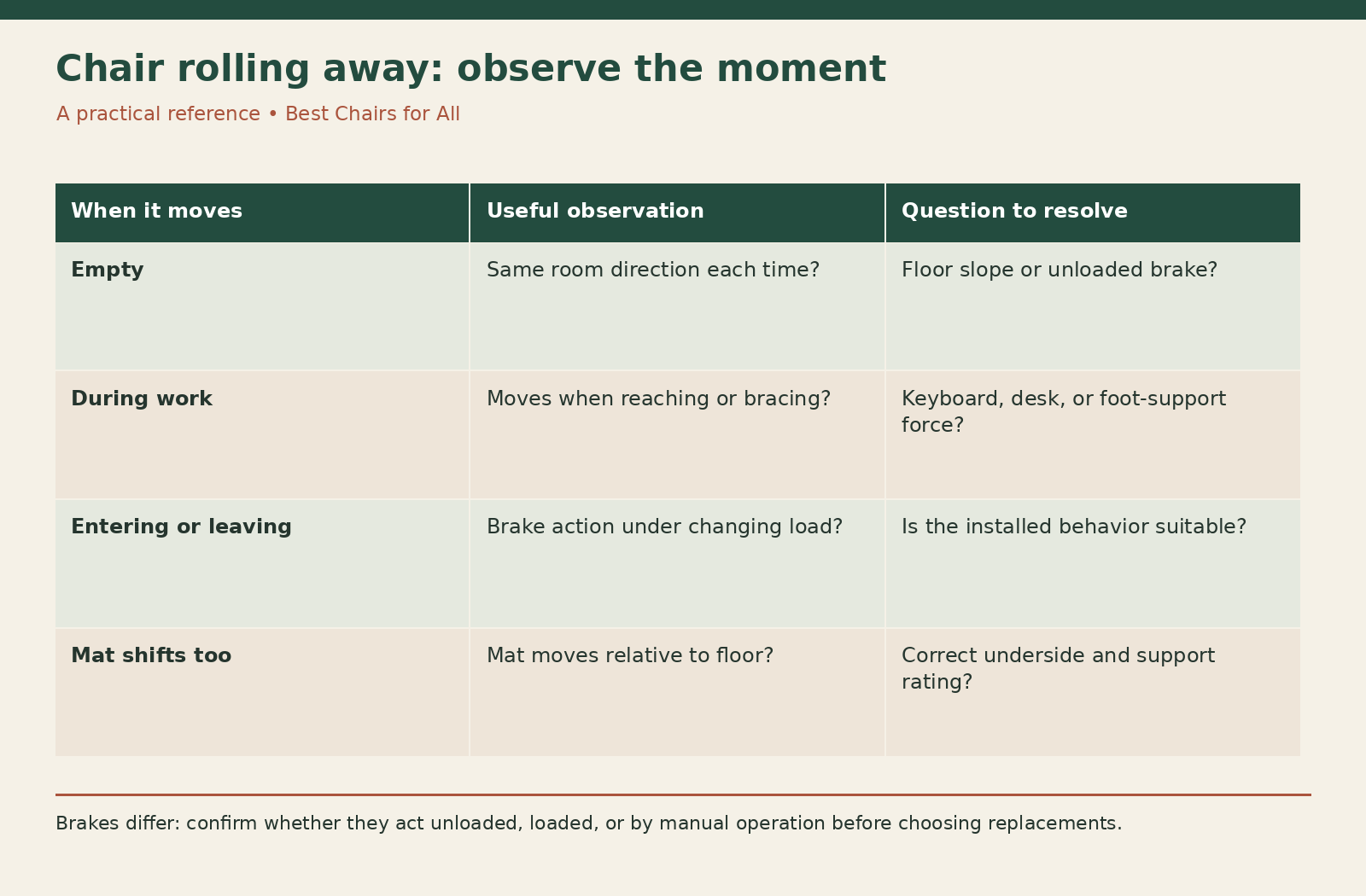
A chair that moves too easily is not necessarily defective. It may be operating normally on a smoother surface than it was selected for. Conversely, a chair that drifts because the floor slopes or because a caster set is mismatched needs more than a friction workaround. Use the observation map below to identify the actual pattern.
Identify the moment of unwanted movement
Write one sentence describing the event without guessing its cause. Examples include “the empty chair drifts toward the doorway,” “the chair slides backward while I type,” and “the chair moves as I begin to sit.” These events involve different conditions and should not all be treated as a need for the same wheel lock.
Note whether the seat is occupied and whether the wheels are rolling or the whole chair is sliding. A locked wheel can still slide on an unsuitable surface, while a freely swiveling caster may move without much visible wheel rotation at first. Observe from a safe position rather than recreating a near fall.
If the chair is unstable, has a damaged base, or moves unpredictably because a wheel detaches, stop using it and seek service. Do not attempt a seated trial of a visibly compromised chair. This guide addresses movement diagnosis on an otherwise intact chair, not structural repair.
Check the slope before changing parts
Inspect the floor and any mat for a consistent direction of fall, a curled edge, a threshold, or a local hollow. A small spirit level on a suitable straightedge can help describe the surface, but a reading is not a structural assessment. In a workplace, report suspected floor problems to facilities.
If an empty chair repeatedly heads toward the same room location regardless of its starting orientation, floor slope becomes a useful question to investigate. Do not let it roll uncontrolled into a wall or walkway. Clear the area and have a second person help observe if needed.
Do not level a chair by placing improvised shims under individual wheels. The chair needs its intended contact and mobility arrangement. A floor defect, unsuitable mat, or sloping workstation location should be addressed at that level, particularly if it affects other furniture or circulation.
Learn the actual brake behavior
Some casters brake when unloaded; others can lock manually or use a different load response. IKEA’s explanation of its office-chair safety casters describes locking when the chair is empty and releasing with use. That system is intended to affect the empty-chair transition and is different from a manual lock used to hold an occupied chair.
Do not assume that “braking caster” tells you which behavior you will get. Read the exact product description and the chair manufacturer’s supported options. A caster that helps prevent an empty chair from moving may still allow normal rolling while you sit.
Never disable an intended brake because it makes the chair harder to push across the room. Likewise, do not add weight to the chair merely to defeat a load-sensitive feature during ordinary use. If the behavior is inconvenient or unsuitable, ask the manufacturer about an approved alternative that preserves the chair’s intended application.
Match the caster to the surface
A move from carpet to a smooth floor can make the same chair feel dramatically more mobile. Check whether the fitted casters are documented for the new surface. Flooring compatibility concerns contact material and intended performance, not just whether the wheels physically turn.
For a concrete example, the Herman Miller Mirra 2 product information distinguishes caster options, including carpet applications. Read the option selected on your actual order. A stock photograph may not reveal which set is installed on your chair.
Keep the floor clean. Hair wrapped around one wheel can make movement uneven, while grit affects contact and floor protection. Cleaning should restore predictable performance, not deliberately leave wheels dirty to create resistance. If proper cleaning makes the chair too mobile, address caster choice and floor conditions rather than accepting a jammed wheel as a brake.
Examine forces from the workstation
A chair that moves backward during typing may be responding to how you reach the keyboard or brace your feet. Check whether the keyboard is too far away, the desk edge blocks your approach, or a foot support pushes you away from the work surface. Observe the task without trying to force yourself to stay still.
The OSHA computer-workstation checklists help examine chair support, reach, and related workstation conditions. Use them to evaluate the arrangement rather than assuming every movement is a caster failure. A supported working position should not require constant effort to keep the chair near the desk.
Adjust the normal chair and workstation controls where appropriate. If armrests strike the desk, lower or reposition them within the documented range. If the chair remains too far away because the opening is narrow, measure that clearance. Changing wheels alone will not create the missing space.
Distinguish rolling from mat movement
Mark the mat’s starting position with a nearby reference that will not damage the floor. Observe whether the chair changes position on the mat, the mat shifts on the floor, or both. A mat that creeps can make a stationary-looking chair end up farther from the desk.
Check that the mat is specified for the actual surface. Carpet mats and hard-floor mats use different underside designs; a studded carpet mat should not be placed directly on a hard floor. Read the mat maker’s application and support limits rather than using an old spare without identification.
If the mat curls or creates an edge the wheels repeatedly cross, address the mat’s condition and dimensions. A larger rolling area may be needed, but do not add an unsecured second mat as a bridge. Our carpet-mat movement guide provides a separate fit check.
Compare supported ways to reduce movement
A manufacturer-approved braking caster can address a specific movement pattern if its brake behavior matches the need. Confirm attachment, overall installed height, floor compatibility, and capacity for the complete chair configuration. Do not buy from the brake label alone.
Supported glides may be another option for a chair intended to remain in one location, but replacing casters with glides changes how the chair moves and may change its height. Confirm that the chair manufacturer approves the conversion and that the floor is protected appropriately. A glide is not automatically suitable just because it fits the socket.
A suitable mat can protect a floor and change rolling conditions, but it is not a guaranteed restraint. Some mats create an easier rolling surface. Choose a mat for its documented application and usable area, then assess the actual combination. Avoid promising that a certain texture will hold every chair in place.
Avoid makeshift restraints
Socks, tape, loose rubber cups, improvised chocks, and objects wedged through wheels can interfere with the intended chair geometry or become trip obstacles. They can also make the chair difficult to reposition when you need to stand. A temporary annoyance should not become an unpredictable transition into the seat.
Do not tie the chair to the desk or a wall to control drift. The tether can pull on unsuitable attachment points and create an obstacle around your feet. The chair and workstation should work without an improvised restraint that changes their behavior when you turn or rise.
If you need a chair to remain stable during a specific transfer or task, obtain an appropriate assessment and equipment recommendation for that use. An ordinary office-chair brake option is not automatically a transfer aid. Do not test a potentially unsuitable setup by repeatedly attempting a difficult movement alone.
Use a three-condition observation sheet
Make three rows: empty chair, occupied work, and entry or exit. In each row, record floor or mat, observed direction, wheel or mat movement, fitted brake type, and any workstation contact. Add the next question rather than jumping immediately to a purchase.
A hypothetical empty-chair row might read “smooth floor; moves toward door; wheels roll; no verified brake; check floor slope.” An occupied-work row might read “stays put until reaching keyboard; arms hit desk; measure clearance.” Those entries point to different investigations even though the owner initially described both as rolling away.
After a supported change, repeat only the relevant safe observation and record the result. Change one factor at a time where practical. If you replace wheels, relocate the desk, and introduce a new mat simultaneously, you may solve the problem but lose the ability to explain which condition mattered.
Plan for shared or changing use
A chair may move between carpeted meeting rooms and hard-floor desks. Record the approved floor application and keep staff aware of any braking behavior. An unfamiliar unloaded brake can be mistaken for a jam, while a freely rolling replacement can surprise someone accustomed to resistance.
Keep movement controls accessible if the chair uses manual locks. A lock that requires awkward bending or cannot be reached from the intended position may be a poor practical match. Ask the supplier to demonstrate the actual mechanism rather than assuming it will be convenient from a product photograph.
Review the combination after a flooring change or caster replacement. The final setup should provide predictable movement, usable working height, and a clear route into and out of the workstation. When the observation sheet identifies the moment and cause of drift, you can choose a supported correction with a clear purpose and verify whether it worked.
Something unclear or out of date? Send a correction with this article’s title and the detail to check.
Sources, research & corrections policy ↗