Tilt-in-space changes the orientation of the seat and back together. Recline changes the angle between the seat and back. A chair can offer one, both or neither, and the functions are not interchangeable. The appropriate use, settings and sequence must be established for the individual by their seating team and the exact equipment instructions.
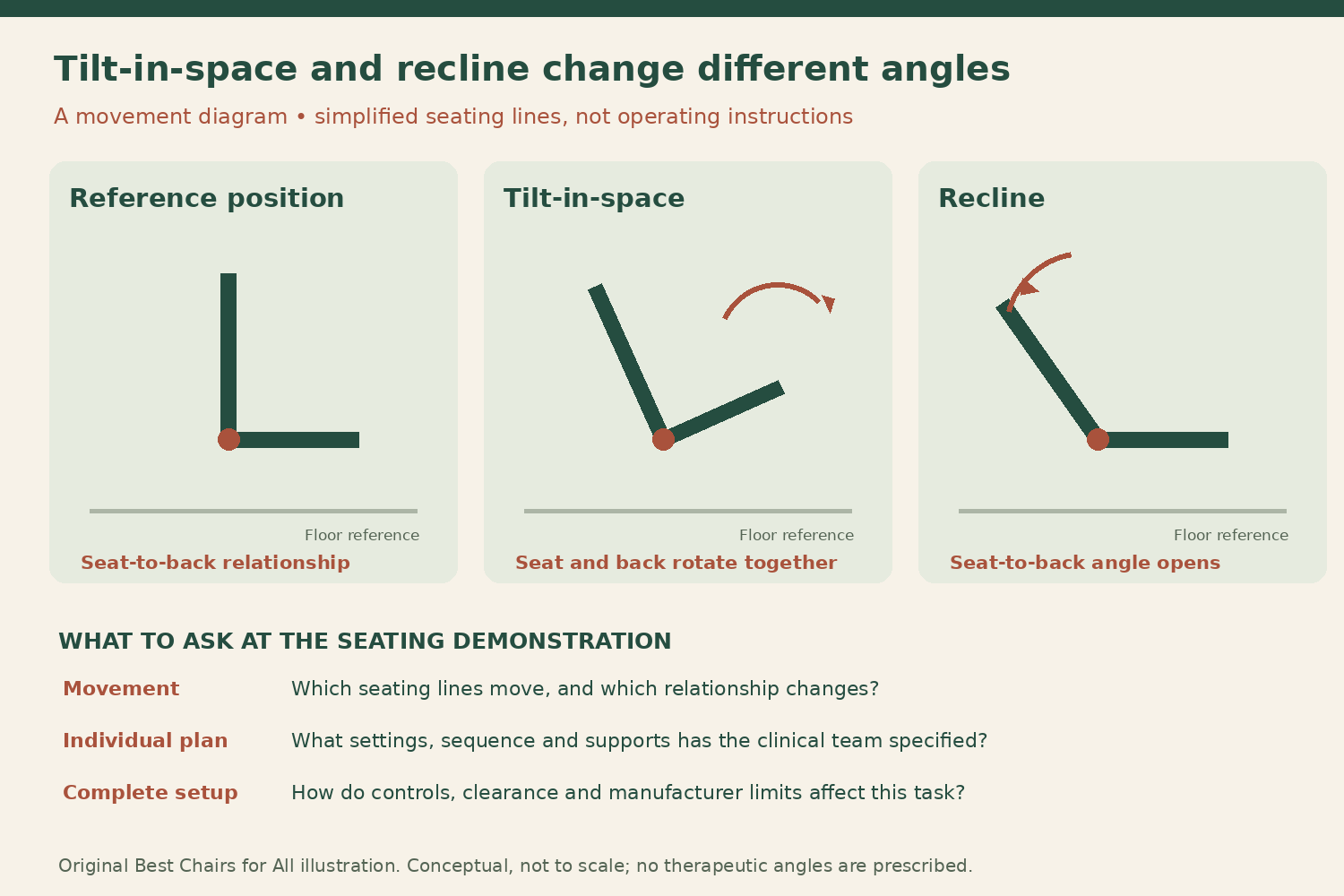
Picture the seat and back as two connected lines
In tilt-in-space, the seating system rotates relative to the floor while the seat-to-back relationship is maintained. In recline, that relationship opens or closes as the back changes angle relative to the seat. Sunrise Medical’s movement explanation distinguishes these two changes, and the University of Washington description likewise separates seat-to-back movement from whole-system orientation.
The base and wheels do not have to be tipped off the floor to provide tilt-in-space. This is a seating function built into the equipment, not an instruction to lean a conventional chair onto its rear wheels. A fixed seat slope, sometimes discussed as seat rake, is also different from an adjustable tilt function available during use. Identify what actually moves before interpreting the word tilt in a listing.
Keep recline separate from an adjustable back angle
Some manual chairs have a back angle that a technician adjusts during setup. That does not necessarily mean the user has a dynamic recline function. Ask whether a quoted feature is a fixed configuration adjustment, an attendant-operated movement or a powered function the user can control. The same word can appear in all three contexts with very different practical implications.
A reclining back can require coordinated support and individual fitting. Do not assume that adding a recline mechanism to an existing chair is a simple accessory change or that an aftermarket back can be mounted without assessing compatibility. The cushion, back support, head support, leg support and controls need to work as a complete prescribed system. Bring the reason for the requested movement to the assessment rather than ordering a feature based only on its name.
Leg elevation and seat elevation are additional functions
Permobil’s Wheelchair Handbook discusses power seating functions including tilt, recline and elevating legrests as distinct equipment features. Raising the legs is not the same movement as opening the seat-to-back angle, and raising the whole seat height is not tilt. A chair advertisement that says it has several powered positions needs a function-by-function explanation.
Make a simple inventory with columns for what moves, who operates it and what support or instruction is required. Include any headrest, calf support, foot support and controller arrangement specified for the system. Do not copy a combination of positions from someone else’s chair. Even two chairs offering both tilt and recline can have different geometry, limits, support surfaces and programmed behavior.
The purpose of the position belongs to the clinical plan
A seating team may consider position changes for support, comfort, pressure management or particular daily tasks. This article does not prescribe a therapeutic angle, duration, frequency or sequence. Those depend on the individual’s needs, body position, equipment and care plan. A small visible movement should not be assumed to accomplish the same purpose as a clinically assessed position change.
Tell the team what you want to accomplish: a different visual orientation, support during a particular activity, an easier control reach or another specific goal. Report sliding, discomfort or difficulty returning to the working position. Do not repeatedly change settings to diagnose a health problem or substitute a catalog angle range for a prescribed routine. Ask who will review the result and what observations should prompt follow-up.
Recline can change the body’s relationship to supports
Because recline changes the seat-to-back angle, the user’s relationship to the back and other supports can change during the movement. Tilt changes orientation in a different way. These mechanical distinctions explain why one cannot simply substitute the feature that reaches farther back. The assessing team evaluates the person’s position and support needs rather than ranking functions by maximum angle alone.
Do not loosen a positioning component or remove a prescribed support because the movement feels restricted. Ask the provider to inspect the complete setup. A strap, cushion or back component that interferes with movement can indicate a configuration or fitting issue requiring assessment. The correction should come through the responsible team and manufacturer instructions, not through an improvised change to the restraints or seat hardware.
Measure the space in every intended configuration
A moving back can extend behind the chair, leg supports can project forward and tilt can change the height and location of the occupied seating envelope. Record the available space near walls, desks, counters and vehicle interiors. A chair fitting beneath a table in one position does not establish access in every permitted seating position.
Request the manufacturer’s dimension information and a provider demonstration of the exact selected system. Keep people, pets, clothing and objects clear of moving mechanisms. Do not use a hand to gauge a shrinking clearance while a powered component operates. If a position collides with furniture, revise the room or task arrangement with the appropriate guidance rather than restricting movement by wedging the chair between objects.
Controls and interlocks are part of the configuration
The Sunrise Medical SEDEO comparison shows that available power seating features vary across systems. The presence of a control button does not establish the full permitted range or operating conditions. Ask the provider to explain the controls, any programmed limits and any speed reduction or drive restriction specified for the exact chair. Do not bypass an interlock to make a preferred position available while moving.
Have each intended operator receive training, whether that is the user, an attendant or both. Learn the documented way to stop movement and respond to a fault. Keep charging and service instructions available. Unexpected motion, a control that does not respond normally or a support that becomes insecure is a reason to stop the task and obtain service guidance, not to keep cycling through positions to see whether the problem clears.
Use the demonstration to test the planned task
Arrange a fitting and demonstration with the prescribed supports installed. Ask the team to show tilt alone, recline alone and any permitted combination, identifying what changed each time. Observe the intended everyday task within the professional assessment, without independently experimenting with a therapeutic position or transfer. The goal is understanding the equipment and its prescribed operation.
Write down which controls and named positions correspond to the plan. If memory seating is provided, ask how positions are set, changed and verified and who may make those changes. A stored position is not automatically appropriate after a cushion, support or health change. Keep follow-up arrangements clear so the user does not have to reconstruct the plan from a photograph of a different chair.
Document the system for caregivers and transport providers
A useful handoff names the exact seating system, permitted operator, required supports and the approved routine. A note saying “recline when uncomfortable” leaves too much unspecified and can confuse recline with tilt. Use the terminology from the actual controller and manual, with any individualized instructions supplied by the clinical team.
For vehicle or airline handling, request the manufacturer’s transport configuration and dimensions separately. A comfortable seated position does not establish an approved occupied vehicle position or a safe cargo-handling state. Do not ask transport staff to guess which powered movement reduces the chair’s height. Provide the documented handling instructions and keep the user’s prescribed positioning plan separate from empty-equipment transport information.
Tilt and recline discussion sheet
| Check | Evidence and decision |
|---|---|
| Movement identity | Mark whether the seat and back rotate together, the seat-to-back angle changes or a separate function moves the legs or seat height. Do not infer dynamic recline from a technician-adjustable fixed back angle. |
| Individual purpose | Ask the clinical team what each prescribed movement is intended to accomplish. Keep its specific settings and routine in the care plan. A catalog’s maximum angle is not a clinical dose or a universal recommended position. |
| Complete supports | List cushion, back, head and leg supports and their approved relationship. Report sliding or interference to the provider. Do not remove or loosen prescribed parts to make a mechanism reach farther. |
| Space envelope | Check rear, front and overhead clearance in the intended positions with provider guidance. Keep moving mechanisms unobstructed. An upright footprint cannot represent every tilt and recline configuration. |
| Controls and limits | Identify who operates the function, its stopping method and model-specific restrictions. Preserve programmed safety limits and interlocks. Ask for training rather than bypassing a restriction that conflicts with a desired task. |
| Follow-up record | Save exact system identity and the clinical plan, then request review after relevant equipment or health changes. Keep empty-chair transport instructions separate from the user’s individualized positioning routine. |
Worked example
Imagine a simplified chair drawn as an L-shaped seat and back. In the first drawing, the L rotates backward while its internal angle stays the same: that represents tilt-in-space. In the second, the seat line stays in place while the back line opens away from it: that represents recline. Real products may combine these movements or use additional geometry, so the drawing explains the distinction without prescribing a position.
A user comparing two proposed systems asks the provider which function serves the assessed goal, what supports are required and how each changes the room envelope. They do not select the larger advertised angle as automatically better. If a caregiver calls both functions reclining, the demonstration clarifies the controller labels before the handoff. The useful outcome is a shared understanding of the actual movement and the individual plan, with equipment limits and clinical instructions kept together.
Sources checked November 6, 2026
Use the current document for the exact model, market and production revision. These sources establish the cited instructions and distinctions; they do not certify an individual chair or replace a personal assessment where one is needed.
- Sunrise Medical: Dynamic tilt and recline movement definitions
- University of Washington: Wheelchair tilt and recline descriptions
- Permobil: The Wheelchair Handbook
- Sunrise Medical: SEDEO power seating functions and configuration differences
- Sunrise Medical: Clinical Benefits of Tilt
Something unclear or out of date? Send a correction with this article’s title and the detail to check.
Sources, research & corrections policy ↗