Recliner heat and massage features need to be understood as specific electrical functions with their own controls, timers, and use limits. On many ordinary recliners, massage means vibration from small motors rather than the rollers and tracks found in a dedicated massage chair. Heat may cover only a defined area and may operate independently of vibration. Verify the actual system rather than relying on the product name.
Start with the exact model manual and control reference. This guide provides a control-function map and a timer comparison exercise so you can distinguish normal behavior from an unresolved fault. It does not prescribe heat or vibration for a medical condition or promise therapeutic results. If personal health, sensation, or a medical device affects suitability, ask the appropriate healthcare professional and provider.
Identify what the advertised massage actually does
Ask the retailer whether the feature uses vibration motors, moving rollers, air chambers, or another documented mechanism. Ask where those components act and whether the system has selectable zones. A listing that says massage without an explanation does not establish a kneading action, a particular intensity range, or coverage from neck to feet.
Pride’s heat-and-massage accessory page explains that available options depend on the lift-chair model. Use that model dependence as the starting point for comparison. A deluxe option and a standard option can differ in controls and modes, so write down the exact package included in the quote and showroom demonstration.
Separate movement controls from comfort controls
A hand control may combine back, footrest, lift, heat, and vibration buttons. These functions do not necessarily share the same operating logic. A movement button may need continuous pressure while a heat button toggles a timer. A power button may switch only the massage system, leaving reclining available through another control. Ask what each button does rather than inferring behavior from its symbol.
Pride’s operating-instruction library lists separate hand-control references and heat-and-massage inserts. That separation is useful: the chair’s main manual may not explain every optional control in detail. Obtain both the main guide and the insert that matches the actual hand control supplied.
Build a control-function map
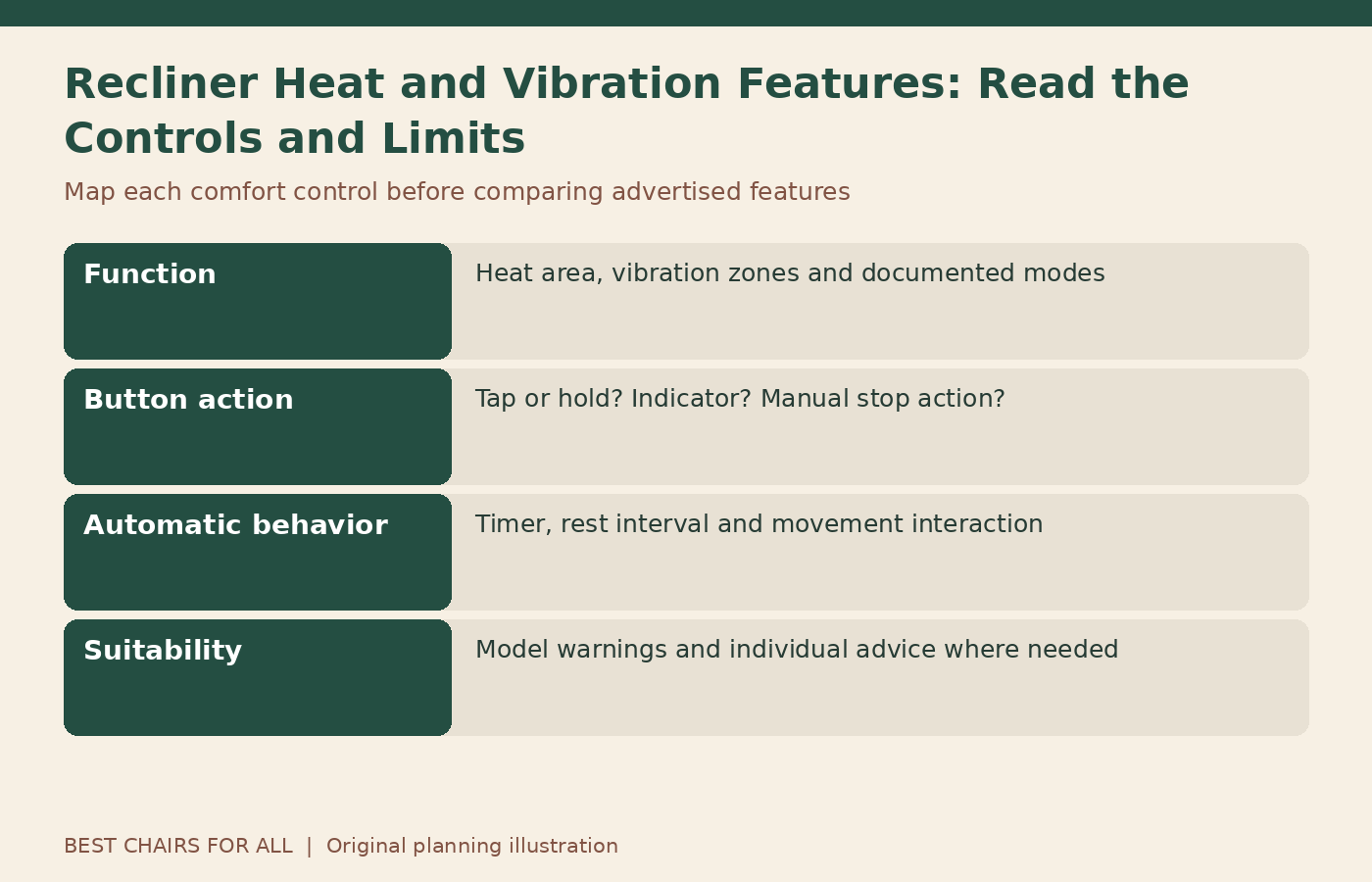
Draw the remote or button panel on paper and label each control with Function, Press action, Indicator, and Stop action. Press action means tap, hold, or another instruction explicitly stated in the manual. Indicator means the light or display described by the manufacturer. Do not invent a color code or assume a flashing light means low power without documentation.
Add a fifth field for automatic behavior, including timers or temporary interruption during chair movement where the manual describes it. Leave unknown items blank for the retailer to explain. A completed map is useful to household members who otherwise remember only that one button makes the chair warm and another changes the vibration pattern.
Understand intensity, speed, and mode separately
Intensity usually describes the strength setting of the advertised system, while speed can change the rhythm and mode can change the pattern or selected zones. These labels vary. A stronger setting is not evidence of greater medical benefit, and a pulsing sensation is not proof that rollers are moving beneath the upholstery. Ask the provider to demonstrate the differences on the exact model.
Describe what you perceive in ordinary terms: gentle continuous vibration in the lower back, alternating zones, or a pattern that feels too strong. Avoid translating that impression into claims about circulation, healing, or pain treatment. The furniture comparison concerns the documented function, personal comfort, understandable controls, and the manufacturer’s permitted use.
Read the timer rather than guessing it
Automatic shutoff can be part of normal operation, but timer lengths differ between systems and revisions. The La-Z-Touch manual 93000466-00, revision 11/11 describes a particular timer arrangement for the products it covers. Other manufacturers and other La-Z-Boy systems can behave differently. Its timing is not a recommendation for using another chair.
Record your model’s stated run time, any required rest interval, and what happens after power interruption. Do not bypass a timer or keep restarting a feature to turn a limited session into continuous operation. If the chair’s behavior differs from its matching instructions, contact the provider. A timer is one element of the design, not a guarantee of personal suitability.
A timer comparison exercise
Imagine System A automatically stops after its documented session and requires a stated pause before restarting. System B has a different timed program and separate heat control. A shopper who compares only the word massage might treat them as equivalent. A control map reveals the practical difference: how long each intended program runs, whether heat follows the same timer, and how the user stops it.
These are hypothetical systems rather than product recommendations. The exercise is to copy the actual timer wording into a comparison sheet, identify any independent controls, and ask about uncertain behavior. Do not choose the longest timer as inherently better. A clear, suitable operating routine matters more than maximizing the minutes printed in an advertisement.
Confirm the heated area and temperature controls
Ask which part of the chair heats and whether settings are selectable. A heat label does not prove that the seat, back, arms, and footrest all warm. Upholstery thickness and the system design can affect how warmth is perceived, but you should not diagnose a fault by comparing hand-feel alone. Use the manufacturer’s description and provider guidance for an unexpected result.
Never add a separate heating pad, insulating cover, or blanket arrangement over an integrated heat system without explicit compatibility guidance. Do not insert objects to hold a sensor or switch in position. If the surface becomes unexpectedly hot, the upholstery changes, an odor appears, or the controls behave abnormally, stop use and follow the manufacturer’s service instructions.
Keep medical suitability outside the sales promise
A furniture feature described as soothing or relaxing is not a prescription for a health condition. People with reduced heat sensation, circulation concerns, limited mobility, or medical devices may need individual guidance and must follow the product’s warnings. Ask the provider to identify relevant restrictions in the exact manual rather than accepting a general statement that heat is good for everyone.
Do not use a comfortable first impression to override professional advice or the manufacturer’s limits. Likewise, do not infer that a low setting removes all concerns. The practical buying action is to understand the feature and disclose relevant questions to the appropriate professional. This guide does not determine a personal temperature, session duration, frequency, or treatment position.
Check interaction with reclining and power sources
Some systems pause optional functions during movement or limit simultaneous operation. Backup power or an approved battery pack may also change which features are available. Ask for the specific explanation and add it to the control map. Do not assume a feature is broken merely because its behavior differs during a documented movement stage.
Conversely, do not assume any unexplained shutdown is normal. Record which functions remain available, the indicator state, the selected program, and whether mains power or an approved battery supply was in use. A precise record helps the provider distinguish expected operation from a problem without you opening connectors or substituting an unverified power adapter.
Keep liquid and cleaning products away from controls
Follow the chair’s cleaning and power-isolation instructions. Avoid spraying cleaner toward buttons, cable openings, or powered upholstery components. A damp or damaged control should not be used to see whether it dries out through operation. Report spills that may have reached electrical parts to the provider before resuming use, following any immediate manual instructions where safe.
Do not wash a removable-looking remote cover or unzip upholstery to access heat or vibration components unless the manufacturer expressly provides that owner procedure. A zipper may be a manufacturing or service feature rather than a laundering invitation. Keep the care instructions for upholstery separate from the electrical feature instructions so neither is treated as permission for the other.
Evaluate sound and sensation realistically
Vibration motors can produce an audible sound, and different modes may change it. Ask what is expected on the model during the demonstration. A new grinding sound, uneven operation, or a sharp change from normal deserves provider attention. Do not keep increasing intensity to overcome a sensation that seems weak; first confirm the intended zones and controls.
During comparison, sit in the normal supported position and use the same documented program on repeated trials. Record a plain comfort observation and whether the controls are understandable. Do not claim a scientific vibration measurement, medical effect, or durability result from a brief showroom trial. The aim is an honest feature comparison with clear limits.
Prepare a feature-specific fault report
If a function seems unavailable, record chair identity, comfort-system option, hand-control identification, power source, selected program, indicators, and other functions still working. Note whether the behavior occurs only during movement or after the normal timer interval. Stop if there are electrical warning signs or unexpected heat. Avoid repeated trials that could worsen a fault.
Send this report to the original retailer or authorized provider and ask which owner checks, if any, are permitted. Do not connect a heat-and-massage control directly to a motor or alter the harness to fit another controller. The exact wiring arrangement matters, and component labels alone do not prove compatibility with the chair or optional package.
Decide whether the feature earns its place
Compare the base chair’s fit and movement first, then assess the comfort functions. An elaborate control cannot make up for an unsuitable seat or inaccessible buttons. Ask whether the optional package changes warranty coverage, repair arrangements, power requirements, or cover compatibility. Keep its exact name on the order so the delivered configuration can be checked.
Save the completed control map with the manual and show other household users how the documented functions start and stop. Revisit the map after a service replacement or control revision. A well-understood heat-and-vibration system is one whose purpose, controls, timing, limits, and service route are clear, without assuming that a furniture feature provides a medical outcome.
Something unclear or out of date? Send a correction with this article’s title and the detail to check.
Sources, research & corrections policy ↗