If a massage chair feels too intense, stop the session and identify which subsystem was uncomfortable before considering another one. Back rollers, foot rollers, airbags, stretch movement, heat, and recline can have separate controls. Reducing a setting labeled intensity may affect only one of them. Do not continue because you think stronger pressure must be more effective or because an automatic scan supposedly selected the right setting.
Use the exact model’s safety and operating instructions. This is a control-identification guide, not a recommendation for a treatment dose, session length, or medical condition. If you have a health-related question, persistent symptoms, or uncertainty about suitability, consult a qualified clinician along with the manufacturer’s safety information. An uncomfortable trial is a reason to stop, not an adaptation exercise to complete.
Stop first and read the control's actual behavior
Locate the pause, stop, power, and restore functions in the manual. They may perform different actions. A pause can stop massage while leaving the chair reclined; a restore command can move it upright. Follow the documented sequence for returning and leaving, and keep the surrounding space clear. Do not climb over a raised footrest or reach through moving gaps to retrieve the remote.
The Super Novo 2.0 manual distinguishes POWER/PAUSE/RESTORE options and separate controls for back intensity, Cloud Touch, and underfoot speed. The Infinity Evolution manual likewise separates 3D intensity from air-pressure adjustments. Those are examples for named models; do not copy a button sequence to a similar-looking remote.
Once stopped, write down the program, active area, setting shown, and what changed immediately before the experience became uncomfortable. Do not repeatedly reproduce it for a more detailed description. A brief record can be enough for support to identify the relevant control. If the chair behaved erratically, would not stop as documented, or showed damage, keep it unused pending manufacturer guidance.
Identify the subsystem by location and movement
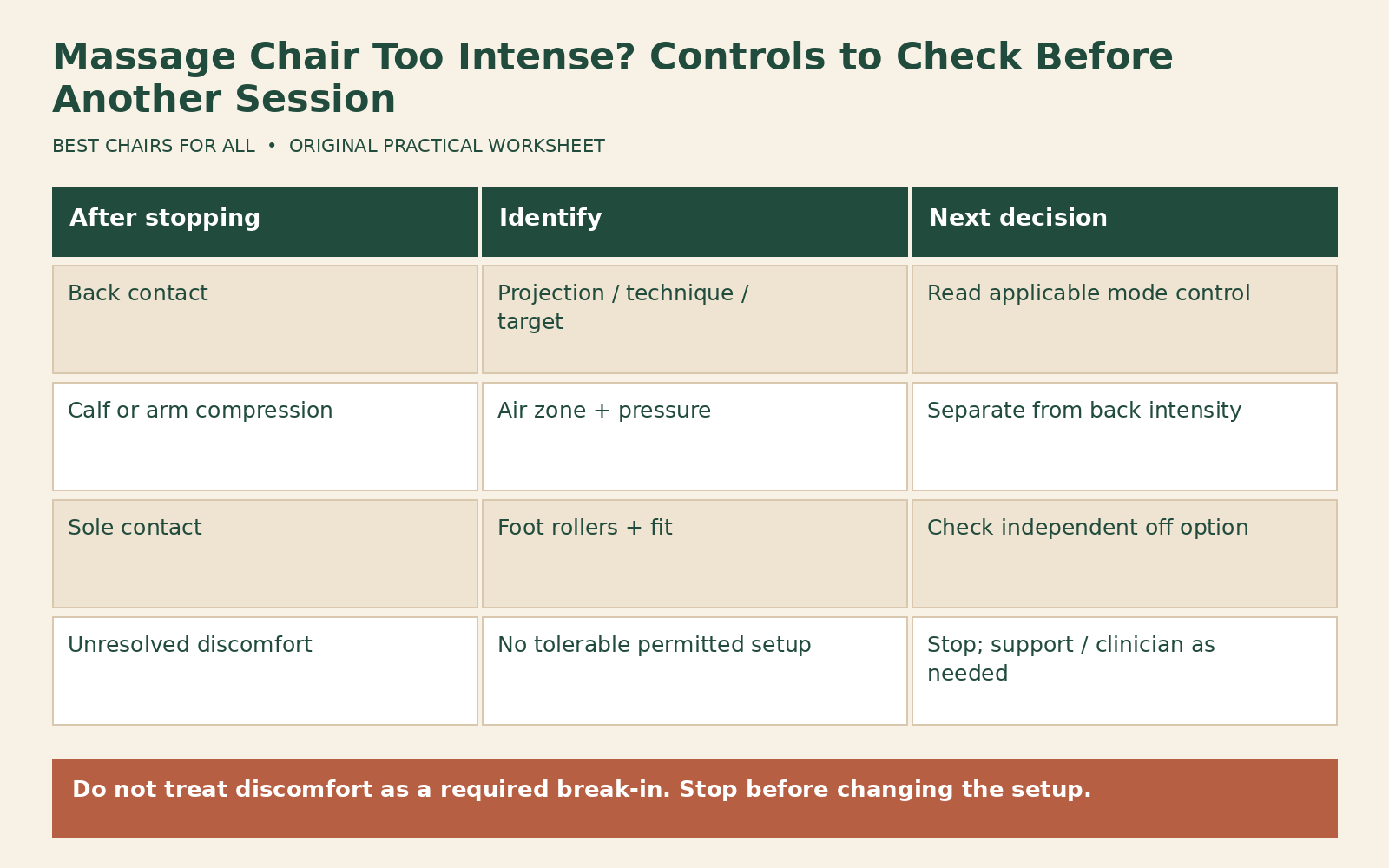
A moving contact along the back may involve the back mechanism. Compression around a calf or arm may involve airbags. Contact under the soles can involve foot rollers, while a coordinated pull or repositioning can be part of a stretch program. These descriptions help locate the control but do not diagnose the cause of a physical symptom. More than one system can be active at once.
Draw a simple body-area map and mark only what you observed. Add the active program and status-screen indicators if known. Avoid writing a conclusion such as “roller force too high” when the sensation was around a calf compartment and the manual shows airbags there. Correct subsystem identification is the first useful step. It prevents repeated changes to a back setting while the uncomfortable feature continues unchanged.
Check whether the manual offers an off option for that subsystem, a lower setting, or a different mode with separate controls. Do not assume a low setting on one screen applies everywhere. A chair may allow manual control but restrict an automatic program. If no tolerable permitted configuration exists, stopping that function or returning the chair may be more appropriate than searching for an undocumented workaround.
Distinguish pressure, speed, and target area
A speed control changes timing or movement rate; it is not automatically a pressure control. A width control can change the path or spacing rather than projection. A target control moves the area being massaged. Read the model’s definitions before deciding which adjustment addresses the observation. A slower movement can still feel too strong, and a correctly located contact can still be unsuitable.
The Super Novo 2.0 manual lists a back-intensity adjustment separately from underfoot speed, and notes that some settings are unavailable in particular program families. That explains why a grayed-out menu item may be normal for the selected mode rather than a broken remote. Ask support how to select a documented mode that exposes the relevant control; do not keep pressing an unavailable option during discomfort.
For airbags, find the pressure and region controls. Turning down back projection may leave air compression unchanged. For feet, find the foot-roller control rather than assuming the main intensity setting includes it. Record the exact names shown on your screen. Similar labels such as force, strength, intensity, and speed can refer to different actions across brands and generations.
Check fit before assuming settings are the only issue
An unsuitable shoulder reference can place the mechanism where you did not intend. A footrest at the end of its usable travel can create a poor contact location. A narrow compartment can remain uncomfortable even at a low setting. Review the fit instructions and permitted correction range after stopping. A body scan is a starting alignment function, not a guarantee that every region fits or that pressure is appropriate.
Do not slide into an unintended position, force your legs deeper, or lean against moving components to alter the sensation. Use the posture and foot placement described for your chair. If a permitted correction reaches its limit and contact remains misplaced, ask the manufacturer whether the chair fits your proportions. Repeating the scan does not enlarge the physical adjustment range.
Recline can also change the contact relationship, but it should not be used as an improvised intensity prescription. Check the model’s instructions for independent position adjustment and program behavior. A more upright or more reclined position may change the experience without resolving the underlying fit issue. Stop if the resulting arrangement is uncomfortable or makes the controls and exit sequence difficult to use.
Use only documented softening accessories
Human Touch’s Super Novo 2.0 product page describes an included removable softening pad. That is a model-specific accessory with an intended role. It does not authorize folded blankets, loose cushions, extra foam, or a similar pad in every other chair. Check the supplied instructions and ask support if the pad is missing or its installation is unclear.
An approved back pad and a foot insert are different items. Do not put one into the other’s compartment. Added material can change heat, fit, friction, and movement. The Super Novo 2.0 manual also addresses its own softening soles, which should be handled only as that manual directs. Keep accessories identified by part and model rather than calling all extra padding a universal solution.
Do not remove original upholstery, safety padding, or an internal component to make a feature feel different. Do not defeat a sensor or modify the mechanism’s travel. A consumer chair’s adjustment system has limits. If the allowed settings and approved accessories do not provide a tolerable experience, that limitation belongs in the purchase or return decision rather than a do-it-yourself redesign.
A before-another-session decision record
Use five fields: uncomfortable area, active subsystem, current mode, documented control or accessory, and next decision. The next decision can be “ask support,” “do not use this function,” or “review return eligibility.” Do not make another trial an automatic requirement. A worksheet should reduce uncertainty, not encourage you to continue an experience that has already become unsuitable.
Here is a hypothetical example. The area is calves, the active subsystem is air compression, and the mode is an automatic program. The user had changed only back intensity. The next step is to read the air-pressure and zone instructions and ask support if the program does not allow the needed change. The example identifies a control mismatch; it does not recommend a particular pressure setting or another session.
A second example concerns soles while back and air settings feel acceptable. The record points to a separate foot-roller control and a possible foot-fit question. If the off option is documented, the user can ask whether the desired program permits it. If the lowest available operation remains unsuitable, that is a reason to stop using the feature. It is not evidence that the user needs to build tolerance.
Check what persists between uses
Some settings reset after power-off while others are retained. Shared users may also leave different programs or target areas selected. Read the memory behavior and inspect the status screen before starting. Do not assume the chair returns to the configuration you last found acceptable. A stored favorite may include fewer settings than you expect, or may launch an automatic sequence with changing behavior.
Keep a short operating note with the model’s actual control names and any support-confirmed settings. Avoid turning the note into a clinical regimen. Its purpose is to prevent accidental selection of a different subsystem or program, not to prescribe duration or frequency. If the interface changes after an update or replacement remote, verify the controls again through official documentation.
If the confusing change occurs only partway through an automatic program, note the displayed program name and approximate stage without repeating the experience. The manual may describe a routine that changes intensity, technique, or position as it progresses. Ask support which controls remain available during that stage and whether the feature can be disabled. A comfortable opening sequence does not establish that the complete routine is suitable.
Also distinguish a nonresponsive setting from one that is unavailable in the current mode. A grayed-out item, an unchanged numeric value, and a control that changes on screen but has no apparent effect are three different observations. Record which occurred and which subsystem was active. Do not open the chair to determine whether the motor moved. The external interface record and exact manual reference provide a safer and clearer starting point for manufacturer troubleshooting.
For a new purchase, ask the demonstrator to show how each subsystem can be reduced or disabled and how the chair stops and returns. A program called gentle is not enough evidence of independent control. Save the answer with the return policy. The useful outcome is a chair whose permitted functions you can understand and use tolerably, or a clear decision that its available controls do not meet your needs.
Something unclear or out of date? Send a correction with this article’s title and the detail to check.
Sources, research & corrections policy ↗