A massage chair’s advertised height range is a screening tool, not a guarantee that the shoulders, calves, and feet will all align for every person within it. Torso length, leg length, foot size, seat position, and compartment shape matter too. Check shoulder location and foot-roller contact separately under the exact model’s instructions before deciding that a chair fits.
Do not force your feet into a compartment or accept uncomfortable pressure because your standing height appears on a product chart. Stop the trial and consult the manufacturer’s fit and safety information. For a health condition or persistent symptoms, speak with a qualified clinician. This guide provides a mechanical fit worksheet; it does not establish medical suitability or a prescribed position.
Separate standing height from seated proportions
Two people who are both six feet tall can have different seated shoulder heights and leg lengths. A chair that aligns well with one may reach its shoulder-adjustment or footrest limit for the other. The standing-height range is useful for eliminating clearly unsuitable candidates, but it cannot describe every body proportion. Ask what the published range means and which fit functions were considered.
Some charts are especially easy to overread. The Super Novo 2.0 controller guide provides an overall-height guide for manual shoulder settings, including a “5 feet 11 inches and up” category. That category is not an unlimited maximum user-height specification. It is a starting reference for a particular adjustment. Confirm the chair’s actual supported range and compartment limits separately.
The Super Novo 2.0 use-and-care manual describes automatic shoulder detection and manual settings from small to large. Infinity’s Palisade manual describes automatic and manual legrest extension. Those are separate adjustment systems on different models, not interchangeable instructions. Use the actual chair’s process for each contact region.
Ask for fit dimensions that answer your question
Request the documented user-height range, maximum user weight, seat width and depth, shoulder adjustment range, and footrest extension behavior. Ask whether the foot compartment has a stated foot-size limit or usable internal dimensions. If the manufacturer does not publish a number, mark it unknown and ask for a trial or written fit guidance. Do not calculate an internal dimension from the chair’s outside width.
A weight limit is a separate condition from height fit. Being below the limit does not establish sufficient calf width or suitable shoulder placement, and a generous height range does not raise the load capacity. Keep each requirement in its own row. If several people will use the chair, complete a separate fit record for each rather than choosing solely around the tallest or heaviest person.
Ask whether the listed dimensions describe an empty chair, compressed upholstery, or a specific measurement location. A compartment’s narrowest opening can matter more than its widest interior point. Product photos often hide taper and padding thickness. Where the seller offers a measurement, request a labeled image showing the reference points, with the chair unoccupied and stationary. Do not ask someone to place measuring tools near moving parts.
Check shoulder alignment first
Sit exactly as the manual instructs, with the approved pads and pillows in place. Run the documented scan or manual setup and check the shoulder reference during the confirmation step. Use only the permitted correction controls. If the mechanism’s reference remains too high or low at its adjustment limit, stop and ask whether the chair fits your proportions or needs service.
Do not slide far forward to make the shoulder reference appear correct while sacrificing normal back contact. That changes the relationship to the seat and footrest and can make another region fit worse. Record the supported sitting position in which the shoulder check was performed. A successful shoulder adjustment should be assessed in the position you are actually instructed to use, not a temporary pose created for the scanner.
A body scan is a mechanism-positioning function. It does not diagnose a condition or approve pressure on a particular area. If the interface displays a completed scan but the contact is clearly misplaced or uncomfortable, the screen does not overrule your observation. Stop and use the manual’s support route. Describe the reference location and available correction rather than repeatedly restarting in hopes of a different answer.
Evaluate legrest length under the model's procedure
Read how the chair measures or accommodates leg length. The Super Novo 2.0 manual describes an extension-and-retraction sequence and specific foot contact needed for its leg-length measurement. Do not copy that position onto another model, which may use a different mechanism or instruction. Ask the demonstrator to show the exact sequence before you begin a trial.
Check whether your legs can occupy the intended position without pushing against the end of travel or leaving the feet short of the intended contact surface. Note whether the footrest is at a limit and whether that changes when the backrest moves. Do not pull the legrest by hand, stand on it, or force a spring-loaded section farther than the manual permits. An extension number alone does not establish a usable fit.
For a shorter user, a footrest that retracts still may leave the foot rollers under an unintended area. For a taller user, adequate extension may coexist with an unsuitable calf-compartment shape. Keep length, width, and contact location separate. If one of those cannot be made comfortable through the documented settings, the chair may be unsuitable even though the other two pass.
Check where the sole rollers actually contact
Identify whether the model has sole rollers, what area they cover, and which controls affect them. Back-massage intensity may not change foot-roller action. During a permitted trial, use the manufacturer’s low-setting and stop instructions and observe the contact location without pressing downward to intensify it. Stop if it is uncomfortable. This is a fit observation, not a test of how much pressure you can tolerate.
Foot size can affect where the arch, heel, and forefoot lie relative to the mechanism. A broad “fits tall users” claim does not answer that alignment question. Ask whether the foot unit has an on/off option or separate speed or intensity control, and whether these work in the programs you intend to use. A model may offer fewer foot adjustments than back adjustments.
Do not add folded towels, thick socks, loose pads, or aftermarket inserts unless the manufacturer explicitly permits the item and placement. Padding changes the fit and may interfere with intended contact or motion. An approved softening accessory for the back does not establish permission for a foot-compartment insert. Keep accessory claims specific to the named part and model.
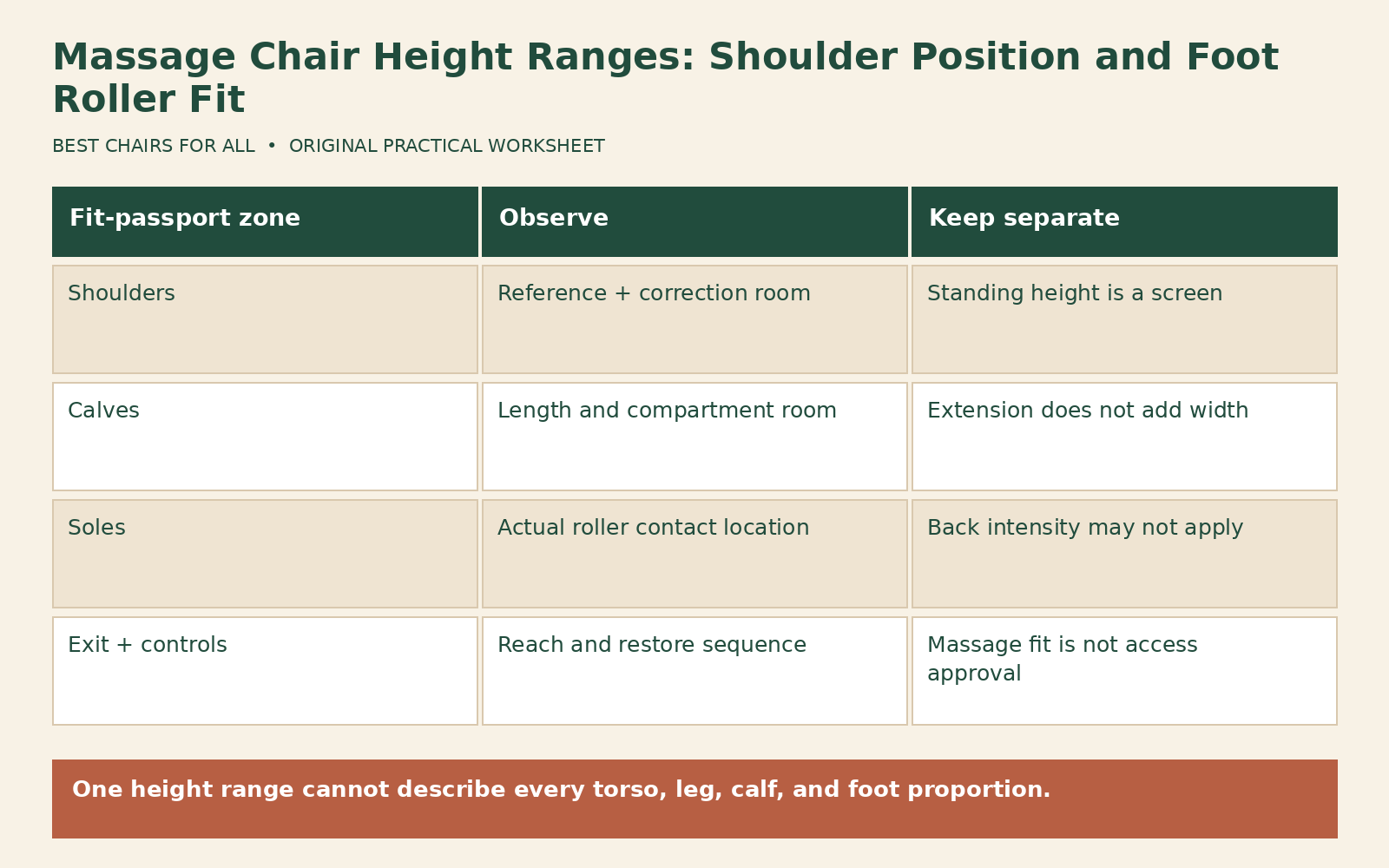
A three-zone fit passport
Make a fit passport with rows for shoulders, calves, and soles. Add columns for starting position, documented adjustment, remaining travel, contact observation, and decision. Use “comfortable within permitted range,” “uncertain—ask,” or “unsuitable—stop” as outcomes. Do not give the chair a single pass based only on the shoulders or only on whether your feet fit into the opening.
Here is a hypothetical example. A user within the advertised standing-height range gets a suitable shoulder reference with room to adjust. The footrest reaches a comfortable length, but the calf compartments remain too narrow in the instructed position. The overall result is not a fit pass. A longer legrest would not solve the width issue. The passport names the missing dimension before the next model is considered.
A second example involves a user whose shoulder setting is acceptable but whose sole rollers contact too far toward the heel even after permitted length adjustment. The user stops and asks whether a different foot unit or model is appropriate. This is a location question rather than a request for more intensity. The record prevents a salesperson from treating every foot-fit complaint as a simple pressure preference.
Compare shared-user setups honestly
Ask whether the chair rescans for each user, saves a shoulder setting, or remembers only program choices. A memory feature can preserve a setting that needs to change between household members. The Super Novo 2.0 manual says its shoulder-detection choice is saved until changed. Verify the behavior of the exact model rather than assuming a fresh automatic setup occurs every time the power is turned on.
Keep a brief operational note for each user, such as “automatic shoulder check; confirm before start,” without storing unnecessary health details. Recheck the legrest fit after switching users. Do not allow one person’s comfortable setting to become the default recommendation for everyone. A chair’s broad marketing range is less useful than two independently successful, documented fit checks.
For users with specific mobility or access needs, obtain appropriate individualized advice and confirm the product’s intended use and entry/exit procedure. A fit worksheet cannot certify accessibility. Check the ability to reach controls, complete the restore sequence, and leave as instructed, in addition to the three massage-contact zones. If assistance is required, clarify it before purchase.
Turn the trial into a purchase decision
Request a demonstration of the adjustment limits, not just a favorite automatic program. Ask what happens if shoulder correction or footrest travel reaches its limit, and whether a poor fit qualifies for the seller’s return process. Keep packaging and deadlines in view during a home evaluation. Do not wait for an unsupported promise that the mechanism will adapt to proportions outside its usable range.
Your final requirements should name the actual missing feature: a lower shoulder reference, a shorter effective legrest, more calf room, or a different foot-roller location. That makes the next comparison concrete. A chair fits when its separate contact zones work together in the instructed position, with tolerable controls and a usable exit sequence. Standing height starts the search; the fit passport supplies the evidence for the decision.
Something unclear or out of date? Send a correction with this article’s title and the detail to check.
Sources, research & corrections policy ↗