A speaker-equipped gaming chair is compatible with your setup only when there is a complete audio path from the game device to a supported chair input. “Bluetooth chair” does not mean every console can send Bluetooth sound directly to it. Identify the source output, any required converter or transmitter, the chair input, and the power connection before buying cables or assuming a pairing failure means the speakers are broken.
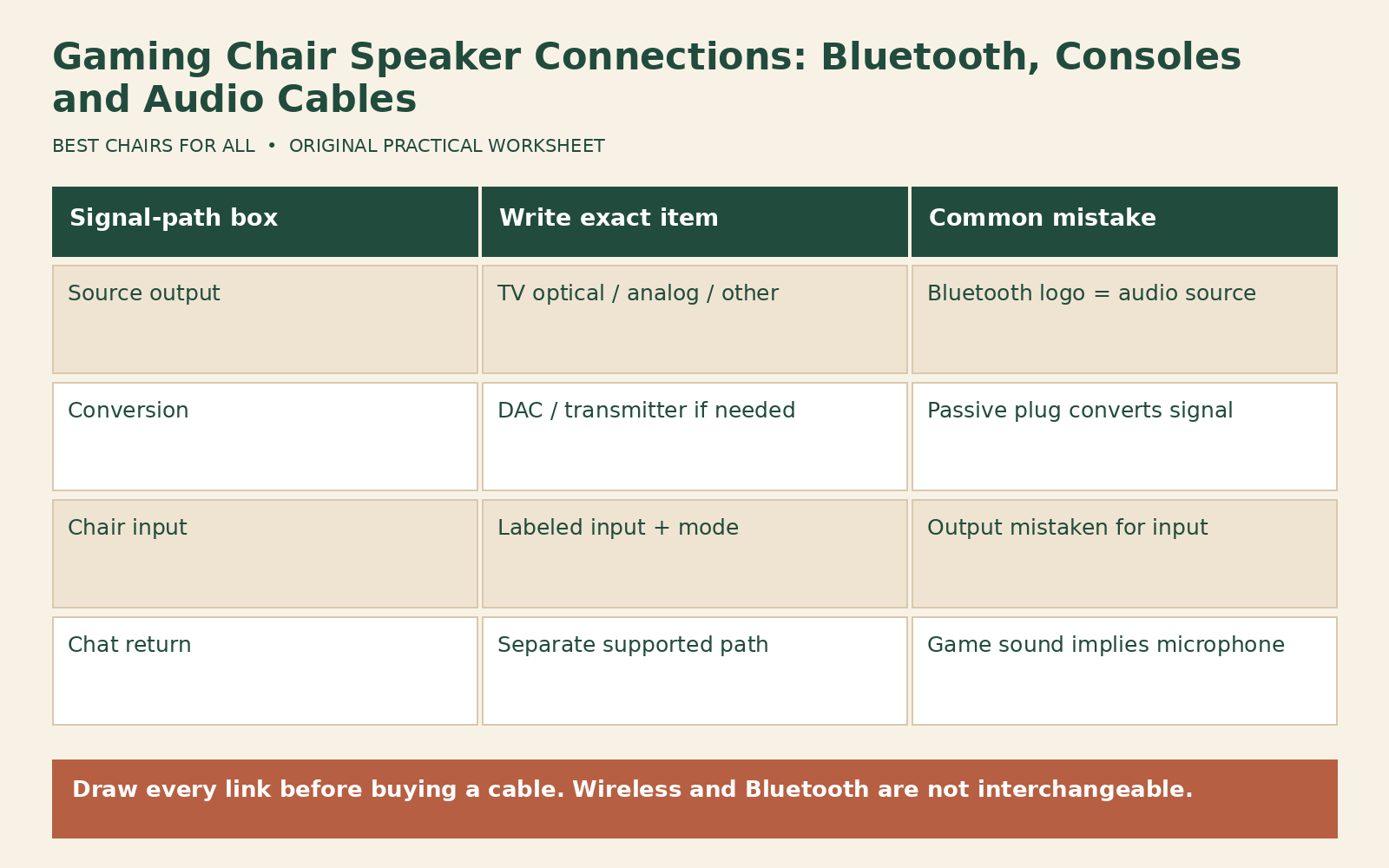
Treat game audio, voice chat, and microphone return as separate paths. A chair can play game sound while providing no way to send your voice back to the console. It can also receive sound through the television rather than directly from the console. A simple connection drawing often resolves more uncertainty than another attempt to pair devices that do not support the same audio role.
Inventory the ports and model first
Write down the exact chair model and photograph its control panel. Label each socket from the manual: audio input, audio output, headphone output, power, or another named function. A 3.5 mm socket’s shape alone does not establish whether it accepts input or supplies output. Similarly, a USB port may provide power or charging without accepting digital audio. Do not infer capabilities from connector appearance.
X Rocker’s official FAQ distinguishes Bluetooth use from standard console audio connections and directs owners to model-specific guides. Its next-generation connection section also warns that illustrated control panels and cables are examples. Match the guide to your actual panel instead of buying the cable shown in a photograph for another variant.
Do the same inventory for the television, monitor, console, and computer. Record the exact output labels and whether they are available in the device’s audio menu. A monitor may pass HDMI audio to a headphone output, while another monitor may have no audio output at all. A television’s optical output may operate under different format settings from its headphone output. The full device model matters.
Understand what Bluetooth can and cannot connect
Bluetooth equipment has roles and supported profiles. A chair that receives stereo audio from a phone is acting as an audio receiver. Another audio receiver does not become a source merely because both devices have Bluetooth logos. The console’s Bluetooth support for controllers also does not establish support for ordinary Bluetooth speakers. Check the platform’s audio documentation for that specific connection.
Sony’s official PS5 Bluetooth-audio explanation states that PS5 does not support ordinary Bluetooth audio connections. That is why a chair pairing successfully with a phone does not prove it can pair directly with a PS5. Use the chair manufacturer’s documented console route instead. Do not buy a random USB dongle simply because it advertises Bluetooth; compatibility, supported audio role, and output format still matter.
A television with Bluetooth audio transmission may offer another route, but verify that the television supports sending sound to an external speaker and that the chair supports the corresponding receiving mode. Some televisions restrict simultaneous internal and Bluetooth sound or have device-specific delay behavior. Check the current television manual and menus. Pairing success alone does not guarantee acceptable timing for every game.
Draw the simplest supported wired path
An analog route may look like console to television over HDMI, then television headphone or line output to chair audio input. Another documented route may use a controller’s compatible audio output. Use the chair guide to identify the correct cable and the source guide to configure output. Start at a low listening level and raise it gradually. Do not connect two outputs together because the plugs happen to fit.
A headphone output is generally adjustable, while a line output may behave differently. That can affect where volume is controlled. Write down which device changes the level and whether the chair has its own gain or volume control. If sound is distorted, do not assume more volume is the answer. Reduce the source level and check the documented input requirements and cable seating before changing several controls at once.
Microphone return requires its own compatible route. A stereo cable to the chair is not evidence that the chair sends a microphone signal back. A headset connected through a controller may carry chat separately while game audio plays elsewhere, depending on platform settings. Confirm the exact combination with official device instructions. Do not promise a single-cable chat solution unless the chair and platform explicitly support it.
Optical audio needs the right conversion
An optical digital output and an analog chair input use different signal types. A passive plug adapter does not convert digital audio into analog sound. A suitable digital-to-analog converter may be required under the documented connection method. Check the converter’s supported input formats and the television’s output setting. Do not assume every converter decodes every surround format or that a chair’s two speakers accept a multichannel digital stream.
The X Rocker next-generation guides include distinct DAC and transmitter methods. Use the method for your hardware, including its power and format requirements. A wireless transmitter supplied for one chair family may use a proprietary link rather than the chair’s Bluetooth mode. Record the transmitter model and channel or pairing procedure. “Wireless” describes a missing cable in one part of the route, not a universal protocol.
If HDMI audio extraction is proposed, verify the complete video requirements before purchase. Resolution, refresh rate, HDR, variable refresh behavior, and content-protection compatibility can be affected by an inserted device. This article does not certify a particular extractor. Ask the equipment manufacturer for a compatible solution that preserves the features you use rather than solving audio while unexpectedly changing video behavior.
Build a signal-path worksheet
Create five boxes in order: game source, source audio output, conversion or transmission, chair input, and chair power. Under each box, write the exact device and connector. Draw a separate dashed path for microphone return. Mark unsupported or unknown links with a question mark rather than filling them with the word Bluetooth. A complete drawing should show where the signal changes from digital to analog or from cable to radio.
Here is a hypothetical example. Console sends HDMI to a television. The television provides a documented optical output. A compatible powered DAC converts a supported stereo format to analog. The analog cable enters the chair’s labeled input. The chair uses its specified power adapter. Chat remains on a separate compatible headset route. These are generic roles, not a guarantee that any chosen television, DAC, or chair supports the combination.
Another example begins with a computer’s analog audio output and ends at a chair’s analog input. There is no converter box because the signal types already match. If the computer selects a monitor as its active audio device after a display change, the physical cable can remain correct while sound disappears. This demonstrates why the worksheet includes software output selection as well as hardware connectors.
Diagnose silence one link at a time
First confirm power using the chair’s specified adapter and documented indicator behavior. Do not substitute an adapter with an unknown voltage or polarity. Then verify the chair’s selected input mode, cable seating, and volume. Check the source’s active audio device and mute state. Avoid changing pairing, format, cable, and volume simultaneously; doing so can conceal which link was responsible.
A permitted phone-to-chair test can help isolate a receiving path if the chair supports it, but use the model’s instructions and keep volume low initially. Success shows that particular source and input route works. It does not establish that an optical converter, console output, or different wireless mode is correct. Record exactly which route passed rather than writing “chair works” and treating every remaining issue as a console fault.
For intermittent sound, note whether moving the cable, reclining, or rotating the chair changes the result. Stop using a visibly damaged cable or connector and contact support if a socket appears loose. Do not open the amplifier panel or repair mains wiring. Keep cables away from moving chair parts and caster paths. Leave enough slack for permitted chair movement without loops that create a trip hazard.
Check delay, duplication, and ordinary use
If television speakers and chair speakers play together, delayed duplication can sound like an echo. Follow the television’s supported output settings and decide which speakers you intend to use. Do not compensate by raising one set to overpower the other. For audio delay, compare the documented wired and wireless routes if available, using the same game scene. Record the route and settings rather than claiming a measured latency you have not tested.
Make the final setup usable when the chair moves. Route power and audio leads so they do not pull at sockets, cross the room’s exit path, or pass through recline gaps. Put converters and transmitters where ventilation, access, and their own instructions permit. A connection that works only with a cable stretched tightly across the floor is not a finished installation.
Keep a cable inventory beside the drawing. Record connector type at each end, approximate required length, and whether the item carries power, analog sound, or digital sound. Label existing cables with removable tags if several look alike. This is particularly useful after moving the chair, because an audio-output socket and input socket may be close together on the panel. Disconnect power as the manual requires before rearranging connections, and avoid pulling leads by the cable jacket. If a supplied adapter or transmitter is missing, request the model-specific replacement rather than matching only the plug shape.
Before buying a speaker chair, ask the seller to name the complete supported route for your exact console and display. Confirm which accessories are included and which must be bought separately. Keep that answer with the connection worksheet. Compatibility should be a documented path with identifiable inputs and outputs, not a broad console logo that leaves you to discover the missing conversion after delivery.
Something unclear or out of date? Send a correction with this article’s title and the detail to check.
Sources, research & corrections policy ↗