A gaming chair’s advertised seat width may include the raised sides, even though those sides are not a flat place to sit. Compare the usable space between the bolsters at the points where your hips and thighs actually rest. A flat-looking seat can also have a pronounced slope, and a bucket-looking seat can have relatively soft, open sides. Shape and dimensions together tell you more than either product label alone.
Bucket seats borrow a visual language from racing seats, where lateral support has a different purpose. At a desk, the practical question is whether the sides interfere with normal sitting and movement. You do not need to choose the widest available chair automatically. You need sufficient usable width, suitable depth, reachable armrests, and a backrest that works together for your proportions and tasks.
Separate three width measurements
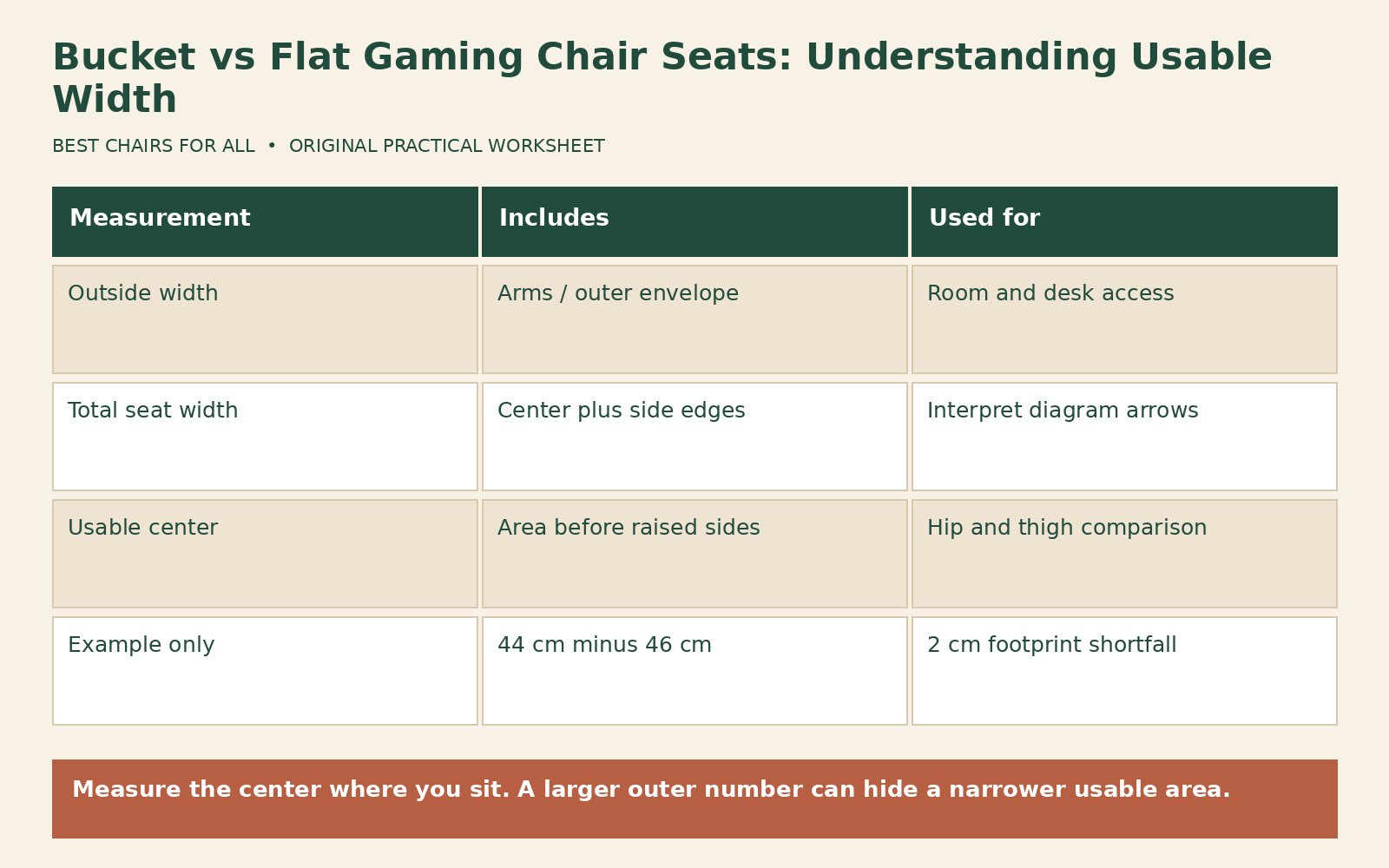
Overall chair width is the outside-to-outside envelope, often across the arms. It helps with room and desk clearance but says little about thigh room. Total seat-base width measures the upholstered base including its outer edges. Usable seat width is the area you can occupy without being pushed onto a raised edge. These measurements may all appear on the same diagram with different names, so record exactly what each arrow touches.
Razer’s Enki support page labels seat width including sides, front seat-pan width, rear seat-pan width, and inter-armrest distance separately. Its text also lists a 455 mm seat-base width. Meanwhile, the Enki product page markets a wide 54 cm seat base. The lesson is to reconcile measurement definitions using the diagram rather than treating two different numbers as interchangeable evidence of usable room.
Secretlab’s technology page describes a pebble seat base with gently sloping, flared sides rather than the constraints of a typical bucket seat. That is a design description, not a universal fit promise. The location and stiffness of the slope still matter to the individual sitter. Use the manufacturer’s diagram to screen a chair and a permitted ordinary-use trial to check the actual contact pattern.
Measure your current sitting footprint
Use a firm, stable chair that accommodates you comfortably as a reference. Sit in your ordinary supported position and note where your hips and thighs occupy the seat. A helper can measure the occupied span without pressing into your body, or you can mark the approximate outer contact locations on paper placed on the reference seat while it is unoccupied. Treat this as a rough planning measurement, not a medical or standardized anthropometric assessment.
Take more than one observation. Measure near the rear where your hips sit, and farther forward where your thighs spread. A tapered bucket seat can provide generous width at the front but much less at the rear, or the reverse. Write down whether you usually keep your feet close together or spread them slightly. Do not assume a standing hip measurement describes the footprint you need when seated with clothing and ordinary movement.
Keep sensitive body measurements private if you prefer. A manufacturer support request can state the usable seat width you require without explaining personal dimensions. Ask for the distance between the beginnings of the raised bolsters at a named location on the seat. Request a photograph showing the tape measure and the reference points if the published diagram is ambiguous. A clear question is more useful than asking whether the chair is suitable for a broad body-size label.
Make a paper geometry comparison
Draw a rectangle representing your reference chair’s comfortable seat area. Add the approximate hip and thigh contact spans. Next draw the candidate’s documented central area, using different colors for confirmed dimensions and estimates. If a published number includes the sides, do not silently substitute it for the flat center. Mark the center width as unknown until the seller answers. This prevents a large headline number from dominating the comparison.
For an illustrative calculation, suppose a chair is advertised as 54 cm wide overall across the seat, while its usable center at the relevant thigh position is confirmed as 44 cm. A user’s preferred sitting footprint at that point is 46 cm. The arithmetic is 44 minus 46, or a 2 cm shortfall. The outer 54 cm dimension does not remove that shortfall. These are hypothetical numbers demonstrating the method, not specifications for a particular model or a universal minimum clearance rule.
Now consider a second candidate with a 49 cm documented center and flatter sides. The same footprint leaves 3 cm of nominal spare space. That is promising screening information, but the user still needs to check depth, edge shape, arm placement, and actual contact. Foam compresses, upholstery stretches, and bodies move; a paper comparison cannot certify comfort. It can eliminate a clearly misleading comparison and identify which questions deserve a trial.
Test the contact pattern during normal use
Sit centered with your back supported and feet on a stable surface. Notice whether the sides touch lightly, hold your thighs inward, or create a narrow band of pressure. Then reach your controls and make the small position changes you normally make while gaming. A seat that feels acceptable only when you hold the legs in one unusually narrow position may offer less useful room than its measurements suggest.
Check both sides rather than assuming symmetry. A keyboard placed off-center or a mouse far away can encourage a rotated position that loads one bolster. Center the task before concluding the seat itself is asymmetric. If the contact persists in a centered setup, write down the location: rear hip, outer mid-thigh, or front edge. That location helps distinguish width, taper, and depth problems and gives support staff a specific question to answer.
Do not interpret pressure as beneficial lateral support simply because the chair resembles a racing seat. Ordinary desk use does not require you to brace against corners. If contact becomes uncomfortable, stop. Do not continue a trial to establish a precise time-to-discomfort figure. The useful result is that the normal sitting footprint does not remain tolerable, and that may be enough to inform a return decision.
Flat seats have their own fit checks
A broad, flat base may make lateral movement easier, but it can be too deep or place the armrests beyond your comfortable reach. Bigger dimensions solve one problem only if the other dimensions remain suitable. Compare the distance from the backrest contact point to the front seat edge, not merely the length of the upholstered cushion. A prominent lumbar curve can move your sitting position forward and change the effective depth.
Check whether the seat is truly flat or only lacks obvious bolsters. A cupped center, firm seam, or upward front edge can still create concentrated contact. Product photographs taken from above can hide those contours. Look for a side view and an angled front view, then ask about the central usable area. Read material descriptions cautiously: soft upholstery over a rigid raised form does not necessarily behave like an open edge.
Armrest geometry deserves a separate line on the worksheet. A wide seat combined with very wide minimum arm spacing may leave a narrower person reaching sideways for support. Adjustable pad rotation can change contact under a forearm but may not move the entire support post. Record minimum inner pad distance and the available inward movement, when documented. Do not assume a 4D label establishes a particular minimum spacing.
A candidate comparison you can reuse
Create one row per chair and these columns: outside width, total seat width, rear usable width, front usable width, usable depth, minimum arm spacing, and source. Write “not provided” rather than filling gaps from a similarly named model. Add a final column for the observed contact pattern during a permitted trial. This combines dimensions with experience without pretending the experience was a laboratory test.
For each number, preserve its unit and convert a copy if necessary. Divide millimeters by ten for centimeters, or centimeters by 2.54 for inches. Avoid rounding until the final comparison; a rounded inch figure can conceal a meaningful difference in a tight fit. Keep a small drawing of where the seller measured. Two precise-looking numbers are not comparable when one is measured seam to seam and the other includes the outer upholstery.
Add an evidence grade in plain language: published diagram, written manufacturer answer, retailer answer, or personal estimate. This is not a quality rating of the chair. It describes how much confidence you should place in the dimension. If an estimate is the only reason a candidate appears to fit, resolve that uncertainty before discarding packaging or missing a return deadline. The worksheet should make weak evidence easier to see.
Avoid modifying the seat to gain width
Do not cut bolsters, remove internal structure, or flatten the sides by force. Those changes may expose hard components, alter support, damage upholstery, and affect warranty eligibility. A cushion placed above the bolsters also changes seat height, depth, and backrest contact. It is not a neutral way to convert a bucket seat into a flat seat, even if it initially reduces side contact.
If the shape is wrong, first check whether an approved adjustment or accessory is intended for the model. Then compare a different chair using the actual missing dimension. A larger size may help, but it may also increase seat depth and backrest height. Describe the problem precisely before choosing the next model: “needs a wider central area at mid-thigh without a deeper seat” is far more actionable than “needs XL.”
Keep the final decision tied to ordinary movement. A suitable seat provides usable room in the positions you actually use, while the rest of the chair and desk remain workable. The bucket-versus-flat label can start the search, but your width map should finish it. Save the confirmed measurements and source links so a future comparison begins with evidence rather than another headline dimension.
Something unclear or out of date? Send a correction with this article’s title and the detail to check.
Sources, research & corrections policy ↗