If your gaming chair armrests feel too wide, check pad movement, post spacing, and desk access separately. A 4D label does not tell you the minimum distance between the pads, and rotating the tops inward does not necessarily move the support posts. The useful goal is forearm support without reaching sideways or preventing the chair from approaching the controls.
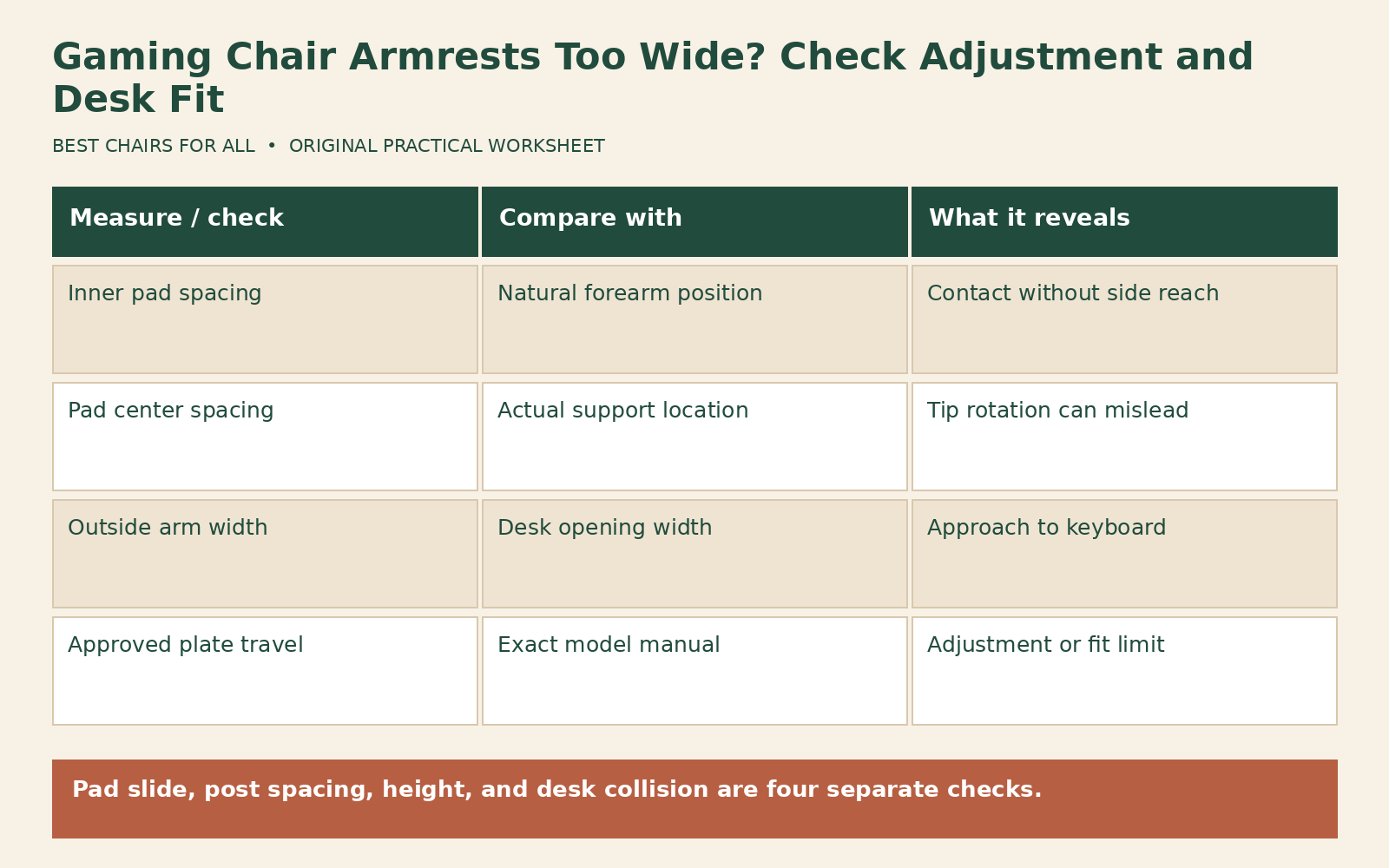
Begin with the exact chair manual. Some models permit width adjustment through the arm pads, some provide an approved mounting-plate adjustment, and some have little inward travel. Do not drill new mounting holes, add improvised spacers, or use different bolts to force a narrower position. If the available adjustment cannot fit you, that is a product limitation worth identifying early.
Separate four different problems
The first problem is pad spacing: the inner edges of the armrest tops remain too far apart. The second is post spacing: the vertical supports are too far apart even if the tops rotate. The third is height: pads that are too low may make you lean outward to find contact. The fourth is desk interference: the arms hit the desk before you reach the keyboard. All four can be described as “too wide,” but each needs a different check.
OSHA’s workstation chair guidance explains that overly wide armrests can make users reach outward and that poorly placed arms can obstruct approach to the keyboard. Use that general furniture guidance as an observation framework, not a diagnosis. Notice whether your upper arms can remain near your torso while the pads make light, useful contact. Stop the experiment if it becomes uncomfortable.
Write down when the issue appears: typing, mousing, controller use, or resting. A pad position that works for a wide mouse movement may not suit controller play, where the hands are closer together. You may need different pad positions for different tasks. The solution does not have to keep every forearm fully supported at every moment, but it should not require a fixed, awkward reach just to touch the chair.
Make a model-specific control map
The Iskur V2 master guide identifies up/down, front/back, inward/outward, and twisting armrest adjustments. That description does not establish the travel or minimum spacing of every other Razer chair. Confirm your own model and generation before copying the control sequence. A button on one side may release a different direction from a similar-looking button on another model.
Secretlab’s TITAN Evo aftercare guide includes a documented mounting-plate width adjustment for that chair and explains that the right arm is installed farther out to accommodate the recline mechanism. This is model-specific evidence, not permission to loosen arbitrary underside fasteners on any gaming chair. Follow the full illustrated procedure, secure the specified hardware afterward, and contact support if access or identification is unclear.
List each permitted movement and mark whether you have tested it. Separate pad slide from pad rotation, and mounting position from height. Avoid forcing a pad beyond its stop or mistaking normal play for an unlocked adjustment. If a control will not engage or the pad will not hold a position, document that operational issue separately. Width troubleshooting should not depend on using a broken latch or leaving a mounting fastener loose.
Measure the distance that matters
With the chair unoccupied, measure between the inner pad edges at the location where your forearms rest. Then measure between pad centerlines at the same location. Record the pad angle because rotating a tapered pad changes those distances. A measurement across the front tips can look much narrower than the spacing under your elbows. Take a photograph or sketch showing the tape location so a later measurement is comparable.
Now sit with your back supported and let your arms settle naturally near your torso. Without forcing them onto the pads, note the approximate forearm positions. A helper can compare those positions with the pad locations, or you can make a rough paper sketch after standing. The purpose is to identify a mismatch, not to establish an exact anatomical dimension. Avoid leaning over while seated to read a tape measure underneath you.
Use a hypothetical example to understand the arithmetic. Suppose your comfortable forearm contact positions are about 42 cm apart and the pad centers remain 49 cm apart at their narrowest useful setting. The total difference is 7 cm, or roughly 3.5 cm per side if the setup is centered. That does not define a universal tolerance. It tells you that rotating a tip inward may not solve the centerline mismatch under the actual contact area.
Adjust in an order that preserves fit
Set seat height and foot support first, then bring the controls into comfortable reach. Choose a backrest angle you can reproduce. Next set pad height so it does not force your shoulders upward or invite you to lean down to find support. Then test inward pad slide, front/back movement, and rotation individually. Keep the unused directions fixed so you can tell which movement actually improves contact.
When a manufacturer permits a mounting-plate width change, perform it only under the exact instructions for that model and with the chair unoccupied in the specified supported position. Do not improvise a way to hold a heavy chair upside down. If you cannot do the procedure safely or identify the correct hardware, ask support or an appropriate assembly service. No general width article can replace the chair’s illustrated assembly and safety information.
After any permitted adjustment, verify that all affected fasteners are secured according to the instructions and that levers, covers, and the recline mechanism remain unobstructed. Test ordinary operation cautiously before returning to play. Do not create symmetry by moving an arm into the recline lever’s clearance space. A small visual asymmetry may be intentional; functional contact and approved clearance matter more than matching the positions of plates underneath.
Check the desk opening next
Measure the clear desk opening at armrest height, including any apron, drawer, support rail, or cable tray. Compare that with the chair’s actual outside arm width in your chosen setting. Measure the height below the lowest obstruction rather than just the top of the desktop. A desk can look open from the front while a hidden crossbar stops the chair several inches short of the working edge.
Use a second hypothetical example. A desk opening is 64 cm wide, while the chair arms span 67 cm outside to outside. Even if the inner pad spacing feels comfortable, the chair cannot enter the opening in that configuration. Moving the keyboard nearer the edge may improve reach, but do not place it unstably or remove desk supports. A different arm position, a wider opening, or another chair may be required.
OSHA’s good working positions guidance emphasizes relaxed shoulders and supported feet, while also encouraging changes of position. Use those broad observations to reject a workaround that solves desk collision by creating a new reach or height problem. Lowering the chair until arms slide underneath can leave the keyboard too high. Raising it can leave the feet unsupported. Check the entire workstation after each change.
Build a two-task fit worksheet
Create one row for keyboard-and-mouse use and another for controller use. Add columns for pad height, inward position, rotation, desk clearance, and observed arm position. Use plain descriptions such as “pads one step inward, front ends slightly turned in, chair reaches working edge.” Do not invent indexed settings if the chair lacks them. A photograph of the empty chair can make your description reproducible.
For each task, mark whether the pads help, are irrelevant, or obstruct movement. This avoids keeping armrests in an unsuitable position simply because every promotional photograph shows arms resting on them. If the manual permits removal and you are considering it, ask the manufacturer whether removal affects stability, assembly, or warranty for your model. General workstation advice to remove obstructive arms does not supply the missing model-specific procedure.
Do not assume an aftermarket pad fixes width. A thicker pad changes height; a wider pad may extend farther inward but can also collide with the desk or restrict entry. Confirm the attachment method, dimensions, load expectations, and compatibility. Loose foam sleeves can shift, and unapproved clamp-on extensions can change forces on the original arm. Evaluate a named, documented accessory rather than a generic promise of universal fit.
Know when the chair is simply too broad
If the pads remain outside your comfortable reach after all approved adjustments, write down the minimum useful inner spacing you actually need. Include desk-opening width and acceptable seat depth in your next-chair search. Choosing a smaller overall size may reduce arm spacing but could also change seat capacity or backrest fit. Compare the full set of dimensions rather than swapping one vague size label for another.
For support, send the exact model, photographs of both arms in their narrowest permitted positions, the measurement location, and a description of the task. Ask whether an additional documented adjustment exists, whether the current asymmetry is expected, and what the normal travel should be. Do not ask support to infer everything from a single photograph taken at an angle, which can exaggerate apparent differences.
For a shared desk, record the limiting user and task separately. One person may need narrower pads for a controller while another needs a wider mouse-side position. Check whether adjustment buttons remain reachable after moving the chair under the desk, and whether either user can enter and leave without catching clothing on the arm. A configuration that can be restored easily is more useful than a narrow setting that blocks routine access.
Keep return timing separate from the support investigation. A ticket may not pause the seller’s deadline. A good outcome is an approved adjustment that provides useful contact and desk access, or a clear decision that the chair’s minimum spacing is unsuitable. The worksheet turns “too wide” into a concrete requirement that you can verify on the next chair before purchase, saving another round of guessing from the 4D label alone.
Something unclear or out of date? Send a correction with this article’s title and the detail to check.
Sources, research & corrections policy ↗