Two chairs can both advertise “recline” and behave very differently. On one, the seat and back rock together. On another, the back travels farther than the seat. A third lets you set the backrest angle separately, then rock the entire assembly afterward. The useful buying question is therefore not simply how far a chair reclines, but what moves, what stays supported, and which controls govern that movement.
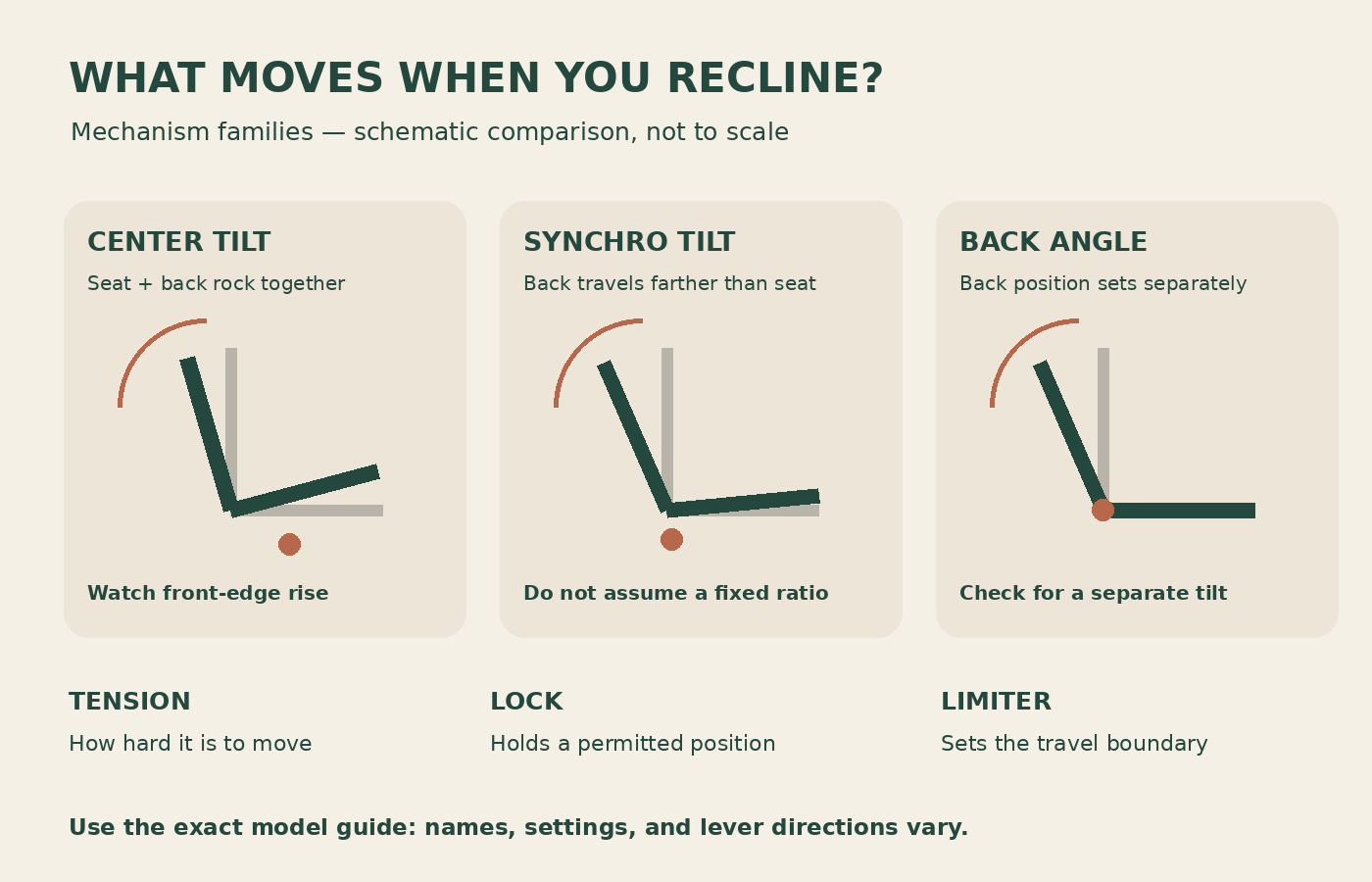
This guide separates those ideas so you can read a specification sheet, try a chair in a showroom, or understand the chair already under your desk. Mechanism names are not standardized enough to replace the exact model’s adjustment guide. Use the descriptions below to ask better questions, then verify the answers in its manual.
Start with three different movements
Watch the seat cushion and the backrest as separate parts. Does the seat change angle relative to the floor? Does the back change angle relative to the seat? Does the seat translate forward or backward? These observations describe actual motion more clearly than a marketing adjective.
Then identify the controls. Resistance is how hard you push to move. A lock holds a permitted position. A limiter defines the end of a movement range. A chair may have all three, only some, or an automatic system that removes a conventional tension knob. Counting levers will not reliably tell you which functions exist.
Make a quick control map using the owner’s manual: lever location, function, release procedure, and available settings. Do this with the chair unloaded where the manual requires it, and keep hands away from moving linkages. Do not loosen structural bolts to discover what a lever does.
Center tilt: the assembly rocks around a central pivot
A basic center-tilt chair typically moves its seat and back together around a point beneath the seat. HON describes center tilt as motion around a fixed pivot commonly above the pneumatic cylinder. The front edge of the seat rises as the user rocks backward.
The practical test is to keep your feet in a normal position and lean back gently within the chair’s permitted range. Notice whether your heels become light or whether pressure changes at the seat’s front edge. Those observations depend on your height, the seat setting, and the chair geometry, so a mechanism label alone cannot predict your experience.
A center-tilt chair can be entirely adequate for occasional reclining. It may be less appealing if your particular fit makes the front edge lift your legs uncomfortably. Record that specific result rather than rejecting every chair with the same general mechanism name.
Knee tilt: the pivot moves toward the front
Knee-tilt descriptions place the pivot closer to the seat’s front edge. The intention is to reduce the amount of front-edge rise during recline compared with a more central pivot. HON’s tilt overview distinguishes central, mid-range knee, and synchronized knee arrangements rather than treating every reclining chair as equivalent.
“Knee tilt” does not guarantee that every user keeps both feet planted through the entire range. An unsuitable seat height or seat depth can still affect support. Start from a usable upright fit before comparing movement; otherwise you are measuring the effects of a bad setup as much as the mechanism.
Ask a seller whether the specified knee tilt also changes the relationship between back and seat. Pivot location and coordinated back movement are separate characteristics. A concise answer should explain both, ideally with the manufacturer’s diagram rather than a photograph of the chair tilted backward.
Synchro tilt: the back and seat move by different amounts
With a synchronized mechanism, reclining changes the seat and back together, but not necessarily through the same angle. The back generally travels farther. The Steelcase seating specification guide illustrates one synchro mechanism using two degrees of back movement for one degree of seat movement. That is a definition for the mechanism described there, not a universal ratio for every brand.
The distinction matters because keeping the seat relatively more level can feel different from rocking a rigid seat-and-back assembly. However, the ratio alone does not tell you whether the back support follows your body comfortably. Seat depth, lumbar shape, armrest position, and resistance still matter.
For a practical comparison, use two checkpoints: a modest recline you might use when reading, and a deeper position within the chair’s approved range. At each checkpoint, note whether you remain supported without sliding forward. Do not turn this into a contest for the largest published angle; the relevant question is how the chair behaves in positions you actually use.
Independent back adjustment is a different feature
An adjustable backrest angle lets you change the relationship between the back and seat separately. It does not automatically mean the whole chair has a synchronized rocking action. Some task mechanisms combine independent back adjustment, whole-chair tilt, and seat-angle controls; others provide only a subset.
Encore Seating’s mechanism guide lists different controls for its task-intensive arrangement, including back-angle adjustment and tilt functions. This is why a product listing that says “multi-function” needs a more precise explanation. Ask which parts can be set independently and whether a free-moving mode remains available after setting them.
A useful showroom exercise is to return the chair to upright, change only the back angle according to its manual, and observe whether the seat moved. Next try the normal rocking mode. That separates a preset back position from the ongoing motion of the whole mechanism. Never pull an unfamiliar recline lever while leaning heavily against an unsupported back.
Tension, lock, and limiter: three controls you should not confuse
| Control | What it changes | A useful question |
|---|---|---|
| Tilt tension | Resistance to reclining. | Can I move comfortably without fighting the back or dropping backward? |
| Tilt lock | Whether the permitted position is held. | Does it lock upright only, at steps, or across a continuous range? |
| Tilt limiter or back stop | The boundary of allowed recline. | Can I still move forward within the selected range? |
| Seat-angle control | The seat’s starting angle or available inclination. | Is this independent of the rear recline setting? |
The Classic Aeron adjustment guide makes the limiter distinction especially clear: its selected rear boundary still allows forward movement. That is different from describing the back as fixed at one angle. Follow the correct guide for the chair generation you own; similar-looking older and newer models may use different controls.
Also check how a lock releases. A mechanism may require you to lean slightly into the back to unload it. If the manual describes that behavior, resistance at the lever is not a reason to force it. Conversely, a control that behaves differently from the instructions deserves a support inquiry.
There is no universal direction for the tension knob
It is tempting to remember “clockwise means tighter” and apply it to every chair. Manufacturer documentation shows why that shortcut is unreliable. Fractal Design’s Refine guide gives a clockwise increase for its tension control, while the Encore guide gives the opposite direction for several mechanisms it describes. Control orientation and design vary.
Read the label or manual, change a small amount, and test again. Count turns or clicks if you need a reversible comparison. Stop at the specified end of travel; additional force will not create a setting beyond the mechanism’s designed range. Do not remove the knob to search for extra adjustment.
If the chair has no obvious tension dial, it may use a weight-responsive system or a simplified selector. Confirm that in the documentation before assuming a missing part. A short control list can be intentional, but it still needs to suit the people who will use it.
Weight-activated mechanisms still deserve a fit check
Automatic resistance can be useful for a shared chair, especially when users are unlikely to reset a large tension knob. It does not eliminate the need to check seat height, depth, and support. Nor does it mean every user will prefer the resulting feel.
The European Steelcase Series 2 page describes both weight-activated and manual synchronized configurations with different recline settings. This is a useful reminder to verify the exact configuration being sold rather than relying only on the model family’s name.
For a household sharing one chair, have each person try the same simple sequence and record the result. If one person cannot start a recline comfortably or another finds it difficult to control, ask whether the chair has an adjustment that addresses that issue. “Automatic” is a description of the mechanism, not evidence that further comparison is unnecessary.
A ten-minute comparison that produces useful notes
- Establish the starting fit. Set height and depth according to the manual. Bring the actual keyboard or work surface into the comparison if possible.
- Identify the moving parts. Ask someone to observe from the side, or use the manufacturer’s motion diagram. Do not reach beneath the chair while it moves.
- Try one controlled recline. Check feet, seat-front contact, lumbar contact, and whether you slide. Return upright before changing a control.
- Change resistance only. Retest the same movement. This isolates the effect of tension from the effect of a different angle.
- Try the lock or limiter. Establish whether it holds a position or merely stops further travel. Confirm how it releases.
- Return to your normal task. Check armrest and desk clearance. A comfortable recline does not establish that the chair works for typing.
Write observations as concrete statements: “heels lift at moderate recline,” “arm pads hit the desk,” or “limiter permits forward movement.” Those notes make comparisons useful later. “Chair B felt premium” is much harder to translate into a purchasing decision.
Troubleshooting before assuming the mechanism has failed
If the chair will not recline, first check the documented lock position and any shipping or assembly steps. Then check whether resistance is set unusually high. If it reclines farther than expected, examine the limiter or lock setting before concluding the tension control is broken. These checks are about control settings, not repairs.
Stop using the chair and contact support if the movement is suddenly unstable, a structural part is visibly damaged, or a lock unexpectedly releases under normal use. Give support the model identifier, configuration, a description of the control setting, and a short video if requested. Do not open a spring-loaded mechanism or gas cylinder to diagnose it yourself.
What to check on a product page before buying
Look for a model-specific adjustment guide, a clear description of seat and back motion, the lock or limiter positions, and whether tension is manual or automatic. Confirm which features are standard and which require an upgrade. If those details are missing, request them before ordering.
The best mechanism for your use is the one whose movement you can control and whose support remains useful through your real tasks. Begin with what moves, then evaluate resistance and stopping behavior. That approach makes a short specification sheet far easier to interpret and gives a showroom visit a clear purpose.
Something unclear or out of date? Send a correction with this article’s title and the detail to check.
Sources, research & corrections policy ↗