A massage chair body scan typically helps position the massage mechanism for the seated user’s outline or shoulder location. It is a setup function for a consumer appliance, not a medical examination. Do not interpret the word scan as evidence that the chair diagnoses a condition, measures spinal health, evaluates organs, or certifies that a massage program is appropriate for you.
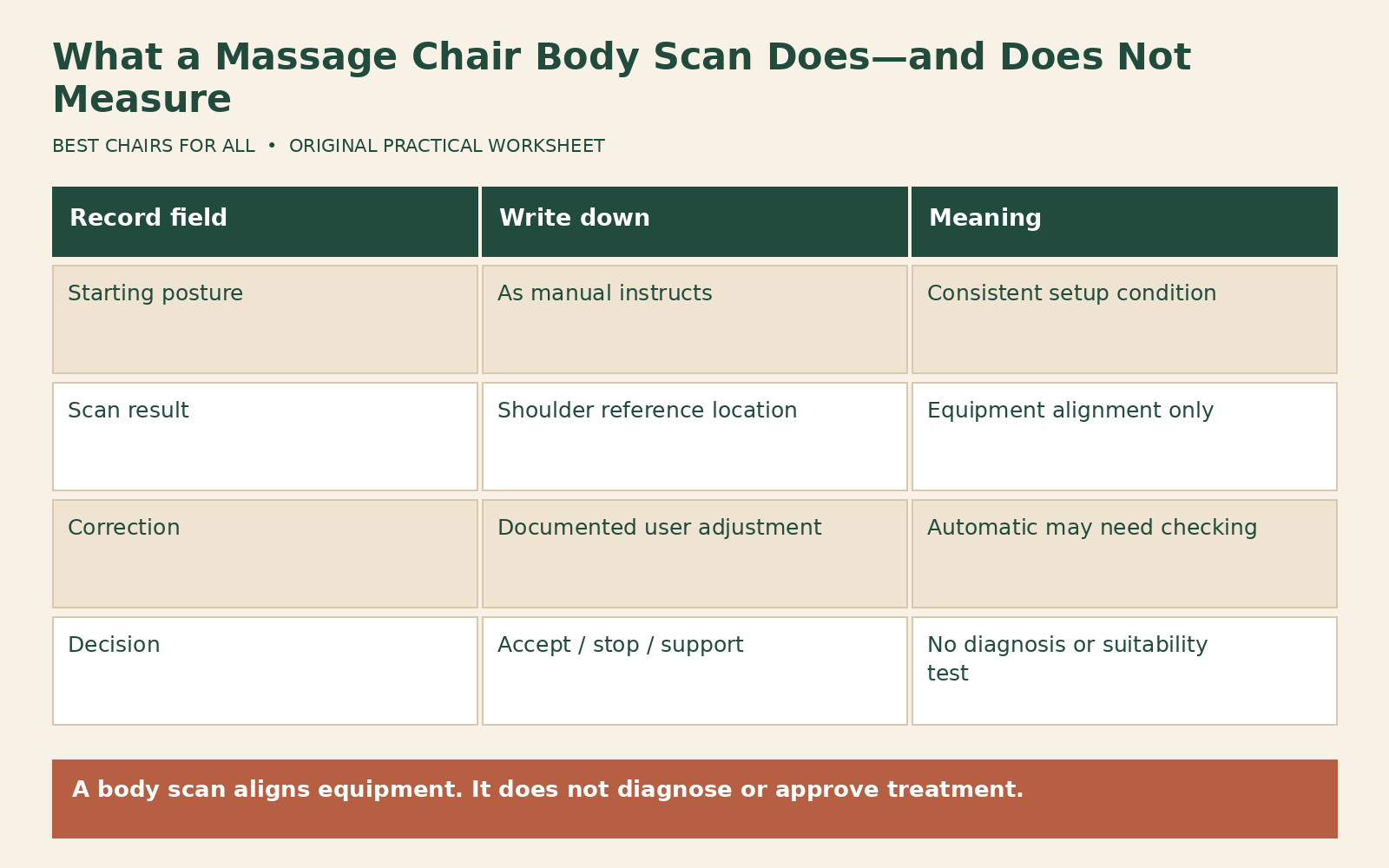
The exact function varies by model. Read the scan instructions, sit as directed, and check any shoulder-position confirmation before proceeding. If the result places the mechanism incorrectly or the operation feels uncomfortable, stop and follow the manufacturer’s adjustment or support process. For questions involving a health condition, use the manufacturer’s safety information and a qualified clinician rather than relying on the scan.
Translate the marketing term into an operation
Ask what the chair actually does during the scan: moves rollers to locate a contact reference, estimates shoulder height, checks legrest extension, or performs another documented adjustment. Do not assume that all those functions exist because a product says body sensing. A useful specification names the controlled component and the setting the user can confirm. A broad phrase such as personalized massage leaves too much unresolved.
Infinity’s official FAQ describes body scanning in relation to adjusting rollers to user height. The Evolution manual separately describes shoulder-position adjustment after a scan. Together, these documents show a practical equipment-alignment process. They do not establish a clinical measurement or a guarantee that every person within a broad height range will find the same program suitable.
Human Touch’s Super Novo 2.0 controller guide provides POSITION buttons for moving the rollers after the AcuPoint Body Sensing scan if needed, as well as for Zone or Spot use. The presence of a user correction is important. An automated starting point can require confirmation; “automatic” does not mean the user should ignore an obviously misplaced result.
Prepare for the scan consistently
Follow the exact seating instructions in the manual, including back and head placement, leg positioning, and any required pillow arrangement. Avoid beginning while leaning forward to read the remote or reaching to move an object. A scan taken in an unusual position can provide a poor starting reference for the position you actually intend to use. Do not add a thick cushion or cover unless the manufacturer permits it.
Remove bulky objects from pockets and avoid bunched clothing that changes contact. This is a consistency step, not a guarantee of scan accuracy. The chair may sense through upholstery and clothing in a model-specific way. Do not attempt to improve sensing by removing essential pads, exposing internal parts, or pressing against a moving mechanism. If the instructions are unclear about clothing or accessories, ask support.
Keep the surrounding moving area clear before powering the chair or starting a program. Body scanning may occur as part of a sequence that also changes chair position. Know the stop and return controls in advance. A general explanation cannot establish the safe sequence for entering, scanning, pausing, and leaving your model. Use the complete manual, including its safety section, before the first trial.
Distinguish shoulder height from overall height
Two people of the same standing height can have different torso and leg proportions. A shoulder-location check therefore addresses something a simple height label cannot fully describe. Conversely, an accurate shoulder reference does not prove that the foot rollers, calf compartment, seat depth, or arm areas fit. Evaluate each contact region under the manufacturer’s instructions rather than treating a successful scan as universal fit approval.
A long torso may place the shoulders differently from another user within the same advertised height range. A thick accessory behind the back may also move the body relative to the mechanism. Record these facts when asking support about a poor result. Do not select a different height in an undocumented menu or force a legrest beyond its normal travel to compensate for an unrelated shoulder issue.
If the chair offers a shoulder-position confirmation, follow that step before allowing the program to continue. Use only the permitted adjustment controls. The Evolution manual’s named shoulder adjustment is an example for that chair, not a universal button sequence. Another chair may use a touchscreen, directional control, or a different confirmation window. Verify the actual interface rather than pressing buttons based on an online photograph.
What the scan does not tell you
A consumer alignment scan does not establish why an area hurts, whether a tissue is injured, or whether more intense pressure is appropriate. It also does not replace the manufacturer’s user restrictions or warnings. A label such as smart or AI does not change those limits. Ask for evidence of the specific function instead of translating sophisticated branding into medical capability.
The scan does not necessarily measure body weight or establish that the user is within capacity. Check the stated weight limit separately. It does not measure room clearance, floor suitability, outlet condition, or whether another person or pet is in the moving area. Those remain installation and use responsibilities. Keep the mechanical setup, user fit, and health suitability questions separate so one successful screen message does not obscure the others.
Nor does a scan guarantee a comfortable intensity. Roller projection, technique, speed, air pressure, foot settings, and recline may have independent effects on how the program feels. Confirm the model’s low-setting and stop procedures before use. If the output feels too strong, stop rather than assuming the scanner selected a therapeutic dose. Consumer massage controls are not individualized clinical prescriptions.
A scan-verification record
Create a record with six fields: model and manual revision, program selected, starting posture, scan result, permitted correction, and decision. In scan result, describe location in ordinary terms, such as “shoulder reference appears too high.” In correction, record the documented adjustment you used. In decision, write whether the reference became acceptable, remained incorrect, or prompted a support question. Avoid assigning a numerical accuracy score without a defined measurement method.
Here is a hypothetical example. User A begins leaning forward to reach the remote and receives an unsuitable shoulder reference. After stopping and restarting according to the manual in the instructed supported posture, the reference is closer but still needs the permitted downward correction. The record identifies posture and correction as separate factors. It does not prove the chair’s sensor is defective or that the second result is medically correct.
User B follows the seating instructions consistently but reaches the limit of the permitted correction while the mechanism still appears too high. That is a reason to stop and ask whether the chair fits the user’s proportions or needs service. Repeating the scan many times is not a substitute for resolving a clear range limitation. Include the model, approximate user height if relevant, and exterior observations in the support request.
Keep shared-user settings separate
When different people use the chair, follow the manual’s scan sequence for each user rather than assuming the previous reference carries over appropriately. Check whether saved programs include position or only technique settings. A memory button’s behavior is model-specific. A favorite program name does not establish that it rescans, retains a shoulder position, or adjusts the legrest automatically.
Label a household note with the person’s own setting description only if everyone agrees to share that information. Keep the note focused on operation, such as “confirm shoulder reference before start,” rather than personal health details. If one user finds a program comfortable, do not present that as evidence another user should accept it. Proportions, preferences, and safety considerations can differ.
After moving the chair or changing an approved accessory, recheck the relevant setup under the manual. Do not assume a scan compensates for an unapproved cover or altered padding. The system operates within a designed physical arrangement. Changing that arrangement can affect contact while leaving the interface apparently normal, which is another reason to keep accessory compatibility separate from scan marketing.
Ask useful questions before purchase
Request the manual and ask what the scan measures, what it changes, and what the user can correct. Ask whether shoulder position can be adjusted after scanning, whether legrest fitting is separate, and what happens if the reference remains wrong at the adjustment limit. A demonstration should show those controls rather than simply displaying a completed-scan animation.
Also ask how the scan behaves in manual modes and saved programs. Does it run every time, only in selected programs, or on request? Does switching users require a new sequence? Do not assume the answer from a similar model in the same brand. Save written answers with the model name and date, especially if the interface has been updated since the printed manual.
Ask how a failed or incomplete scan is displayed. Does the interface request a new scan, provide a default position, or ask the user to confirm manually? The answer changes what a completed screen means. Do not interpret the absence of an error message as proof that the reference is suitable. If the manual does not explain the outcome, request a demonstration from support before relying on the feature.
Also distinguish roller-location correction from changing program coverage. Moving a Zone or Spot target during a manual massage may use the same directional button that corrects shoulder position during setup, but the operating context is different. Record which screen was active when an adjustment was made. That detail helps support understand whether the issue concerns the scan, the selected target area, or a control being used outside its intended mode.
A useful buying decision treats scanning as one convenience within a broader fit and control check. The practical artifact is your verification record: it shows whether the chair places its mechanism where intended and whether permitted corrections are sufficient. If those checks fail, stop and seek manufacturer guidance. The word scan should make the setup process clearer, not encourage you to accept an unsuitable fit or infer health information the chair does not provide.
Something unclear or out of date? Send a correction with this article’s title and the detail to check.
Sources, research & corrections policy ↗