Tilt and recline describe different movements on many gaming chairs. Backrest recline changes the angle between the seat and backrest. Seat tilt usually rocks the seat-and-back assembly relative to the base. A tilt lock controls that rocking movement, while tilt tension changes its resistance. Your chair may combine controls, omit a feature, or lock only in one position, so identify the exact mechanism before assuming a fault.
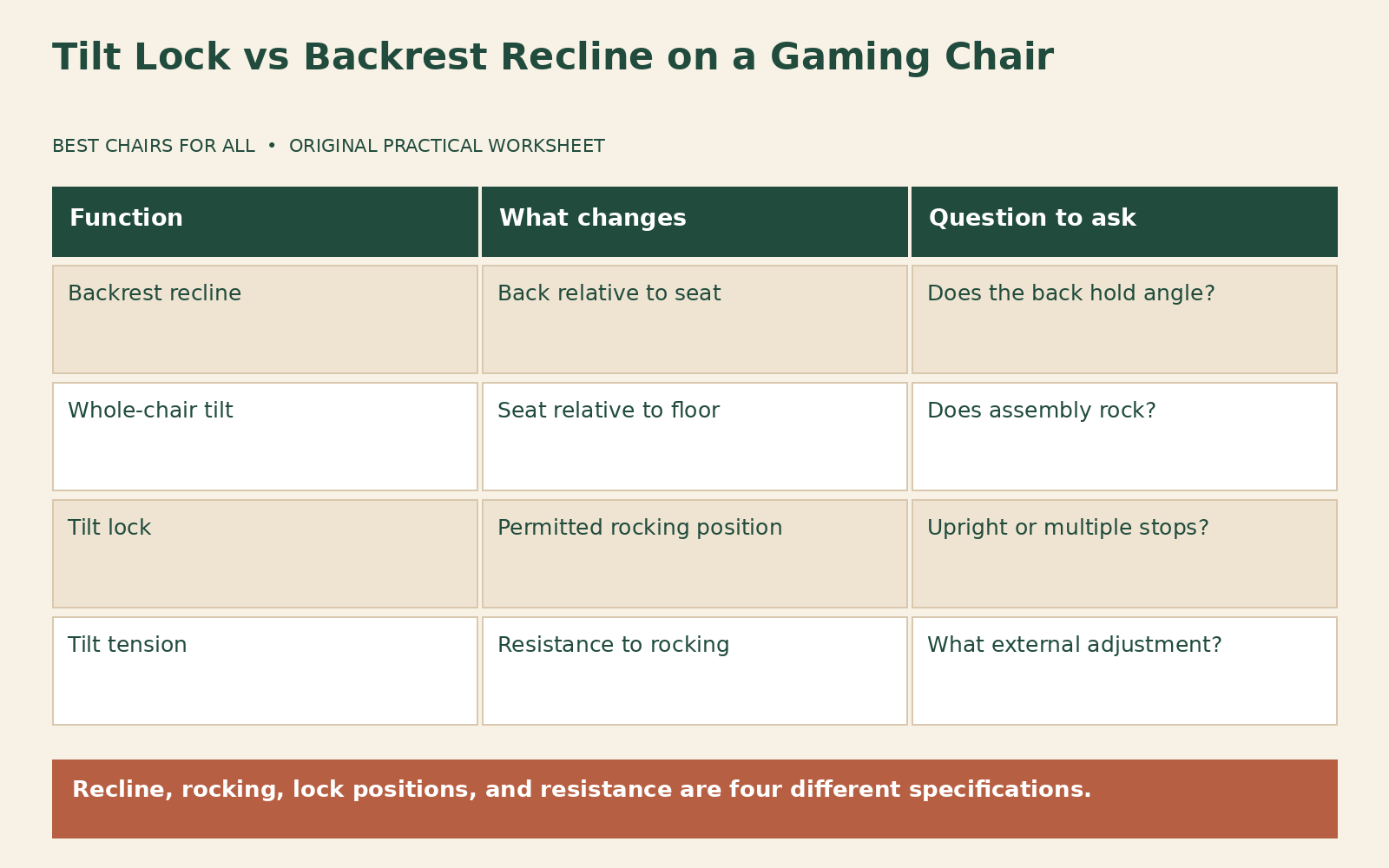
The distinction explains a common surprise: you lock the tilt lever but the backrest still reclines through its separate control. It can also explain the reverse: the backrest angle holds while the whole chair rocks. Neither observation alone proves something is broken. Compare the movement with the manual, keeping fingers away from linkages and following the manufacturer’s posture and loading instructions.
Draw two angles, not one
Imagine a side-view triangle formed by the seat and backrest. Reclining the backrest opens that angle while the seat may remain in the same orientation. Now imagine rotating that whole triangle backward around a point above the base. That is a simplified picture of whole-chair tilt. Actual mechanisms differ, but the two drawings keep the questions separate: did the back move relative to the seat, or did the seat move relative to the floor?
Secretlab’s TITAN Evo usage guide lists backrest recline and multi-tilt as separate functions. Its control layout should be read for that chair rather than treated as a universal lever map. A lever on the left of one model may be on the right of another, and a combined height-and-tilt lever can behave differently from separate controls.
Corsair’s T3 RUSH 2019 manual page provides instructions for an earlier generation. The T3 RUSH 2023 specification page lists “Tilt Angle Lock: No.” This is exactly why “tilt lock” and “lock at any angle” should not be treated as synonyms, and why a similarly named model’s controls need verification.
Distinguish lock from tension
A lock restrains movement according to the mechanism’s design. Some chairs lock rocking at the upright position only; others allow selected tilt positions. A tension control changes how much effort is needed to rock when movement is permitted. Tightening tension does not create a true lock, and a very tight setting may make a working tilt feel as though it is stuck. Read the specific direction and range in the manual.
Do not turn a tension knob indefinitely to test the difference. Operate it only within the documented range and stop at a firm limit. Do not remove the knob, open the tilt mechanism, or attempt to adjust an internal spring. A stiff or nonresponsive control is a support question when the normal instructions do not resolve it. Use the chair unoccupied or loaded exactly as the manufacturer specifies for that adjustment.
Backrest recline often has its own latch or lever. Supporting your back as instructed matters because changing the latch can release stored or applied force. Do not pull a recline lever while standing beside a loaded backrest, leaning your full weight onto it, or allowing another person to push it. A generic explanation of the function does not replace the model’s safety sequence for changing angle.
Build an external control inventory
Write the name of each control and where it is located: seat height, backrest recline, tilt lock, and tension. Add the expected result from the manual. If one lever serves two functions, record the motion used for each rather than calling it simply “the lever.” A horizontal push or pull and a vertical lift can perform different operations on a combined control. Use the diagram to confirm, not trial and error with every possible movement.
Check whether a transport tab or assembly safety device is addressed in the official assembly procedure. Do not remove an unfamiliar screw merely because a forum says it restricts recline. Some screws are structural or belong to other mechanisms. If the chair was assembled by someone else, request the assembly record and verify the completed steps against the manual. Missing instructions are a reason to get documentation before operating an uncertain control.
Compare the actual label or diagram with the delivered hardware. A replacement tilt unit, an updated model, or a mislabeled retailer photograph can cause confusion. Photograph the accessible controls and send the images to the manufacturer if the map does not match. Do not lie under or lift a heavy chair into an unsupported position to inspect it. Ask for a safe exterior identification method.
A movement observation worksheet
Use four rows: backrest relative to seat, seat relative to floor, resistance while rocking, and position after releasing the control. In each row, write what you expected and what happened during ordinary permitted operation. Keep the observation descriptive: “seat and back move together” or “backrest opens while seat stays level.” Avoid labeling a part broken before the movement has been identified.
An illustrative example: a user sets a more reclined backrest angle, then engages the tilt lock. The backrest stays at its chosen angle, but the chair no longer rocks. That can be normal on a chair with independent recline and tilt functions. The lock did not erase the backrest setting. The user saves both settings in their controller preset, then returns the backrest separately for desk use.
Another example: a user unlocks rocking but cannot move the chair with an ordinary supported lean. The manual identifies an external tension knob, which is at a very firm setting. Following the permitted adjustment direction produces usable rocking resistance. That example illustrates a tension issue, not a repair technique for every stuck chair. If the prescribed adjustment does not work, stop and request support rather than applying extra body force.
Check foot support and task reach after changing angle
Reclining changes your distance from the controls and the screen. If the hands now reach forward while the torso remains back, the new angle may not suit keyboard use. Controller play can have a different reach requirement, but the screen still needs to remain comfortably visible. Move equipment through its normal adjustments or return to a less reclined position rather than using the arms to pull yourself forward against the chair.
Whole-chair tilt can change how the front edge meets your thighs and whether your feet stay supported. Notice that relationship without trying to hold the chair at a balance point. Use a stable foot support if appropriate for the workstation, and do not prop the chair base or casters on loose objects. A floor rocker or footstool is not interchangeable with changing the geometry of a wheeled chair’s base.
Recheck the neck pillow and lumbar support as separate controls. The same settings can feel different when the backrest moves. It is reasonable to maintain a desk preset and a relaxed preset, with a short note describing each. Do not assume the deepest advertised recline is the intended position for every task. The available range is an operating capability, not a recommendation that you must use its endpoint.
Describe symptoms that need support
A lock that releases unexpectedly, a backrest that will not hold a documented position, visible damage, or a newly loose mechanism needs manufacturer attention. Stop using the affected chair when operation is unstable or parts are damaged. Do not repeatedly reproduce a sudden release for a video. Ask support how to document the fault safely; an explanation of when it occurred and exterior photographs may be enough to start the case.
A small amount of movement may be normal in some mechanisms, but only the manufacturer can identify acceptable play for the specific part and model. Do not borrow a tolerance from another chair. Describe the direction, whether the lock is engaged, and whether the movement began recently. A new clunk under load differs from an unchanged slight movement at an adjustable pad, and the location matters to troubleshooting.
Never open a gas cylinder or sealed tilt assembly, substitute unknown hardware, or defeat a latch to obtain a different recline range. Do not spray lubricant blindly into an upholstered or enclosed mechanism. Approved exterior maintenance, if any, should come from the exact instructions. If a replacement part is authorized, follow the supplied procedure or arrange appropriate assistance rather than treating the replacement as an invitation to rebuild the original mechanism.
Compare mechanisms before a future purchase
Ask four separate questions: what is the backrest recline range, does the seat rock, where can rocking lock, and how is tension controlled? Then ask whether those features differ by size or variant. A product that says “recline” may lack multi-position tilt locking. A product that says “rocking” may return to a single upright lock point. Feature names are most useful when translated into movements and hold positions.
Add a simple sketch to each saved preset. Draw a horizontal floor line, a seat line, and a backrest line. Label the sketch with the control positions you used, without assigning angles you have not measured. For the desk preset, note whether rocking is permitted or locked. For the controller preset, note the independent backrest position. This makes it clear why restoring the tilt lever alone may not restore the entire sitting position.
If a household member changes the chair, compare the sketch before changing anything else. A backrest that looks farther back may be showing both recline and whole-chair tilt at once. Return each control through its normal documented operation rather than pulling on the backrest by hand. Keeping the two movements separate also makes support videos more useful because you can name which line moved relative to the other.
Keep the official specification and manual link with the comparison. Where they appear inconsistent, obtain clarification before ordering. Your final worksheet should state the intended use: fixed desk angle, occasional rocking, or a repeatable controller position. That is a more meaningful requirement than maximizing the advertised angle. Understanding the two movements lets you operate the chair predictably and tell normal behavior from a problem without dismantling anything.
Something unclear or out of date? Send a correction with this article’s title and the detail to check.
Sources, research & corrections policy ↗