A gaming chair can feel hard because its foam is intentionally firm, because its shape concentrates contact, or because the chair does not fit your sitting position. Those explanations lead to different decisions. Identify where the hardness is felt and whether ordinary adjustments change it before buying extra cushions or waiting for an uncertain break-in period. Stop using a chair that is damaged or produces discomfort you cannot resolve through permitted adjustments.
This is a furniture troubleshooting guide, not a diagnosis of pain. Persistent symptoms or questions about a medical condition need a qualified clinician. The fact that a manufacturer describes foam as supportive does not require you to accept an uncomfortable seat, and a plush first impression does not establish long-term suitability. Keep the return deadline visible while investigating.
Firmness and density are different descriptions
Foam density describes material mass relative to volume; it does not by itself tell you exactly how soft the finished seat will feel. Firmness, thickness, contour, cover tension, and underlying structure all contribute. Two chairs described as high-density foam can feel different. Unless the manufacturer publishes comparable test methods and values, do not turn that phrase into a numerical comfort ranking or assume a heavier foam must be softer.
Secretlab’s FAQ describes its cold-cure seat foam as medium-firm. That is useful expectation-setting: a purchaser seeking a deep sofa-like sink should not assume every gaming chair aims for that feel. It is still a manufacturer description rather than an objective comfort score for your body. Do not infer that a particular number of days will transform the seat into a different category of cushioning.
Razer’s Enki page describes a softer seat base paired with a firmer backrest. This illustrates another distinction: seat and backrest may intentionally feel different within the same product. Write down which surface is bothering you. “Chair is hard” can mean a broad firm seat, a pronounced lumbar arch, a raised thigh bolster, a tight front edge, or a localized point that deserves inspection.
Map the contact instead of naming the whole chair
Draw a simple seat rectangle and backrest rectangle. Mark the location where contact feels excessive, using ordinary terms: front edge, outer left thigh, rear center, low back, or shoulder wing. Note whether the sensation is broad or sharply localized. Do not press repeatedly into an uncomfortable area to gather more data. Your ordinary sitting observation is enough to identify the next question.
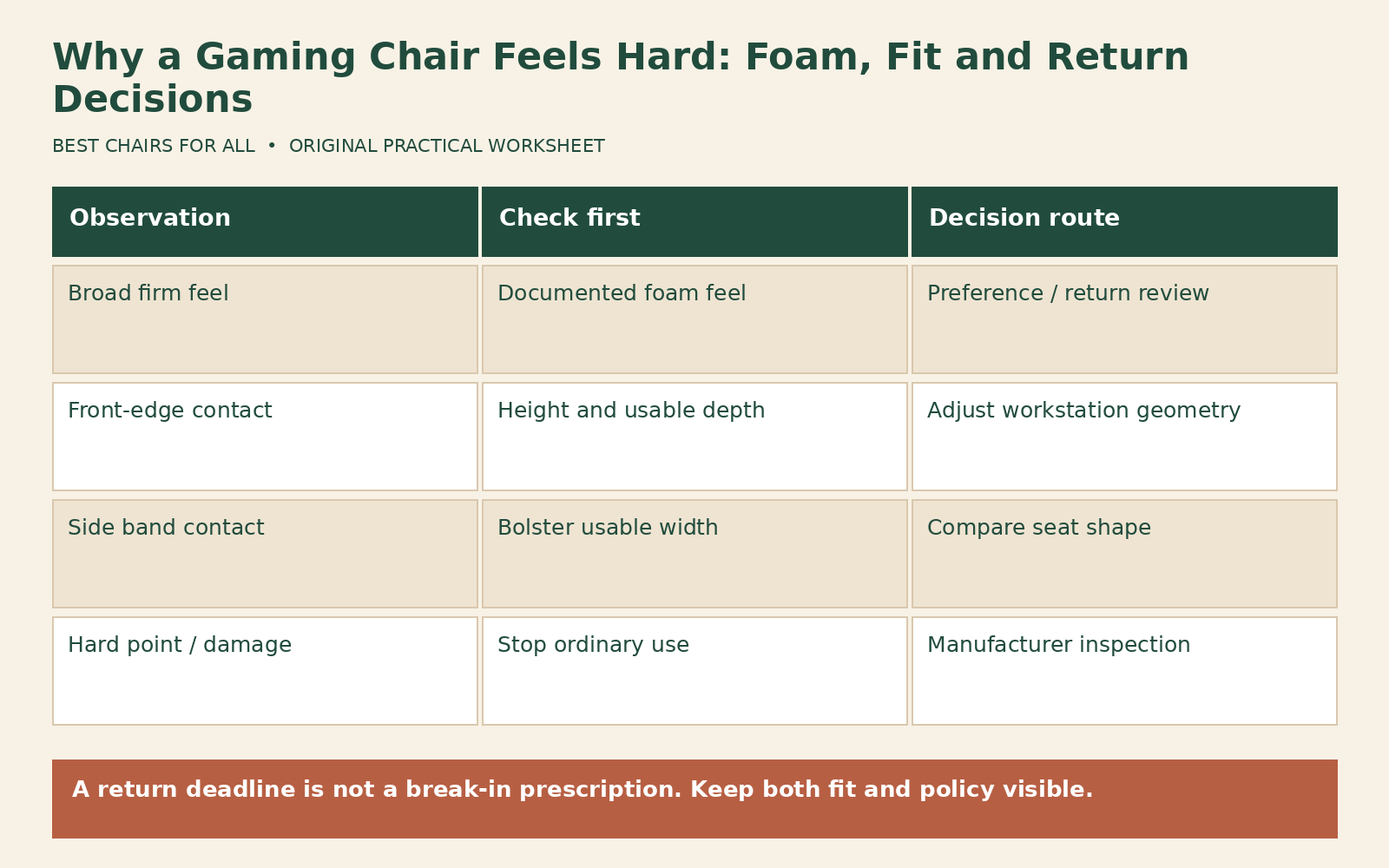
A broad firm sensation across the seat may reflect the intended cushion construction. A narrow contact band along a bolster points toward geometry. A front-edge issue may involve seat depth or height. A hard point or visibly uneven cushion may require manufacturer inspection. These are troubleshooting branches, not diagnoses. A photo of an empty seat with the area indicated can make a support request clearer without exposing personal information.
Check pockets and clothing before attributing every contact to the chair. A wallet, thick seam, belt hardware, or object trapped on the seat can create an isolated pressure point. Remove loose debris and compare in ordinary clothing. Do not strip upholstery or probe through the cover. If a rigid component seems exposed or the cushion looks damaged, stop using the chair and contact the seller or manufacturer.
Establish a stable sitting position
Set height so your feet have a stable support surface and your thighs are not being held against a steep front edge. If the desk forces a higher chair setting, a suitable stable footrest may be part of the workstation solution. Check that the back of the knees clears the seat edge when you sit back. A deep seat can make you slide forward, losing back support and loading a smaller area of the cushion.
Adjust the backrest and lumbar system according to the manual. Excessive lumbar projection can push you forward and make the seat feel shorter or more concentrated under you. Change one control at a time, then return to the same ordinary task. Do not evaluate the seat while perched at its front edge. The Razer Enki master guide specifically cautions against sitting on the front edge and instructs owners to stop using damaged parts until repaired or replaced.
Compare desk reach as well. A keyboard too far away encourages you to lean forward and reduces contact with the backrest. Bring equipment within a comfortable reach before concluding that the foam alone is responsible. If the chair only feels acceptable when you abandon the controls or cannot see the screen, that is not a usable setup. The whole activity needs to fit, not just a brief resting pose.
A three-condition comparison log
Use three conditions, each within the chair’s instructions: your initial setup, a corrected height-and-reach setup, and the corrected setup with a modest approved lumbar or backrest adjustment. Keep clothing, task, and room conditions similar. For each condition, record the contact location, whether you sit back naturally, and whether the sensation improves, worsens, or stays the same. Avoid numerical pain scoring as a purchase test.
Here is an illustrative result. In the initial setup a user feels a hard front edge and sits forward. Lowering the seat enough to support the feet reduces that contact, but the desk is now too high. Adding an appropriate footrest allows the chair to return to desk height with supported feet. The seat feels more tolerable without any foam change. The useful finding is a workstation-height mismatch, not proof that every firm chair needs a footrest.
A different user feels the same broad hardness after ordinary adjustments and cannot find a comfortable position. The contact is not isolated to an edge and there is no visible damage. That pattern may simply mean the intended seat feel is unsuitable for the user. There is no requirement to keep searching indefinitely for a hidden control. A timely return may be the more sensible option than a series of unverified accessories.
Treat break-in claims carefully
Some materials and personal impressions can change with use, but the amount and timing are not guaranteed for every chair. Ask the manufacturer what changes are expected for the exact foam construction and what would count as a defect. Get the answer in writing if it influences a return decision. Do not accept an unsupported claim that discomfort is necessary evidence of a healthy adaptation process.
Check the policy that applies to your order now. Secretlab’s refund and return page asks shoppers to select a purchase date to identify the applicable document. That is a useful reminder that current marketing summaries may not be the complete terms for an earlier purchase. Record the return initiation deadline, packaging requirements, shipping responsibility, and any condition rules before deciding to wait.
Set a personal decision date comfortably before the seller’s deadline so you have time to obtain instructions and arrange collection if needed. This is an administrative deadline, not a prescribed adaptation period. Keep your observations concise and dated. If a support conversation is still underway, ask explicitly whether it changes the return window; do not assume that opening a ticket automatically pauses the clock.
Evaluate a cushion as a geometry change
An added cushion raises your sitting surface and can move you forward relative to the backrest. Recheck foot support, knee clearance, armrest height, lumbar contact, and screen position. A thick cushion may reduce contact with a bolster while making another dimension worse. It can also slide on the original upholstery. Verify compatibility and secure placement under the manufacturer’s instructions before considering it part of the setup.
Do not stack cushions as an open-ended experiment. First name the goal: a modest change in surface feel, a different contour, or replacement of a defective component. A surface cushion cannot repair a broken seat structure, and a loose pad does not establish a higher weight capacity. If the only tolerable arrangement requires improvised supports, the base chair may be the wrong purchase.
Keep accessory costs separate in the decision worksheet. Write the chair’s effective kept cost, the accessory cost, and any return cost you have confirmed. Compare that total with the cost and uncertainty of exchanging for a different design. Avoid inventing resale value or assuming an accessory can be returned after use. This makes a practical purchase decision out of what can otherwise become an emotional attempt to rescue a costly chair.
Build a support and return packet
Collect the order number, exact model and size, delivery date, photographs of any visible irregularity, and the short comparison log. Describe a suspected defect separately from a preference. “There is a hard raised point under the left rear cover” asks for inspection; “the evenly firm seat does not suit me” asks about fit and returns. Clear wording helps the support team route the issue correctly.
Ask for permitted inspection steps and do not dismantle the seat, gas lift, or recline mechanism. Do not try to soften foam with heat, water, chemical sprays, repeated jumping, or heavy weights. Those actions introduce damage and make the original question harder to resolve. Preserve packaging until the chair is accepted or the return is completed, and follow the seller’s transport instructions if it must leave your home.
A satisfactory result can be an adjustment that works, an authorized repair for a documented fault, or a return because the seat feel does not match your needs. None requires a claim that all hard chairs are good or all soft chairs are bad. Finish with a specific explanation of what did and did not change. That record is useful when choosing your next chair, because it turns “too hard” into measurable requirements about shape, depth, support, and surface feel.
Something unclear or out of date? Send a correction with this article’s title and the detail to check.
Sources, research & corrections policy ↗