Affiliate disclosure: As an Amazon Associate, Best Chairs for All earns from qualifying purchases. Read our disclosure. Amazon links below open matching US search listings; check the exact model, seller, configuration, availability, and checkout terms.
The best reclining office chair should give you controlled back movement and an easy return to work. Steelcase Gesture is the office-first starting comparison here. HBADA E3 Pro 2026 deserves a fitting if you deliberately want a deeper supported position, while FlexiSpot C7 is a conditional alternative whose current angle and configuration fields need clarification. Choosing the largest advertised recline number is an unreliable shortcut.
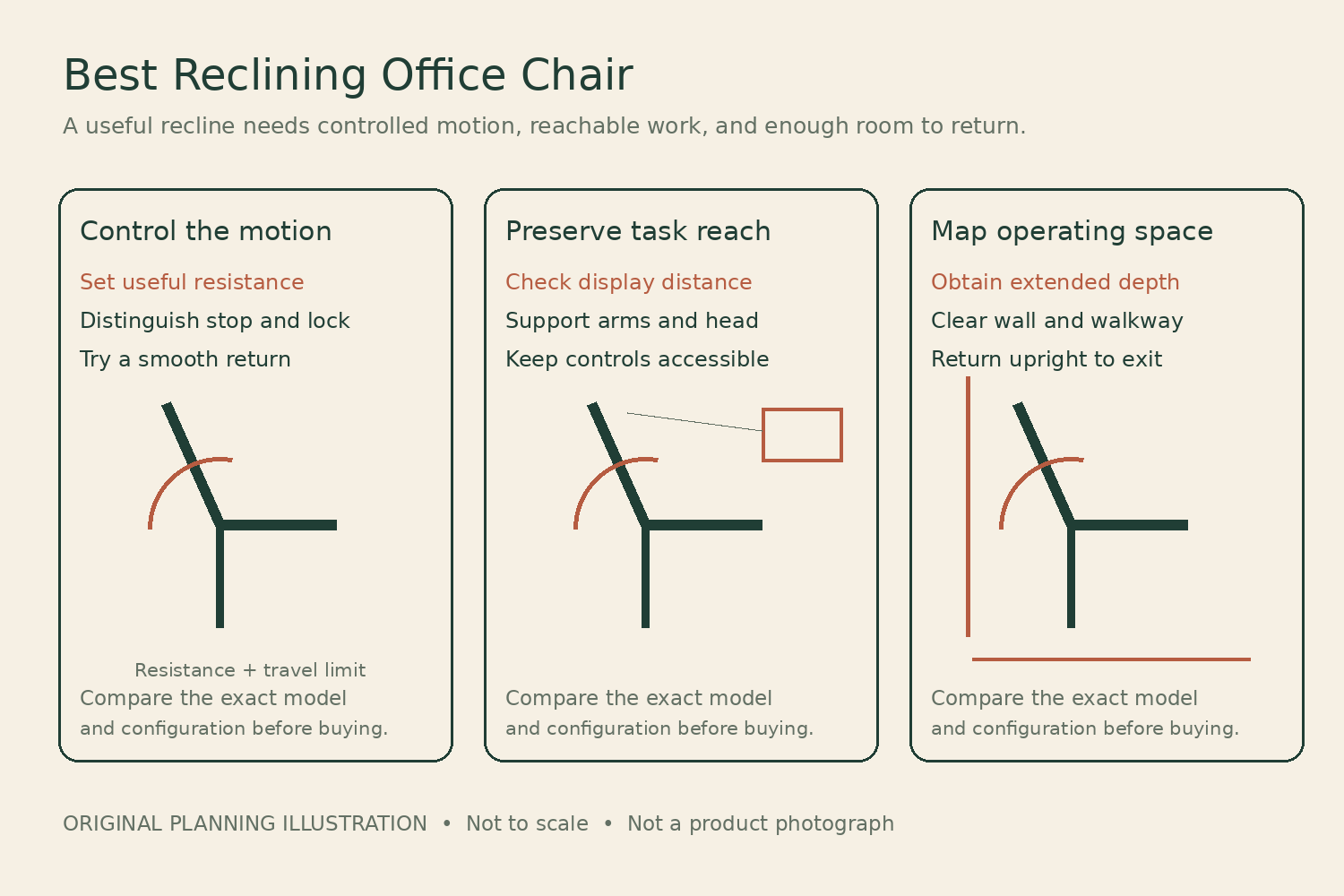
This guide examines the reclining mechanism and the workstation around it. It uses manufacturer documents and current US listings checked November 6, 2026; we have not tested recline stability, comfort, or durability. For a guide specifically about where an integrated leg support meets your calves, see our office chairs with footrests comparison. Back movement and leg support require different fitting questions.
Define the job for the recline
Start with one intended activity: reading a long document, taking a call, watching a presentation, or pausing away from close keyboard input. A reclined position can change your reach and viewing distance substantially. If your hands remain on a fixed keyboard while the back moves away, you may end up leaning forward again and losing the support you wanted.
Decide whether the chair should move freely within a controlled range, stop before a selected angle, or hold a particular supported position. Product pages sometimes use lock, tilt, and recline loosely. Ask the supplier to demonstrate the actual behavior. A stop that limits backward travel is different from a mechanism that fixes the back against movement in both directions.
Three operating approaches
| Chair | Reason to investigate | Evidence to check | Unresolved purchase question |
|---|---|---|---|
| Gesture | Task movement with manual limits | Three stops and upright back lock | Do arms and optional headrest fit through movement? |
| E3 Pro 2026 | Deeper labeled recline positions | 105/115/130/140° current generation | Does selected variant ship and fit upright? |
| C7 | Seat controls and optional leg support | Current manual and exact SKU drawing | Which conflicting angle specification applies? |
Consult Steelcase’s movement description, the E3 Pro 2026 mechanism page, and C7’s current US specification. Manufacturer claims about pressure-free sitting, pain relief, or automatic perfect support are not findings from our own testing.
1. Steelcase Gesture Office Chair
Best for: Best first comparison for working while changing back angle.
Gesture is the office-first option when you want to lean back during work without choosing a chair mainly for an extended leg rest. Steelcase identifies manual tension adjustment, three recline stop settings, and an upright back lock. The distinction between a stop and a lock matters: ask the demonstrator what the back can do between the selected limit and upright rather than assuming every setting fixes it at one angle.
The US seat-height range is 16–21 inches and the published user limit is 400 pounds. Its adjustable arms and optional integrated headrest deserve a trial in the position you plan to use. A comfortable recline is not useful if the pointing device remains on a desk too far away. The manufacturer provided current US store and dealer routes when checked, but selected upholstery and headrest configurations determine dispatch.
Product Details
| Brand | Steelcase |
|---|---|
| Seat height | 16–21 inches, US store |
| Capacity | 400 lb |
| Recline control | Tension, three angle stops, upright back lock |
| Headrest | Integrated option |
| Warranty | Limited lifetime framework; 12-year multi-shift parts/labor |
Pros
- Manual resistance and travel limits support a purposeful setup
- Adjustable arms can be evaluated through the movement
- Does not require buying a built-in leg support
Cons
- No integrated pull-out footrest in this comparison
- Headrest configuration must be specified separately
Choose Gesture after testing controlled movement and an easy return to typing. Steelcase describes twelve-year multi-shift parts and labor within its limited lifetime terms. Do not choose it by an angle copied from a third-party chart; the useful evidence here is the supported motion and control arrangement. Keep feet appropriately supported and use the manufacturer's adjustment instructions.
2. HBADA E3 Pro Ergonomic Office Chair 2026 Edition
Best for: Best deeper-recline candidate to trial with the correct generation.
E3 Pro 2026 is the option to investigate when you deliberately want a deeper leaning-back position in an adjustable mesh chair. Its current US page labels four positions at 105, 115, 130, and 140 degrees. Those are manufacturer angle labels, not measurements made by us or directly comparable comfort scores. The same name appears on older versions, so the 2026 generation must be part of the order description.
The current dimensional drawing gives 18.1–21.5 inches of seat height and 17.7–19.7 inches of depth. The relatively high minimum should be checked before the recline attracts your attention. A with-footrest option exists, but it is separate from the without-footrest configuration. The US page had a sold-out label alongside purchase controls, so exact variant availability requires seller confirmation. Do not interpret the visible configuration menu as proof of immediate shipment.
Product Details
| Brand | HBADA |
|---|---|
| Recline positions | 105°, 115°, 130°, 140°, manufacturer labels |
| Seat height | 18.1–21.5 inches, 2026 drawing |
| Seat depth | 17.7–19.7 inches, 2026 drawing |
| Seat width | 20.3 inches, 2026 drawing |
| Capacity | 330 lb |
| Warranty | 5 years base/lift/casters; 3 years other components |
Pros
- Current generation explicitly labels four recline positions
- Sliding depth and adjustable headrest
- With and without leg-support configurations can be compared
Cons
- Higher minimum may fail the main seated fit
- Marketing headline overstates the uniformity of warranty length
Choose E3 Pro only after trying the working and leaning-back positions and confirming inventory. The actual policy gives five years to base, gas lift, and casters, while mechanism, arms, and backrest receive three. It also limits purchase channels and use conditions. Its health, maintenance-free, and zero-gravity marketing is not independently established by this guide.
3. FlexiSpot C7 Office Chair with Footrest
Best for: Best conditional option when exact C7 specifications are clarified.
C7 is the alternative to compare if you want an adjustable seat with an optional concealed footrest and a different lumbar-control approach. The manufacturer describes a dynamic lumbar pad that can be left free or locked at a selected angle, plus depth adjustment and forward seat tilt. Those controls should be demonstrated separately. A forward-tilting seat is not the same thing as a reclining back.
The current US page lists a 21-inch seat width and 17–20-inch depth. It also contains an unresolved recline discrepancy: a feature heading says 128 degrees, while the specification table says 93–110. A current US retail listing identifies a specific C7B-MESH-FT configuration with its own dimensions. This makes C7 a conditional shortlist candidate, not a model to order because an unverified maximum angle exceeds another chair's number.
Product Details
| Brand | FlexiSpot |
|---|---|
| Manufacturer seat depth | 17–20 inches |
| Manufacturer seat width | 21 inches |
| Manufacturer seat height | 18.31–21.65 inches; SKU confirmation needed |
| Capacity | 300 lb |
| Recline specification | 128° in feature text; 93–110° in spec table—unresolved |
| Warranty | 10-year listing; confirm component terms |
Pros
- Seat slide and distinct lumbar control can be assessed
- Footrest configuration has a current US retail route
- Manufacturer supplies a current user manual
Cons
- Manufacturer angle fields conflict
- Retail and direct dimensions require SKU-level reconciliation
Choose C7 only after the seller supplies the current drawing, supported recline stops, and warranty for the exact SKU. The US manufacturer and retail pages state ten-year coverage, but obtain the applicable terms rather than assuming every material and moving part shares one remedy. If the supplier cannot resolve the specifications needed for your intended position, remove it from the shortlist.
The movement-and-reach worksheet
Use a permitted chair trial with the actual workstation. Follow the adjustment sequence and warnings supplied with the chair. Start with a useful ordinary seated fit, then investigate recline. If the seat is too high or deep before you lean back, the reclining feature should not move that chair ahead of a model that fits the main task.
- Baseline: record loaded seat height, depth, foot support, and comfortable keyboard reach. Note whether the chair is already at an adjustment stop.
- Resistance: with the instructions available, set the recline tension for controlled motion. Check whether you can begin and end the movement without a sudden drop or a forceful push.
- Travel behavior: demonstrate each selected stop or lock. Record whether it limits travel, holds a fixed position, or permits movement back toward upright.
- Task reach: repeat the intended reading or call activity. Check head and arm contact, screen visibility, and whether controls remain accessible.
- Return: restore the working position and place the feet for a normal exit. The transition should be manageable without pulling on the desk or loading a footrest as a step.
As an illustration, imagine a reader who can see a fixed display comfortably when upright but moves the eyes several inches farther away when leaning back. Enlarging the document or adjusting the display may solve the task better than buying a chair that reclines even farther. Measure the actual change during the trial. A bigger angle without a usable view is extra travel that does not complete the task.
Map the swept space behind and in front
A chair’s ordinary overall depth does not establish the space needed in recline. Request the maximum operating envelope with the selected headrest and any leg support extended. Mark the intended placement on the floor, then open the nearby cabinet, door, and drawer. Include room to move back into an upright position and stand.
Do not press the reclined back against a wall to make an unsuitable room fit. Likewise, an extended leg rest must not occupy a walkway or strike a desk crossbar. If the supplier cannot supply a fully extended dimension, arrange a showroom measurement or a practical trial. Guessing the footprint from a photograph is especially risky when models have different seat and back relationships.
Keep the upright position in the comparison
HBADA’s current drawing starts at an 18.1-inch seat height. FlexiSpot’s direct table starts higher than many conventional low-range chairs, with other US listings showing different endpoints. These are reasons to verify ordinary sitting before considering relaxation. A high minimum may require a different task arrangement and cannot be dismissed because you plan to recline occasionally.
Seat depth also changes back contact. If a cushion is too long, a person may sit forward and never meet the support whose recline they paid for. Test the depth slider in the actual model; do not substitute a model-family review or an optional accessory cushion for evidence. A headrest can be useful in a leaning-back position yet intrusive during typing, so both positions deserve attention.
Angles need a common reference before comparison
A back-to-seat angle is not automatically the same as an angle measured from the floor. A seat that tilts during recline changes the relationship further. This is why the table reports controls and manufacturer labels rather than pretending all angle claims form one precise ranking. Ask what is moving, what is fixed, and how the angle was measured.
C7’s own page illustrates the problem by giving incompatible values in two sections. We do not average them or select the more appealing figure. The decision remains conditional until the exact SKU’s supplier resolves it. A buyer who needs a particular recline position should reject unresolved specifications rather than use a return policy as a substitute for basic product identification.
Use the approved mechanism as supplied
Never add improvised recline stops, remove limiting parts, or use an aftermarket leg platform to extend the chair beyond its intended configuration. Keep fingers, clothing, cables, children, and pets clear of moving linkages. These practical requirements matter more as the chair occupies a larger operating envelope. Read the actual model manual before assembly or demonstration.
The presence of a footrest does not make a rolling office chair an overnight bed or establish a safe sleep position. This guide recommends evaluating a supported office activity, not replacing sleeping furniture. If a medical or mobility requirement determines your reclining position, seek a chair and individual guidance appropriate to that requirement rather than relying on an office product’s relaxation imagery.
Verify service for the moving parts
Recline controls, pivots, and adjustment levers deserve specific warranty questions. HBADA’s policy separates five-year core components from three-year mechanisms and other components, despite broader five-year headlines. Steelcase describes its own multi-shift framework. FlexiSpot lists ten years, but the exact SKU and component remedy still require confirmation.
Ask whether an approved part is supplied, who installs it, and what information identifies the mechanism on your unit. Retain the invoice, configuration record, and serial label. A current US listing establishes a purchasing route, not unlimited replacement stock or the same warranty across every marketplace seller. Choose a supplier who can resolve the configuration questions before delivery.
Gesture is the clearest starting point for controlled movement within desk work. E3 Pro 2026 is the more specialized deeper-recline trial, provided upright fit and availability are settled. C7 belongs only after its conflicting specifications are reconciled. The best choice completes the activity, stays within the room, and returns comfortably to the position where you work most.
Something unclear or out of date? Send a correction with this article’s title and the detail to check.
Sources, research & corrections policy ↗