As an Amazon Associate, we earn from qualifying purchases. Read our affiliate disclosure. Amazon buttons open searches for matching listings; they do not confirm seller, configuration, price or stock.
Under $500: buy a useful upgrade, not the largest feature list
For a chair-only budget under $500, Branch Ergonomic Chair is a practical first comparison for adjustable padded seating; Branch Ergonomic Chair Pro adds lumbar-depth and broader arm adjustment; SIHOO Doro C300 Standard gives you an adaptive-support and mesh-seat alternative at a lower current base price. The right choice depends on whether those added controls solve your current chair problem.
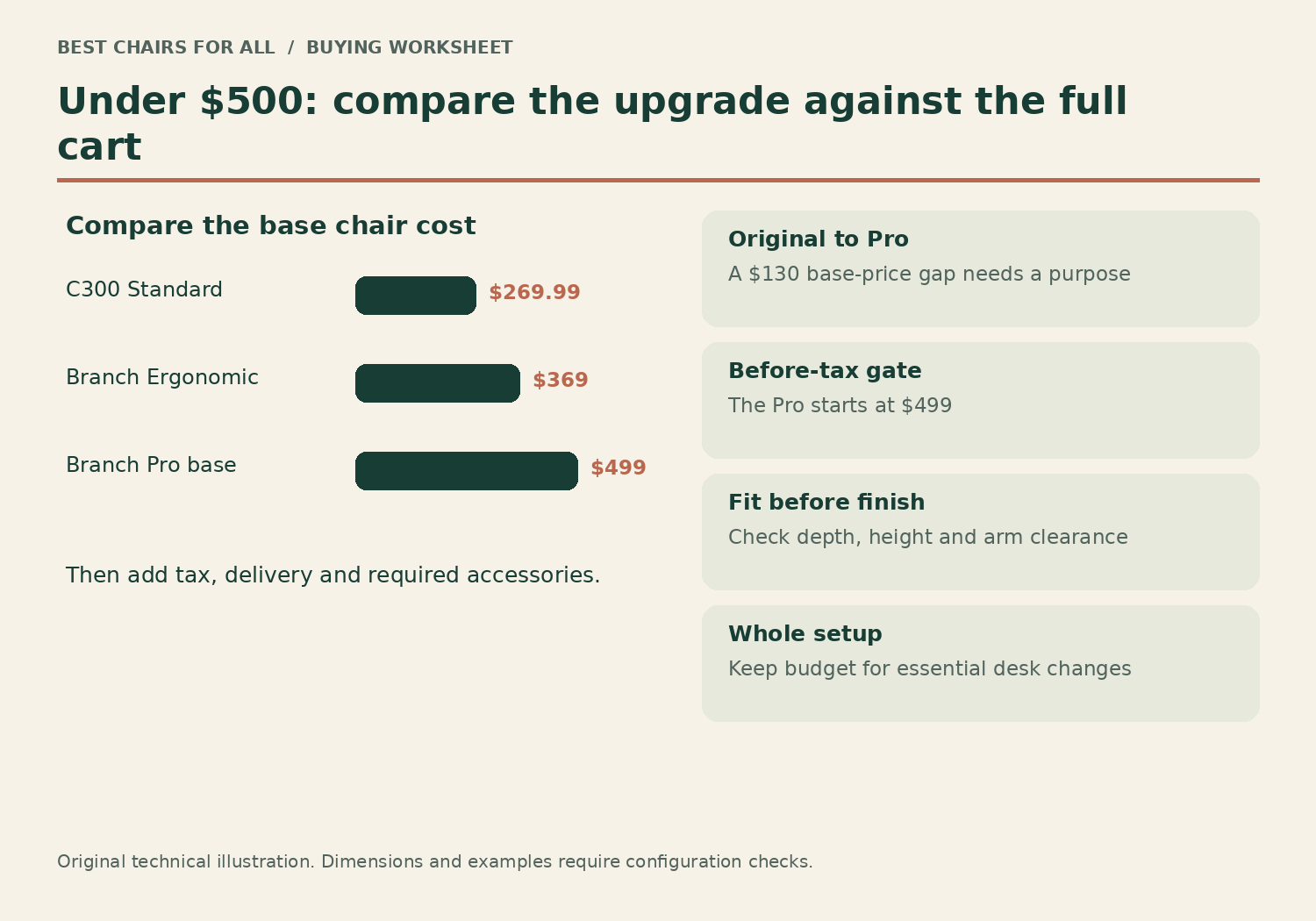
We checked the official US pages on November 6, 2026. Branch listed starting prices of $369 for Ergonomic Chair and $499 for Ergonomic Chair Pro; SIHOO displayed $269.99 for black C300 Standard. These are base configuration prices, excluding tax and optional upgrades. Pro at $499 is eligible only for a before-tax chair-price ceiling: it will usually exceed a $500 all-in limit when tax applies. None of these prices validates an Amazon offer or guarantees later availability. This is a document-based comparison, not hands-on testing.
| Candidate | Displayed base price | What earns the place |
|---|---|---|
| Branch Ergonomic Chair | $369 starting price | Seat-depth adjustment and removable three-way arms |
| Branch Ergonomic Chair Pro | $499 starting price | Lumbar depth, forward tilt and broader arm adjustment |
| SIHOO Doro C300 Standard, black | $269.99 | Adaptive back support and mesh construction |
The three selections
The lower-priced candidate stays on the list deliberately. Spending the full allowance makes sense only when it buys a change you will use. Conversely, saving money on a fixed or poorly matched sitting area can be false economy. Compare the feature that addresses your specific failure before considering finish, brand or a reference-price discount.
Model specifications and ordering details were checked against Branch Ergonomic Chair specifications, Branch Ergonomic Chair Pro specifications, SIHOO Doro C300 Standard official US store. These manufacturer documents support the configuration notes in this comparison; retrieved November 6, 2026.
1. Branch Ergonomic Chair
Best for: a balanced adjustable chair with room in the total budget.
The original Ergonomic Chair started at $369 in Branch's US comparison. It combines a cushioned seat, mesh back, sliding seat, height-adjustable lumbar support and removable three-way arms. Its 17–21-inch listed height range and 275-pound capacity set the initial fit screen.
The appeal is not a claim that eight adjustments outperform every simpler chair. It is the opportunity to tune the basic task position while keeping money available for needed workstation changes. Branch lists the seat-depth dimension as 18–22 inches, which should be clarified against your own usable-depth requirement.
Product Details
| Brand | Branch |
|---|---|
| Seat height | 17–21 inches |
| Seat depth (manufacturer label) | 18–22 inches |
| Capacity | 275 lb |
| Arms | 3D adjustable and removable |
Pros
- Removable adjustable arms
- Base price comfortably below $500 before tax
Cons
- No Pro-style independent lumbar-depth control
- Seat-depth measurement needs careful comparison
Start here if the core adjustments solve your needs and the full configured cart fits your ceiling.
2. Branch Ergonomic Chair Pro
Best for: paying specifically for lumbar-depth and arm adjustments.
Pro adds a two-way padded lumbar support, five-way arms and forward tilt. Branch listed a $499 starting price, so this is a chair-only before-tax recommendation rather than a guaranteed $500 delivered package. Its 275-pound capacity is the same basic screening limit as the original chair.
Pay the premium only if the additional controls matter to your own fit. The optional headrest and extended cylinder are not included by the word Pro, and premium fabrics may change the total. Confirm the current seat drawing and chosen cylinder rather than assuming identical dimensions across every configuration.
Product Details
| Brand | Branch |
|---|---|
| Support | Height- and depth-adjustable lumbar |
| Arms | 5D adjustable |
| Capacity | 275 lb |
| Headrest | Optional; extra cost |
Pros
- Height and depth lumbar adjustment
- Broader arm positioning and forward tilt
Cons
- Almost no margin under the base-price cap
- Accessories and tax take the total higher
Choose it when the added adjustments are the purchase reason and your actual budget covers the necessary build.
3. SIHOO Doro C300 Standard
Best for: an adaptive-support mesh alternative at a lower base cost.
The black Doro C300 Standard displayed $269.99. Its official page lists self-adaptive lumbar support, a weight-sensing recline, four-way arms and a multi-adjustable headrest. The stated capacity is 330 pounds, though that does not establish seat width or fit.
This is the comparison for a reader interested in support that responds with movement rather than simply adding more manual knobs. Verify Standard rather than Pro, Ultra or Footrest versions. We did not establish a sliding-seat range from the retrieved Standard page, so obtain exact usable dimensions when depth is critical.
Product Details
| Brand | SIHOO |
|---|---|
| Support | Self-adaptive lumbar |
| Arms | 4D adjustable |
| Recline | Weight-sensing mechanism |
| Capacity | 330 lb |
Pros
- Lower verified base price
- Mesh and adaptive-support approach
Cons
- Similar model names can obscure the configuration
- Fit-critical depth information needs confirmation
Consider it when the mechanism appeals in a trial and the saved budget has a clear purpose elsewhere in the setup.
The upgrade-value worksheet
Write your three most important requirements in order. Use observable problems such as I cannot retract the arms enough, the lumbar pad is too prominent, or the current seat cannot shorten. Beside each requirement, write the adjustment that would address it. Then mark which candidate actually offers that adjustment. A chair that adds ten irrelevant controls should not beat one that solves the first requirement directly.
For example, suppose the existing lumbar support is at the right height but feels too strong. The original Branch chair’s height-adjustable support does not provide the same independent depth tuning described for Pro. That makes Pro’s added control relevant. If the main issue is simply a seat pan that is too deep, however, compare minimum usable seat depth first; a more elaborate lumbar pad is secondary.
Now attach the incremental cost to the improvement. The listed starting-price gap between Branch Ergonomic Chair and Pro was $130. That is a comparison between base prices rather than every finish combination. Ask whether lumbar-depth control, the arm system and forward tilt are useful enough to justify that gap for you. If none addresses a known need, the less expensive chair may be the more rational purchase.
| Requirement | Proof to request | Decision |
|---|---|---|
| Arms must approach the keyboard | Pad travel and actual desk clearance | Reject a collision, regardless of feature count |
| Back contact must be less intrusive | Lumbar depth or a different support contour | Try the lowest comfortable support setting |
| Seat must fit shorter thighs | Usable minimum depth on chosen build | Do not rely on overall chair depth |
| Total must stay below $500 | Exact configured cart with tax and shipping | A $499 base may fail |
A worked all-in $500 comparison
Assume a hypothetical eight-percent sales tax and free delivery. A $369 base chair becomes $398.52 after tax, leaving $101.48 of a $500 total. A $499 base becomes $538.92, failing that ceiling before adding a headrest. A $269.99 C300 Standard becomes approximately $291.59, leaving $208.41. Your real tax rate, address and selected options can produce different totals.
This example is useful because optional accessories often blur the price promise. Pro’s headrest, tall cylinder and upgraded materials are separate selections. A chair advertised from $499 cannot be assumed to include all of them. When a taller person needs a specific cylinder, the correct comparison is the necessary tall configuration, not the default photograph. The same rule applies to SIHOO’s Standard and Footrest versions.
Do not spend the balance automatically. A workable keyboard height, monitor position or approved floor protector may be more valuable than a cosmetic chair upgrade. Conversely, if every candidate needs a costly accessory just to fit, reconsider the chair shortlist. A $500 budget buys options, but it does not require allocating all of it to the chair itself.
Compare the support mechanism, not the marketing vocabulary
The original Branch Ergonomic Chair has manually positioned height-adjustable lumbar support and a synchronized tilt. Pro adds height and depth adjustment at the lumbar pad and forward seat tilt. C300 Standard describes self-adaptive lumbar support and a weight-sensing recline. These are concrete mechanical differences, with no automatic ranking implied by the word advanced.
Manual adjustment is useful when you prefer to set contact deliberately and keep it there. Adaptive support appeals when you want the chair to respond as you move. Either approach can feel wrong if the support lands in the wrong part of your back. Compare them while typing, reaching a normal mouse position and reading in a supported recline. Avoid testing only the most relaxed pose in a showroom.
Forward tilt deserves its own decision. Some readers like a more forward-oriented seat for detailed work; others will never use it. Verify the instructions and available range for the exact chair, and do not interpret it as a requirement to hold a particular posture all day. A setting is an option to compare, not a universal prescription.
A $500 chair still needs a dimensional screen
Before comparing mechanisms, measure your supported working seat height and the distance from your back to behind the knees. Check that you can approach the desk with the arm pads low or retracted, and that the chair base clears nearby storage. The original Branch chair has a published 27.6-inch base diameter even though another listed width is 25 inches. Base footprint and torso width answer different questions.
The manufacturer’s seat-depth label for Branch Ergonomic Chair is 18–22 inches. Other brands sometimes publish functional depth measured from a different reference point. Do not assume those labels are interchangeable or subtract the numbers as if every measurement method were identical. Ask for a current drawing or compare the actual chair when a quarter-inch difference would decide the purchase.
Capacity also remains a firm exclusion. Both Branch models here are listed for 275 pounds; SIHOO states 330 pounds for C300 Standard. A capacity number is not a usable seat-width measurement or evidence of suitability for every body shape. A heavier reader may need a purpose-built wider chair with separately verified dimensions rather than a more expensive standard chair.
Check the seller as carefully as the chair
A midrange purchase should come with clear evidence of what you are receiving. Save the selected configuration, upholstery name, cylinder and accessories on the order confirmation. Ask whether a display image shows optional equipment. With marketplace listings, inspect the seller and condition; a similar title may be a different model, open-box item or older specification.
Read the warranty and return policy separately. Warranty terms describe coverage for defects and components; a return period gives you a route out of a poor fit. Custom upholstery can affect return eligibility even when the standard chair has a generous policy. A long warranty does not promise free return freight for a perfectly functioning chair you find uncomfortable.
The OSHA workstation-chair guide supports trying chairs and fitting them alongside the rest of the workstation. Use a return period for ordinary work, retain the packaging and make one adjustment at a time. Take notes about pad collisions, front-edge contact and where the backrest meets you. Those notes are more useful to a seller or fitter than an unsupported claim that the chair caused or cured a condition.
Which configuration would we put on the shortlist first?
Choose the original Branch Ergonomic Chair when its usable dimensions fit and you want the principal seat and arm adjustments without exhausting a $500 all-in budget. Compare Pro when the specific extra controls are the reason for upgrading, and accept that its $499 starting point leaves essentially no before-tax margin for extras.
Choose C300 Standard when mesh and adaptive support are the main priorities and you prefer to preserve budget for the rest of the workstation. Its lower current price does not prove inferior durability or superior value; it simply gives a different set of purchase tradeoffs. Trial the actual support behavior and verify fit-critical dimensions.
If the best-fitting chair is outside this list, use the worksheet to explain why. A precise requirement such as lower minimum seat height can justify shopping elsewhere more convincingly than chasing a top overall label. The budget should narrow the search while the dimensions, controls and return route determine the final choice.
Something unclear or out of date? Send a correction with this article’s title and the detail to check.
Sources, research & corrections policy ↗