As an Amazon Associate, we earn from qualifying purchases. Read our affiliate disclosure. Amazon buttons open searches for matching listings; they do not confirm seller, configuration, price or stock.
Start with adjustable fit, without a treatment promise
No office chair is a proven universal treatment for back pain. The most useful shortlist gives you ways to adjust seat depth, back support and arm position while also fixing the desk setup. Steelcase Leap is worth trying when you want separate lower-back firmness adjustment. Branch Ergonomic Chair Pro offers height- and depth-adjustable lumbar support. Haworth Soji is a simpler alternative with an optional height-adjustable lumbar pad.
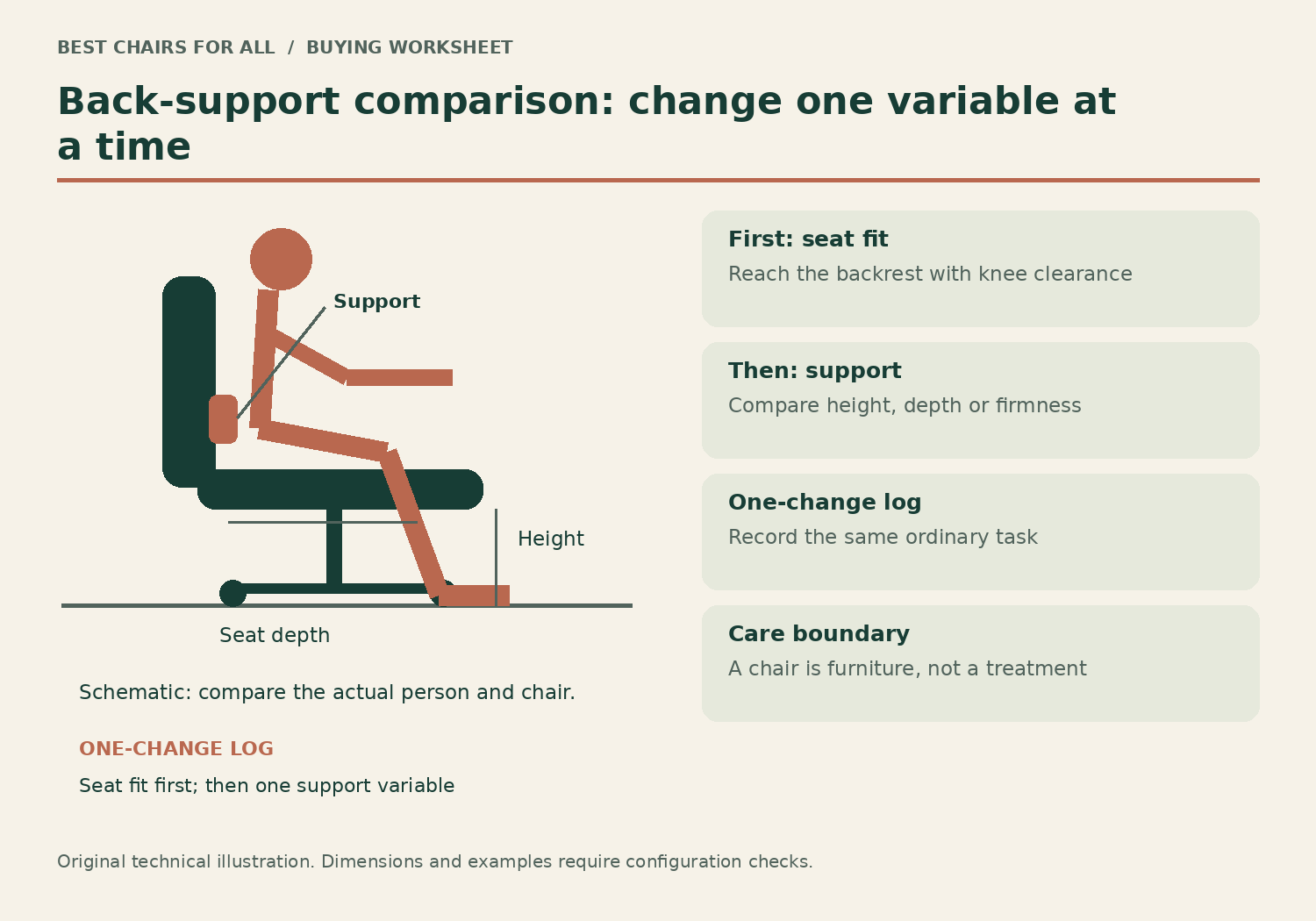
This is a buying guide for readers comparing office furniture, based on official sources checked on November 6, 2026. We have not clinically evaluated these chairs, measured pain outcomes or tested them with injured users. Persistent or worsening pain deserves appropriate professional assessment. A chair that fits can make a workstation easier to use; it should not be sold as correcting a diagnosis or preventing every future episode.
The NHS back-pain guidance explains when symptoms need care and recommends remaining active as appropriate. Seek urgent medical help for back pain with symptoms such as new bladder or bowel changes, loss of feeling around the genitals or anus, or weakness, tingling or numbness in both legs. Use local emergency services when emergency symptoms occur; do not wait for furniture to arrive.
| Furniture problem | Feature to compare | Starting candidate |
|---|---|---|
| Support is always too strong or weak | Lower-back firmness independent of height | Steelcase Leap |
| Support lands in the wrong place | Lumbar height and depth adjustment | Branch Ergonomic Chair Pro |
| Current chair is too deep | Sliding seat with documented range | Haworth Soji |
Three chairs with different adjustment strategies
The model descriptions below explain mechanisms, not medical benefits. A more adjustable chair can still be wrong for your body or tasks. If a clinician has given individual restrictions, use those to screen the purchase rather than substituting generic internet advice. The right comparison is the actual ordered configuration at your desk.
Model specifications and ordering details were checked against Steelcase Leap US adjustment features, Steelcase Leap and Leap Plus dimensions, Branch Ergonomic Chair Pro specifications, Haworth Soji US specifications. These manufacturer documents support the configuration notes in this comparison; retrieved November 6, 2026.
1. Steelcase Leap
Best for: comparing lower-back firmness separately from lumbar height.
Leap stands out because its official product description separates adjustable lumbar height from the lower-back firmness dial. That is useful when the problem is a support surface that feels too forceful or too weak despite being in roughly the right place.
Its brochure also documents a 15.75–18.75-inch functional seat-depth range. Depth adjustment can help establish back contact without pushing the seat into the backs of the knees. These are mechanical fitting features; neither the published specifications nor this editorial comparison establishes that Leap will relieve a particular condition.
Product Details
| Brand | Steelcase |
|---|---|
| Seat height | 15.5–20.5 inches, brochure configuration |
| Functional seat depth | 15.75–18.75 inches |
| Seat width | 19.25 inches |
| Lumbar | Height and lower-back firmness adjustment |
Pros
- Separate lower-back firmness control
- Seat depth and arm adjustment
Cons
- Premium cost does not establish therapeutic benefit
- Firmness and cushion preference need a trial
Prioritize a returnable configuration and evaluate normal tasks without deliberately enduring discomfort.
2. Branch Ergonomic Chair Pro
Best for: readers wanting lumbar depth as well as height control.
Branch Ergonomic Chair Pro provides a padded lumbar support with height and depth adjustments. The brand also describes the support as removable. It belongs in this shortlist because the user can investigate contact position and prominence rather than being locked into one fixed bulge.
Five-way adjustable arms, seat-depth adjustment and forward tilt provide additional fitting variables, but adding variables is not the same as improving symptoms. Set up the basic seat and desk relationship first. Its 275-pound capacity is a firm screening limit; optional tall cylinder and headrest are separate items that alter the purchase.
Product Details
| Brand | Branch |
|---|---|
| Support | Height- and depth-adjustable lumbar |
| Arms | 5D adjustable |
| Capacity | 275 lb |
| Headrest | Optional; extra cost |
Pros
- Two-way adjustable lumbar pad
- Broad arm-pad positioning options
Cons
- 275-pound capacity
- Many controls can complicate an unstructured trial
Choose it for a documented adjustment you need, with no assumption that a medical-sounding posture claim guarantees a result.
3. Haworth Soji
Best for: a simpler sliding-seat and lumbar-height comparison.
Soji offers a 16.25–18.75-inch sliding seat and an optional lumbar pad that moves up and down. This is a useful contrast to chairs with a more elaborate depth-adjustable support: fewer controls can make a one-change fit log easier to interpret.
Order the lumbar and arm configuration explicitly. The standard US seat height is 16.4–21 inches and the listed seat width is 20 inches. A short-legged reader may need a different cylinder or foot support, while someone who wants lumbar-depth control should compare Branch Pro or another suitable design.
Product Details
| Brand | Haworth |
|---|---|
| Seat height | 16.4–21 inches, standard US cylinder |
| Seat depth | 16.25–18.75 inches |
| Seat width | 20 inches |
| Capacity | 350 lb |
Pros
- Clear published depth range
- Optional height-adjustable lumbar
Cons
- Lumbar depth is not an equivalent independent control
- Standard height will not suit every workstation
Shortlist it when seat fit and a straightforward task-chair setup are the main furniture requirements.
Separate a chair-fit complaint from a diagnosis
Describe what happens in observable terms. Perhaps the backrest feels intrusive at the waist, your feet dangle, or reaching the mouse pulls you away from support. These observations do not establish the cause of pain, but they do tell you which parts of a workstation need attention. Do not infer that pain in a particular location always requires one style of lumbar pad.
An overly deep seat can make a user slide forward to avoid pressure behind the knees. The same chair may then seem to have inadequate back support because the backrest is no longer in contact. Adding a protruding lumbar pillow could shorten the sitting area, but it also changes the relationship between the hips, backrest and armrests. A correctly sized sliding seat gives you a more direct variable to assess.
A high desk can create a different problem. If you lower the seat solely to put your feet on the floor, the keyboard may sit above relaxed elbow height. Raising the chair could improve keyboard alignment while requiring a stable footrest. Neither adjustment is a diagnosis or a treatment; it is ordinary workstation fitting that should be evaluated without forcing an uncomfortable position.
The one-change fitting log
Use a short written log during a seller’s return period. The purpose is to avoid changing three controls and then forgetting which one helped. Start with an ordinary task that you would otherwise be doing. Stop a trial position that is uncomfortable, and do not deliberately sit through pain to generate a score. If symptoms make fitting difficult, seek qualified help rather than escalating lumbar pressure.
Record the desk, keyboard and chair positions before the first change. On a chair with a depth slider, begin with sufficient room behind the knees while your back can contact the backrest. Adjust seat height for supported feet and accessible work. Once those basics are workable, change only one back-support variable. On Leap that could be lumbar height; on Branch Pro it could be lumbar depth.
Compare the same task after the adjustment and write a concrete observation: the support no longer presses high into my back, or the seat edge is still noticeable. Do not turn that note into a claim that the chair has treated a spinal condition. A useful purchase log identifies whether the chair can be fitted without adding more equipment or compromising another part of the setup.
| Entry | Example observation | Decision it helps |
|---|---|---|
| Starting position | Feet supported; right arm pad hits desk | Move pad or reject arm configuration |
| One change | Shortened seat while keeping back contact | Compare minimum functional depth |
| Same task afterward | Mouse is reachable without leaning forward | Preserve desk distance for next trial |
| Remaining issue | Support stays intrusive at lowest setting | Try another support design or seek fitting help |
A worked example: too much seat, too little support
Consider a reader whose existing seat is 20 inches deep and whose comfortable supported back-to-knee measurement is around 18 inches. They keep perching because sitting fully back places the front edge against their legs. A headrest or higher back does not address this mismatch. Their shortlist should first include chairs with shorter usable depth and a return option.
The Soji range starts at 16.25 inches in its US store specification. Leap’s brochure lists a 15.75-inch minimum functional depth. Those numbers are promising screening information for this example, but measurement methods differ and cushion compression changes feel. The reader still needs to sit against the actual backrest and check the front edge rather than assuming an exact two-inch arithmetic solution.
Once the seat is workable, the reader can compare back-support designs. Leap changes lower-back firmness with a separate control. Branch Pro lets the lumbar pad move in height and depth and describes it as removable. Soji offers an optional height-adjustable pad. More pressure is not inherently better; the relevant question is whether the least intrusive comfortable support setting is available for the person.
Features worth paying for, and features to evaluate carefully
Seat-depth adjustment is valuable when a fixed seat forces a compromise between back contact and leg clearance. Arm adjustment matters when pads push your elbows outward or block approach to the keyboard. Recline tension matters when the backrest is too difficult to move or gives way unexpectedly. These are more specific buying reasons than a generic orthopedic label without a clear specification.
A headrest can be useful for supported reclined tasks, but its presence does not make a chair better for back pain. It must meet the user without pushing the head forward, and it cannot repair the seat-height relationship to the desk. A footrest, lower keyboard surface or better monitor placement may matter more than the optional headrest in the final configuration.
Be careful with unverified claims about posture correction, spinal decompression or preventing injury. They are different from a manufacturer’s statement that a pad adjusts vertically. Likewise, a durability test or emissions certification is not clinical evidence that a chair relieves pain. This guide recommends comparing documented mechanical features and personal fit, not buying a medical outcome from a product label.
When the workstation needs more than a chair
The OSHA chair guidance considers the backrest, seat, arms and base together and connects chair adjustment with the monitor, keyboard and desk. That is particularly relevant when symptoms appear during only one task. A mouse placed beyond the armrest or a screen off to one side can repeatedly draw the body away from a well-adjusted backrest.
For a shared workspace, record each user’s settings and arrange a convenient foot support where needed. A chair may fit one adult beautifully and leave another with unsupported feet. Do not assume that choosing the larger chair is the more accommodating option: a deeper seat and wider arm spacing can make a smaller user reach or perch.
Before ordering, establish the seller’s assembled-return process and keep the packaging. Ask whether the exact lumbar, arms and cylinder shown are included. Choose Leap for independent firmness comparison, Branch Pro for adjustable lumbar depth, or Soji for a clear sliding-seat alternative. If none can be fitted comfortably, use that information to reject the purchase and investigate the broader workstation or individual needs.
Something unclear or out of date? Send a correction with this article’s title and the detail to check.
Sources, research & corrections policy ↗