As an Amazon Associate, we earn from qualifying purchases. Read our affiliate disclosure. Amazon buttons open searches for matching listings; they do not confirm seller, configuration, price or stock.
The best ergonomic chair is the one whose adjustments fit your problem
An ergonomic chair should adapt the sitting area, support and controls to the user and the work. It does not earn the title simply by having a headrest or a strongly curved back. Our research-based shortlist separates four approaches: Steelcase Leap for deliberate back-support tuning, Steelcase Gesture for varied arm positions, Herman Miller Aeron for sized suspension seating, and Haworth Soji for a straightforward sliding-seat task chair.
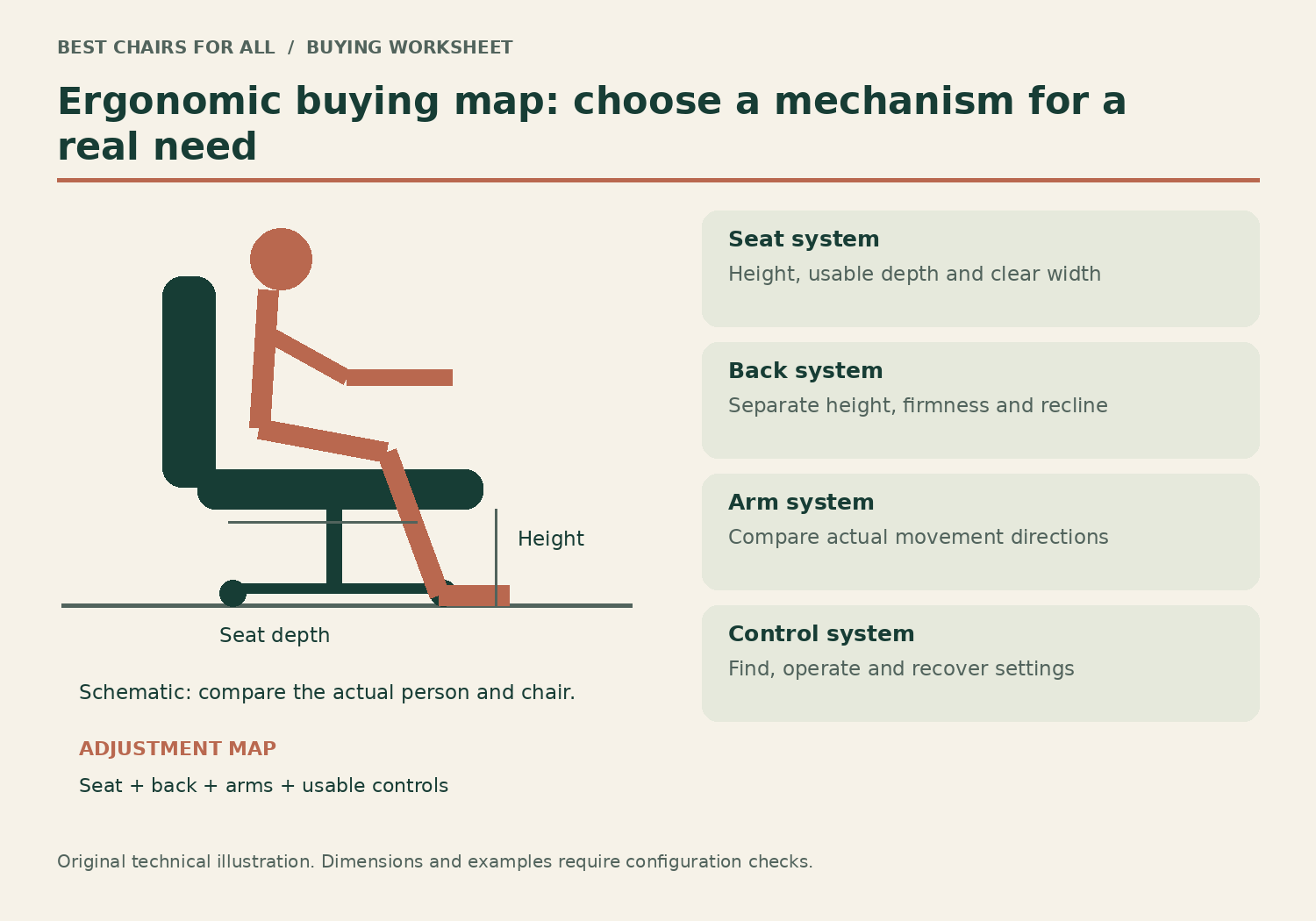
We checked official product documentation and workstation guidance online on November 6, 2026. We did not perform hands-on comfort, durability or clinical testing. The objective is a mechanism-to-need comparison, with clear limits for each recommendation. Before choosing a brand, identify which adjustment your current setup lacks and whether your desk allows the chair to do its job.
| Your main need | First comparison | What would rule it out |
|---|---|---|
| Tune lower-back support independently | Steelcase Leap | Seat or support contour still feels wrong |
| Change arm positions between devices | Steelcase Gesture | Arms cannot match your particular task setup |
| Try a mesh seat in a known frame size | Herman Miller Aeron | Fixed seat frame does not fit |
| Fit a conventional task position clearly | Haworth Soji | Minimum dimensions or selected options fail |
Four useful ergonomic approaches
These chairs are not arranged as a universal league table. An automatic or flexible mechanism is not inherently better than manual adjustment, and a high price does not make an unsuitable seat dimension disappear. Each product earns its place by providing a documented way to address a specific fitting requirement.
Model specifications and ordering details were checked against Steelcase Leap US adjustment features, Steelcase Leap and Leap Plus dimensions, Steelcase Gesture US headrest and adjustment options, Herman Miller Aeron US product and options, Herman Miller Aeron dimensional product sheet, Haworth Soji US specifications. These manufacturer documents support the configuration notes in this comparison; retrieved November 6, 2026.
1. Steelcase Leap
Best for: deliberate adjustment of back support.
Leap provides height-adjustable lumbar support and a separate lower-back firmness dial according to Steelcase's US product page. Its brochure also documents a sliding functional seat depth of 15.75–18.75 inches for the shown chair configuration. That combination is useful when back contact and seat length need separate attention.
The manual approach requires understanding which control changes resistance and which changes support. It does not guarantee a comfortable cushion or support contour for everyone, and current ordered dimensions should be confirmed. Try ordinary input and reading rather than assuming the most adjustable description settles fit.
Product Details
| Brand | Steelcase |
|---|---|
| Seat height | 15.5–20.5 inches, brochure configuration |
| Functional seat depth | 15.75–18.75 inches |
| Seat width | 19.25 inches |
| Lumbar | Height and lower-back firmness adjustment |
Pros
- Independent support variables
- Sliding seat and adjustable arms
Cons
- Controls need deliberate setup
- Support contour remains personal
Choose this approach when you can name a back-support variable you want to tune.
2. Steelcase Gesture with factory headrest
Best for: multiple hand and arm positions across devices.
Gesture's distinctive arm design is its main reason for inclusion. Steelcase describes arms that follow a broad range of positions, along with a depth-adjustable seat and coordinated back support. A reader alternating between input devices can investigate a concrete difference from simple height-only arms.
Arm flexibility still has to fit the desk. Check the real pad position for keyboard, mouse and tablet tasks, and ensure the support structure does not obstruct approach. A headrest is optional and factory-specific; it is not necessary to the arm-position recommendation made here.
Product Details
| Brand | Steelcase |
|---|---|
| Headrest | Vertical, tilt and rotation adjustments |
| Arms | 360-degree arm movement design |
| Seat | Depth adjustment |
| Headrest installation | Order factory-equipped configuration |
Pros
- Broad arm movement approach
- Seat-depth adjustment
Cons
- Premium features can be irrelevant to simple input work
- Exact arm fit requires a real task trial
Shortlist it when arm positioning is the current bottleneck, then verify the rest of the chair fits.
3. Herman Miller Aeron
Best for: suspension mesh and a carefully selected frame size.
Aeron uses mesh across seat and back and comes in A, B and C sizes. The fixed frame makes sizing a different strategy from buying one large chair with a long seat slider. Its back support, arms and tilt are also configuration decisions.
The product sheet lists different fixed depths by size. Those reference values need checking against the current generation and cylinder before purchase. If the frame presses at the seat edge or prevents comfortable movement, choose another size or design rather than expecting a slider to solve it.
Product Details
| Brand | Herman Miller |
|---|---|
| Sizes | A, B and C |
| Seat | Suspension mesh with fixed frame |
| Seat depth | Select by size; no sliding seat |
| Back support | Configuration dependent |
Pros
- Sized frames
- Mesh seat as well as back
Cons
- Fixed seat depth
- Variant and generation details matter
Choose it only when the actual sized frame is comfortable through the movements you use.
4. Haworth Soji
Best for: a clear conventional task-chair fitting range.
Soji lists a 16.25–18.75-inch seat-depth range and 16.4–21-inch standard US height, with a 20-inch seat width. That is a useful reference for readers seeking a padded seat and mesh back without making a headrest or elaborate accessory system central.
Optional arms, lumbar and forward tilt should be confirmed in the order. The standard minimum height can still be unsuitable for some shorter users, while someone needing independent lumbar-depth control should compare another design. Simplicity is valuable when it preserves the adjustments actually needed.
Product Details
| Brand | Haworth |
|---|---|
| Seat height | 16.4–21 inches, standard US cylinder |
| Seat depth | 16.25–18.75 inches |
| Seat width | 20 inches |
| Capacity | 350 lb |
Pros
- Documented sliding-seat range
- Straightforward task-chair format
Cons
- Optional equipment changes the build
- Standard minimum does not fit everyone
Start here when basic seat, back and arm relationships are the fitting priority.
Build an adjustment map rather than counting controls
Divide the chair into three systems: the sitting surface, the back support and the arms. For the sitting surface, record height, usable depth and width. Height aligns the seat with feet and work surface; depth determines whether the back can meet the backrest without knee-edge contact; width determines whether the sitting area provides suitable room without imposing distant arm positions.
For back support, identify which aspects can move and which stay fixed. A height-adjustable lumbar pad changes where it contacts the back. A depth or firmness control changes a different property. Recline tension controls resistance to movement, while a tilt limiter restricts the available recline range. These controls should not be treated as interchangeable simply because each appears under ergonomic adjustments in a listing.
For arms, list actual directions rather than a dimensional label alone. A four-way arm might adjust height, width, depth and pivot; another brand may use different naming. Ask whether the pad moves or the whole support structure moves. The distinction matters for torso clearance and for approaching a keyboard beneath a low desk apron.
A worked adjustment map for two different buyers
Buyer one uses a keyboard for most tasks and likes the dimensions of their current seat. Their main complaint is a lumbar bulge that is at the correct height but feels too strong. A chair offering only additional seat-height travel does not solve that issue. Leap’s separate lower-back firmness control or another documented support-depth approach becomes a more relevant comparison than a taller back or larger cushion.
Buyer two switches between a keyboard, pen display and occasional tablet reading. Their seat fit is acceptable, but their current arm pads cannot follow the hand positions. Gesture’s arm design is a more direct shortlist reason here. The reader should compare whether the pads can reach each real task position and still permit relaxed shoulders rather than assuming the broad movement shown in an animation covers every workstation.
Neither example proves a clinical benefit. It shows how identifying one mechanical mismatch narrows the search. If a chair cannot satisfy a non-negotiable seat measurement, remove it before comparing the secondary feature. The most sophisticated arm system is still the wrong purchase when the user cannot reach the backrest comfortably.
| System | Measured or observed need | Useful evidence |
|---|---|---|
| Seat | Required height and usable depth | Model-specific drawing; physical fit |
| Back | Contact location, pressure preference, recline feel | Separate adjustment descriptions |
| Arms | Input positions and desk approach | Pad and support travel by direction |
| Controls | Can the user find and operate them? | Manual and an actual reset trial |
Understand manual, weight-activated and sized designs
Manual control gives the user a deliberate setting for a particular variable. It can be valuable when a clear preferred position exists or when two users want visibly different settings. The tradeoff is that the controls must be understood and reached. A chair full of adjustments left at unsuitable defaults is not automatically a better workstation than a simpler chair fitted well.
Weight-activated mechanisms reduce some setup by responding to the sitter’s load, but weight is only one part of preference. A person may want greater resistance during concentrated work and a different feel during reading. Check the mechanism’s available overrides or stops rather than assuming automatic means no individual assessment is needed.
Sized seating takes another route. Aeron’s A, B and C frames offer different fixed geometries. That can be effective when a frame matches the user, but a fixed seat cannot slide shorter if it does not. Choose the size through current model information and a trial, not a general assumption that the middle size is right for everyone.
The chair can only work inside a workable workstation
The OSHA workstation chair guidance links chair setup with the monitor, keyboard and desk. This matters because a chair cannot change a fixed keyboard surface or move a screen that draws the user sideways. Before blaming the backrest, check whether the ordinary task allows you to remain near it.
For instance, a keyboard placed deep on the desk can create a long reach even when seat depth is correct. An arm pad colliding with the edge can also keep the chair farther away than intended. Move equipment within the useful work area and assess the available desk clearance. Do not keep changing lumbar pressure to compensate for a reach problem.
Screen location deserves the same attention. A laptop combines display and keyboard in one object, limiting independent positioning. Some setups need separate input devices to achieve the preferred screen height and hand position together. The best chair purchase may therefore leave part of the budget for a workstation change rather than concentrate every dollar on the seat.
Control usability is part of ergonomic value
When trying a chair, find the adjustment you expect to change frequently and operate it as intended. Can you identify the seat-depth lever without turning the chair over? Can you return to a previous setting after another person uses it? Does the manual clearly distinguish tilt resistance from a back stop? A feature that is difficult to use may remain unused.
For a shared desk, record each person’s basic setup using visible references rather than an invented universal numeric setting. One person’s minimum seat depth and low arms may be very different from another person’s preferences. Keep the instructions nearby and check whether optional controls appear on the actual build. A guide for the whole product family may show features omitted from your order.
Do not interpret a durability standard or low-emissions certification as a fit certification. Those can be meaningful claims within their own scope, but they do not establish that a particular pad reaches your back or that a fixed frame suits your thighs. Ask what a badge actually measures before using it to choose between chairs.
How to make the final selection
Narrow the field to two candidates that pass the dimensional screen and offer the adjustment that addresses your main mismatch. Compare them in ordinary work rather than trying every possible posture. Keep the normal keyboard, mouse and footwear consistent, and note which movements remain easy and which components interfere. The point is a decision you can explain afterward.
Verify the ordered model, cylinder, arms, back-support option and caster. Manufacturers offer many versions under one chair name, so save the full specification and seller-specific return terms. If buying refurbished, establish who provides warranty coverage and which parts were replaced. An original retail price is not evidence of current condition or a reason to accept a poor fit.
Choose Leap when independent back tuning is the key requirement, Gesture when arm positions dominate the task, Aeron when a sized mesh frame fits, or Soji when a clear sliding-seat task setup is sufficient. An ergonomic recommendation is useful when its reason is specific and its limits are visible. A chair should pass those individual checks before its reputation settles the purchase.
Something unclear or out of date? Send a correction with this article’s title and the detail to check.
Sources, research & corrections policy ↗