As an Amazon Associate, we earn from qualifying purchases. Read our affiliate disclosure. Amazon buttons open searches for matching listings; they do not confirm seller, configuration, price or stock.
Choose the headrest for the task you want to support
The best office chair with headrest should support a reclined reading or call position without pushing the head forward when you return to the keyboard. Steelcase Gesture with its factory headrest is our first comparison for broad manual positioning. Humanscale Freedom with Headrest offers a movement-linked design. SIHOO M57 is a lower-price mesh alternative with a manually adjustable headrest.
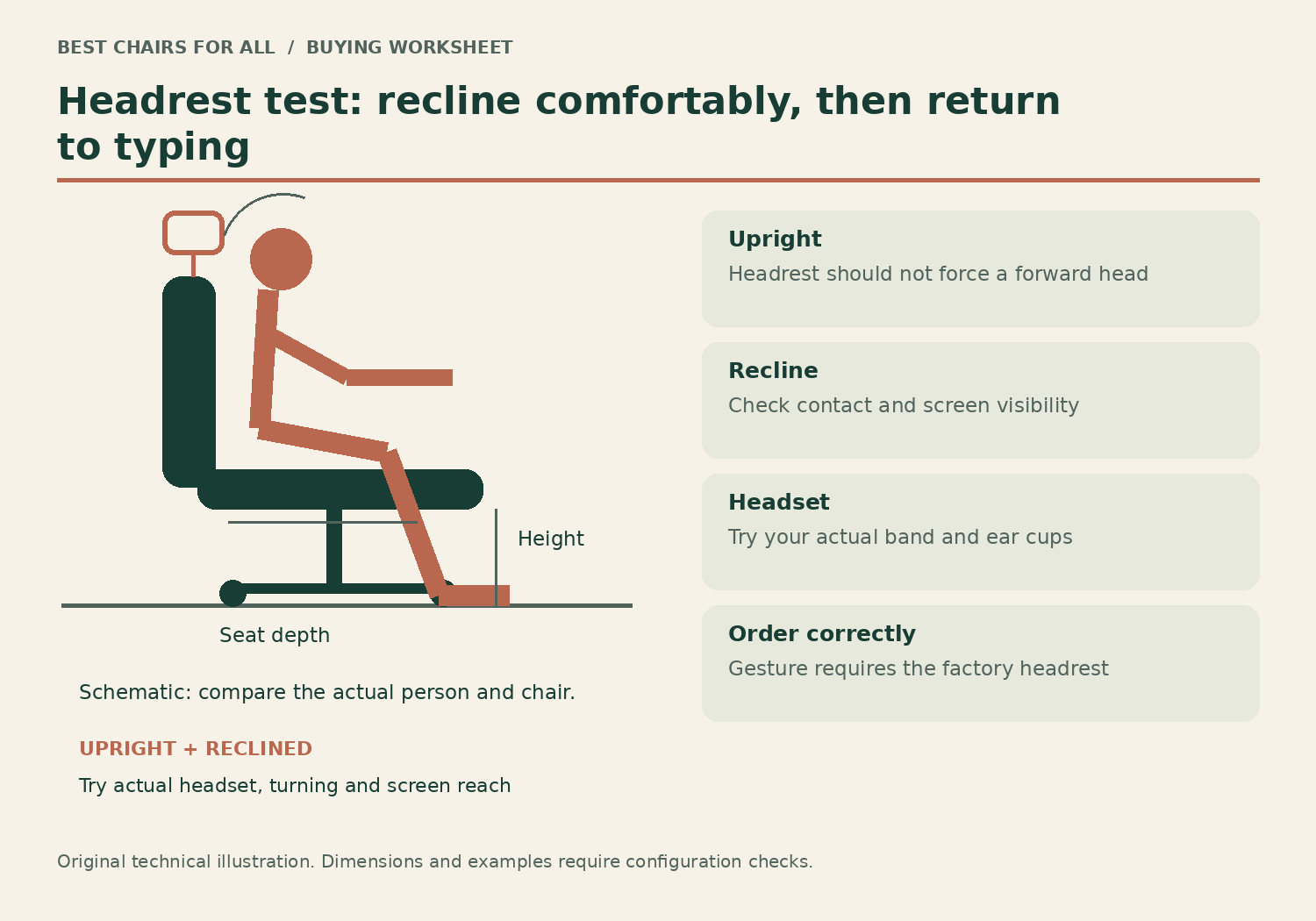
This guide compares documented mechanisms and purchase conditions checked online on November 6, 2026. We have not measured neck pressure, tested these chairs or established that a headrest prevents pain. The shortlist is about fitting an accessory to a useful task-chair setup. Seat depth, working height and arm support still come first, because a well-positioned headrest cannot compensate for sitting too far from the keyboard.
| Headrest approach | Candidate | Key question |
|---|---|---|
| Broad manual positioning | Gesture with factory headrest | Can it meet you in recline and clear you upright? |
| Movement-linked support | Freedom with Headrest | Do you like how contact changes through recline? |
| Height and angle adjustment on mesh chair | SIHOO M57 | Does the available reach meet your torso length? |
Three headrest-equipped configurations
A model name without its headrest configuration is not enough. Gesture needs the factory option; Freedom Task and Freedom with Headrest are different selections. M57’s height-and-angle design is a third approach. None should be selected solely because the backrest appears taller in a photograph.
Model specifications and ordering details were checked against Steelcase Gesture US headrest and adjustment options, Steelcase: factory headrest ordering requirement, Humanscale Freedom Headrest official product details, SIHOO M57 official US store. These manufacturer documents support the configuration notes in this comparison; retrieved November 6, 2026.
1. Steelcase Gesture with factory headrest
Best for: manually positioning a factory-integrated headrest.
Gesture's official US page describes a headrest that adjusts vertically, tilts and rotates ninety degrees. It is a useful candidate when you want to compare a range of contact positions rather than accept a fixed pillow at the top of the back.
The ordering condition is crucial: Steelcase support says the headrest needs factory installation and cannot simply be purchased later. Verify the complete headrest chair and try the intended upright and reclined tasks. The flexible arm design can also help support calls or tablet use, but it does not establish the right headrest position for every torso.
Product Details
| Brand | Steelcase |
|---|---|
| Headrest | Vertical, tilt and rotation adjustments |
| Arms | 360-degree arm movement design |
| Seat | Depth adjustment |
| Headrest installation | Order factory-equipped configuration |
Pros
- Multiple headrest movements
- Integrated factory configuration
Cons
- Must order the headrest build initially
- Premium configuration cost needs a current quote
Shortlist it when manual positioning matters and the seller can provide the correct factory model.
2. Humanscale Freedom with Headrest
Best for: trying support linked to the reclining movement.
Freedom with Headrest takes a different approach: Humanscale describes the headrest as moving with the sitter through recline. Its arms attach to the back and move in tandem, making the support behavior of the whole chair part of the comparison.
This is appealing for someone who dislikes repeatedly adjusting multiple knobs, but a linked mechanism still needs a personal trial. Compare where the pad meets you while reading and how it behaves when you sit upright. Confirm Headrest rather than Task and save the complete configuration, since material, cylinder and arm choices can vary.
Product Details
| Brand | Humanscale |
|---|---|
| Recline | Counterbalance mechanism |
| Headrest | Articulates with recline |
| Arms | Synchronous support |
| Configuration | Specify Headrest rather than Task version |
Pros
- Headrest responds with reclining movement
- Coordinated back-mounted arms
Cons
- Less like a freely positioned independent pillow
- Configuration and return eligibility need confirmation
Choose it after trying the movement pattern, not from an assumption that automatic support fits everybody.
3. SIHOO M57
Best for: a lower-price adjustable headrest on an all-mesh chair.
The M57 official page specifies headrest height travel up to 3.9 inches and a forty-five-degree rotation adjustment. It also lists three-way arms, manually adjustable lumbar support and a 330-pound capacity. The mesh seat gives it a different sitting surface from the two upholstered alternatives.
This is a practical budget comparison if the headrest reaches your preferred location, but numerical travel alone does not establish where it starts relative to your head. Verify the minimum and maximum contact positions for the current model when torso length is a concern. Seat-depth suitability remains a separate purchase gate.
Product Details
| Brand | SIHOO |
|---|---|
| Seat construction | Mesh seat and back |
| Arms | 3D adjustable |
| Headrest | Height and angle adjustable |
| Capacity | 330 lb |
Pros
- Published headrest travel and angle
- All-mesh construction
Cons
- Starting contact height still needs fit confirmation
- Do not infer a seat slider from other adjustments
Consider it when an actual trial confirms the headrest clears typing and supports your normal reclined task.
Separate upright contact from reclined contact
During focused keyboard work, some people prefer no head contact at all. Their backrest and arms can provide support while the head remains free to turn between screens. A headrest that constantly pushes from behind may interfere with that position. The desirable feature for these users is the ability to move clear, rather than a pillow that always meets the head.
During a reclined call or document review, the relationship changes. As the back tilts, the headrest should meet the user comfortably without forcing the chin toward the chest or the gaze toward the ceiling. The screen may need to be repositioned for that activity. It is not useful to compare maximum recline angles if the normal reading setup requires straining to see a display.
The same chair can pass one task and fail another. That is why a headrest trial should include moving from typing to supported recline and back again. Do not evaluate it only by pressing your head into the most padded part while sitting upright. The chair is being bought for transitions during work, not for a single product-photo posture.
The headrest trial card
Bring a simple card to a showroom, or use it during an authorized return period at home. First adjust the seat and backrest according to the chair instructions, then set the headrest. If you change chair height afterward, repeat the check because your eye position relative to the screen has changed. There is no need to extend sitting time for this exercise.
| Task | Pass observation | Reason to reject or readjust |
|---|---|---|
| Type normally | Head moves freely; keys remain close | Pad pushes head forward |
| Read in recline | Support meets comfortably; screen visible | Neck position feels forced |
| Turn between screens | Unobstructed natural turning | Headrest wings or frame interfere |
| Use normal headset | Ear cups and band remain clear | Pad presses headset or changes fit |
| Return to input | No major rearrangement required | Useful position is difficult to recover |
A worked example: good recline, poor typing
Suppose a user buys a high-back chair because its head cushion feels comfortable during a reclined video call. When typing, the same cushion remains too far forward. The user slides the whole chair back to escape it, then reaches for the keyboard and loses contact with the backrest. The original headrest benefit has created a workstation compromise.
The right next step is to use the supported adjustment range described in the manual: change headrest height, angle or retraction where available, then return to the normal typing position. On a broad manual design such as Gesture, the available positioning can be part of that investigation. On Freedom, compare how its movement-linked support behaves through recline rather than expecting the same manual controls.
If no intended adjustment clears the head during typing while preserving the desired reclined support, reject that headrest configuration. Do not modify the stalk, add improvised spacers or attach another brand’s component. A chair without head contact during input can still be a suitable task chair; buying the headrest should add a useful position rather than displace the one used most.
Torso length is more useful than an overall height label
Two users who are both six feet tall can have different seated head positions. A longer torso raises the contact point relative to the seat, while a shorter torso can place the same pad against the wrong area. Compare the pad’s actual height and reach relative to a properly adjusted seat and back. A broad advertised user-height range is not a substitute for those relationships.
Backrest movement also matters. A pad mounted to a reclining back follows a different path from a fixed accessory attached elsewhere. The chair’s design determines whether contact stays close, moves away or changes angle as you lean back. Product photos taken at one recline position cannot establish that path. Manufacturer mechanism descriptions help shortlist the design, but a real task trial answers the comfort question.
Headrest width and shape can affect turning and headset clearance. Wear the headset you normally use and look at both screens or a nearby document. Check whether the frame meets the band or ear cups, especially in recline. This is a practical compatibility issue rather than a claim about any universal ideal head position.
Factory options and later add-ons are not interchangeable
Steelcase’s support page states that Gesture’s headrest must be factory installed and cannot be bought separately for later installation. Order the headrest build from the outset if it is essential. An unverified aftermarket adapter does not turn a standard Gesture into the factory configuration described here, and this guide does not recommend modifying the back to attach one.
Humanscale offers distinct Freedom Task and Headrest versions and multiple materials and components. Confirm the complete configured product, not simply a photograph of a Freedom chair with a pad above it. Ask the seller about the actual return terms for the textile and configuration chosen; a customized chair may have different eligibility from an in-stock standard version.
For M57, verify the exact model and included parts. Similar SIHOO model names can have different arm and headrest mechanisms. A missing piece should be resolved through the seller using the manual and model label. Do not assume a universal clamp-on headrest is compatible with the mesh frame or rated for the way you intend to use it.
The cost comparison should include the useful configuration
Compare complete headrest-equipped carts, not a headrest chair against another model’s bare starting price. Include the cylinder, arms and material you need. On November 6, 2026, M57’s official US page displayed $239.99 for black; that is a reference base price rather than a live Amazon quote or a guarantee about tax and delivery. We have not verified a single current price for every configured Gesture or Freedom.
A more expensive headrest mechanism can be worth considering if it provides the specific range you lack. It is poor value if the seat itself is too long, the arms collide with the desk or the return terms prevent a meaningful fitting period. Apply body and desk measurements before committing to an expensive headrest upgrade.
The OSHA chair guidance focuses on back, seat, arms and base together. Its practical fitting principles remain relevant whether or not a headrest is present. Choose Gesture for a manual-positioning comparison, Freedom for its linked support behavior, or M57 for a simpler mesh alternative when its reach fits you. Make the purchase decision on the full task sequence, including the return to ordinary typing.
Something unclear or out of date? Send a correction with this article’s title and the detail to check.
Sources, research & corrections policy ↗