As an Amazon Associate, we earn from qualifying purchases. Read our affiliate disclosure. Amazon buttons open searches for matching listings; they do not confirm seller, configuration, price or stock.
For a long workday, choose support you can change
The best office chair for long hours lets you keep working while changing position, reaching controls and maintaining contact with the backrest. Steelcase Leap is our starting shortlist choice when independent lower-back firmness adjustment is important. Herman Miller Aeron offers an all-mesh alternative when its size fits. Haworth Soji is a simpler padded-seat alternative with useful adjustment ranges.
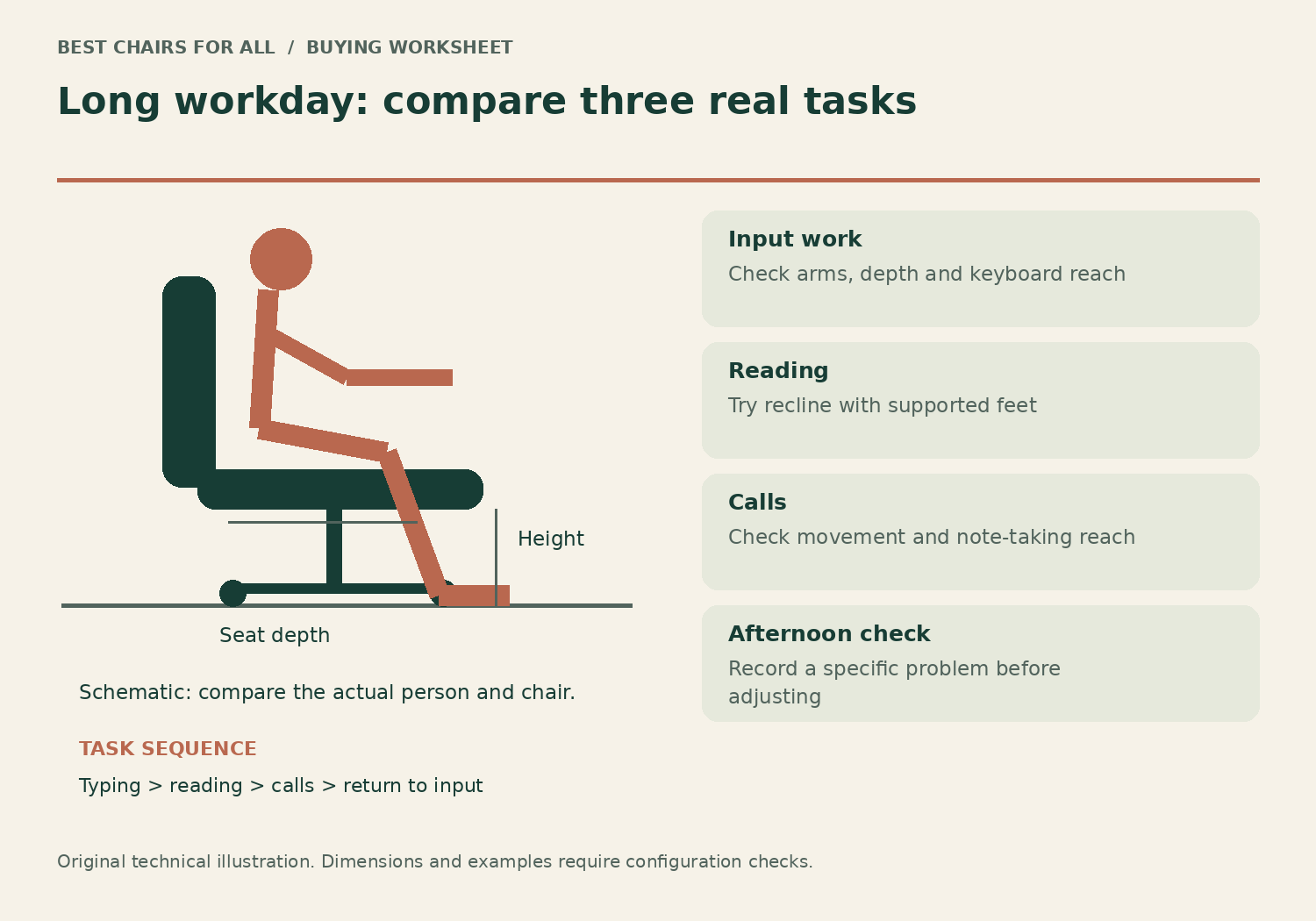
A long day is not a reason to remain seated without breaks. Nor does an eight-hour rating establish that a chair will be comfortable for every person for eight hours. This comparison uses manufacturer specifications and official guidance checked online on November 6, 2026. We have not performed durability, pressure-mapping or all-day sitting tests. The objective is to identify chairs worth trying and a repeatable way to evaluate them during normal work.
| Priority | Shortlist | What to try |
|---|---|---|
| Fine control of back support | Steelcase Leap | Lumbar height separately from lower-back firmness |
| Mesh seat and back | Herman Miller Aeron | Exact size; front frame and seat-edge contact |
| Straightforward upholstered seat | Haworth Soji | Seat-depth slider and recline tension |
The three candidates
These are task chairs with different support approaches. None wins because it has the thickest cushion or the highest back. A chair that feels generous for a ten-minute meeting may interfere with keyboard work after lunch. Match the model to the task changes in your day, then make the real comparison at your own desk.
Model specifications and ordering details were checked against Steelcase Leap US adjustment features, Steelcase Leap and Leap Plus dimensions, Herman Miller Aeron US product and options, Herman Miller Aeron dimensional product sheet, Haworth Soji US specifications. These manufacturer documents support the configuration notes in this comparison; retrieved November 6, 2026.
1. Steelcase Leap
Best for: long days with varied back-support preferences.
Leap has an unusual advantage for this comparison: lumbar height and lower-back firmness can be adjusted separately. That allows a more specific trial than simply making recline harder or softer, especially for someone who changes between concentrated input and reading.
The brochure lists a 15.5–20.5-inch seat-height range and 15.75–18.75-inch functional seat depth for the chair configuration shown. Use those as a screening range and confirm the exact US build. The padded seat and adjustable arms also need a personal fit check; manufacturer feature descriptions are not evidence that its cushion will suit everyone all day.
Product Details
| Brand | Steelcase |
|---|---|
| Seat height | 15.5–20.5 inches, brochure configuration |
| Functional seat depth | 15.75–18.75 inches |
| Seat width | 19.25 inches |
| Lumbar | Height and lower-back firmness adjustment |
Pros
- Separate lumbar-height and firmness controls
- Sliding seat for different thigh lengths
Cons
- More controls require deliberate setup
- Upholstery feel cannot be judged from dimensions
A strong first comparison when you can name a back-support adjustment your existing chair lacks.
2. Herman Miller Aeron
Best for: readers who want an all-mesh sitting surface.
Aeron offers suspension mesh across both seat and back. Its key decision is size rather than a long seat slider: the manufacturer provides A, B and C frames. That makes a fit trial particularly important before committing to a long workday in it.
For reference, the manufacturer product sheet lists fixed seat depths of 16.4, 17 and 18.9 inches by size. Cylinder and current generation can affect other specifications, so verify the ordered version and do not transfer old weight ratings to a new listing. Options such as back support and tilt limiter also change what you receive.
Product Details
| Brand | Herman Miller |
|---|---|
| Sizes | A, B and C |
| Seat | Suspension mesh with fixed frame |
| Seat depth | Select by size; no sliding seat |
| Back support | Configuration dependent |
Pros
- Mesh seat as well as back
- Multiple frame sizes and support options
Cons
- Seat frame cannot slide shorter
- Specific size and generation must match the listing
Choose Aeron when its frame feels unobtrusive through real tasks, rather than because a broad sizing chart puts you near a boundary.
3. Haworth Soji
Best for: a straightforward padded-seat workday chair.
Soji provides a relatively clear fitting proposition: a 20-inch-wide seat, 2.5 inches of depth travel and adjustable recline resistance. Its standard US height range is 16.4–21 inches, which should still be compared with the desk and the sitter's feet support.
The seat-depth range of 16.25–18.75 inches suits a useful trial across different leg lengths. Optional lumbar support and optional forward tilt should be explicitly recorded on the order. If automatic or highly articulated chair features seem unnecessary, Soji offers a less elaborate comparison without eliminating the fundamental seat and back adjustments.
Product Details
| Brand | Haworth |
|---|---|
| Seat height | 16.4–21 inches, standard US cylinder |
| Seat depth | 16.25–18.75 inches |
| Seat width | 20 inches |
| Capacity | 350 lb |
Pros
- Published depth travel
- Optional lumbar and arm configurations
Cons
- No substitute for checking minimum height
- Optional features vary across sellers
Shortlist it when dependable task adjustments matter more than a headrest or lounge-style appearance.
Create a task-change map before shopping
List the actual work you do, not simply the number of hours you sit. A programmer may alternate between keyboard input, reading code and calls. An accountant may reach for paper documents. A designer may use a tablet, mouse and keyboard at different distances. Each change alters how the chair, arms and backrest interact with the desk.
Divide a normal day into four activities and estimate which ones dominate. Mark whether you need supported forearms, free lateral movement, a reclined back or a clear view of a second monitor. If typing takes most of the day, a headrest that only helps while leaning far back should not determine the entire purchase. If document review is common, the recline mechanism deserves more attention than it does for occasional email.
Make one additional column headed failure. Write the specific problem with your current chair: knees touch the front edge, lumbar pushes too high, armrests keep the keyboard distant, or recline takes too much effort. Avoid writing just uncomfortable. A precise failure can be matched to an adjustment; a vague complaint makes every marketing promise sound equally useful.
A practical long-day fitting sequence
First place the keyboard and mouse where relaxed elbows can stay near the torso. Adjust chair height for that work surface, then support the feet. If the desk is fixed and too high, a footrest or lower keyboard surface may be part of the solution. Lowering the chair until the feet reach the floor can create a new shoulder-height problem when the keys remain high.
Next set the usable seat depth. Sit against the backrest and leave clearance behind the knee. The front edge should support the thighs without becoming the stopping point for your legs. With a sliding seat, start short and increase depth only as needed. With Aeron, choose the size before purchase; the frame cannot be shortened by moving the seat backward.
Then position the lumbar support and adjust recline resistance. Aim for support that remains available when you lean back without needing to brace hard with your feet. Follow the instructions for the exact model rather than assuming a knob turns the same way on every chair. Leap’s lower-back firmness control and its recline tension are different settings with different jobs.
Finally set the armrests. Raise them only enough to meet relaxed arms, and retract or rotate the pads if they stop you approaching the desk. A chair arm that feels pleasant during a call can still be too far forward while typing. Recheck keyboard distance after changing the arms, because reaching forward often makes the backrest seem less useful than it really is.
The three-task comparison worksheet
Use this worksheet on two ordinary workdays, without deliberately extending your sitting time. It is a purchasing tool, not a clinical test. Record the task and what happened before adjusting anything. A simple note such as right pad hits drawer during mouse work is actionable. A score of seven out of ten offers much less information about what to change.
| Task | Observe | Possible purchase implication |
|---|---|---|
| Typing or detailed input | Back contact, elbow position, knee clearance | Seat depth and arm placement matter first |
| Reading or reviewing | Ease of recline and screen visibility | Compare tension range and back movement |
| Calls or mixed work | Reach to notes and return to typing | Check pad movement and controls you can reach |
How to interpret an afternoon problem
Suppose your thighs feel fine during morning typing, but the front edge becomes noticeable while reading in recline. Do not immediately add a thick cushion. Check whether you are sliding forward, whether the seat is too deep, and whether your feet remain supported in that position. A cushion changes seat height and backrest alignment, sometimes obscuring the original fit problem.
If your shoulders rise during a call, lower the arm pads and see whether you can still reach the keyboard afterward. If changing the arms solves the call but breaks typing, you may need a wider adjustment range or a better desk arrangement. The chair should support transitions between tasks rather than force a choice between two poor positions.
If you find yourself perched on the front edge while using a laptop, inspect screen and keyboard placement. Raising the entire laptop may improve screen height while making its keyboard unsuitable. An external keyboard can allow separate positions. The chair cannot correct a screen that consistently draws you away from the backrest.
Mesh, foam and the limits of specification sheets
Mesh permits airflow, but the actual support depends on its tension, the frame shape and the user’s proportions. Aeron’s fixed seat perimeter is therefore a significant part of the trial, not an incidental design detail. Sit back in the correct size, use normal working clothes and check whether the frame remains unobtrusive through your usual movements.
Foam seats offer a different surface but thickness alone does not describe support over time. Leap and Soji use upholstered seats with adjustments that may make fitting easier than on a fixed dining chair. We do not claim that either cushion prevents pressure discomfort or has been proven superior in our testing. The more useful question is whether you can change position without losing appropriate support.
Do not equate warranty duration with personal comfort or an obligation to accept a worn cushion in every circumstance. Read coverage by component and intended use, especially for secondhand or refurbished chairs. A seller warranty is different from a manufacturer warranty, and a long shift or shared household schedule may require checking the applicable terms.
Buying for a long workday without buying twice
Prioritize a workable return process over an unnecessary finish upgrade. Check the trial start date, exclusions, return transport and packaging requirements. Keep photographs of the configuration and order confirmation so a later replacement arm or caster can be matched correctly. When considering a refurbished premium chair, ask what was replaced, who covers the mechanism and whether the seller accepts an assembled return.
The OSHA workstation chair guidance supports trying chairs and adjusting the chair alongside the monitor, keyboard and desk. Its principles do not identify a single best brand. Use them to screen for feet support, suitable seat depth, relaxed arm position and a backrest that works through more than one posture.
For most readers in this shortlist, Leap is the first trial when fine back adjustment is the main need, Aeron when suspension mesh and a known size fit are priorities, and Soji when a clear sliding-seat specification and simpler task setup are preferable. Return a model that fails your normal tasks rather than trying to justify it because the published feature count is impressive.
Something unclear or out of date? Send a correction with this article’s title and the detail to check.
Sources, research & corrections policy ↗